

Meta shipped a stack of changes in May, and the loudest one made no noise at all. On May 18 your purchase-based custom audiences could quietly stretch from a 180-day memory to a 730-day one, and for a lot of accounts that happened on autopilot. Pair that with a free one-click Conversions API setup and a third AI assistant joining the official Ads connectors, and the back half of your funnel works differently than it did a month ago.
None of this came with a flashing banner in Ads Manager. That is exactly why it is worth a careful read. The defaults moved, and defaults are where most accounts live. Here is what changed, what it does to your retargeting math, and the short list of things to check before your next budget review.
The audience window jumped from 180 to 730 days
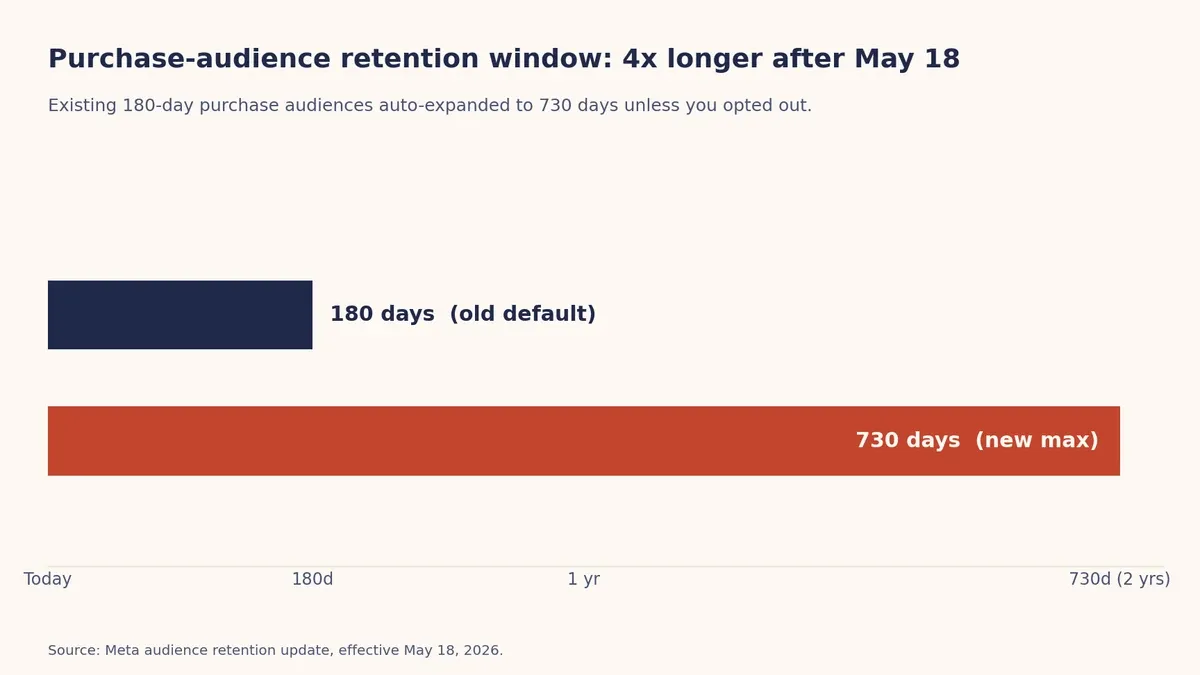
Meta raised the maximum retention window for purchase events in website and app custom audiences from 180 days to 730 days, effective May 18, 2026. Two years of buyers, in one audience, instead of six months. For high-consideration and low-repeat categories, that is a real gift. Furniture, appliances, high-ticket apparel, anything with a long repurchase cycle now has room to stay present until timing catches up.
The catch is the auto-expansion. Existing 180-day purchase audiences were set to roll up to 730 days unless you opted out before the date. If you did nothing, some of your tightest audiences just got four times longer. That matters in two directions. A "purchasers, last 180 days" retargeting pool now reaches back two years, which means colder people, more frequency, and ROAS that drifts as the audience ages. And if you exclude past purchasers from prospecting, that exclusion now spans two years of buyers, so your prospecting reach can shrink without you touching a single setting.
The fix is not "set everything back to 180." It is a per-audience decision. Suppression lists for recent buyers usually want a shorter window. Loyalty and win-back audiences for long-cycle products often want the longer one. The point is to set each audience on purpose rather than inherit a number Meta picked for you.
One-click Conversions API landed in Events Manager
The second change is the one most small teams have been waiting years for. Meta added a free, no-code Conversions API setup directly in Events Manager. No developer, no server work, no third-party middleware. The events and parameters you already send through the Pixel get mirrored through a server-side connection and deduplicated automatically, so you are not double-counting.
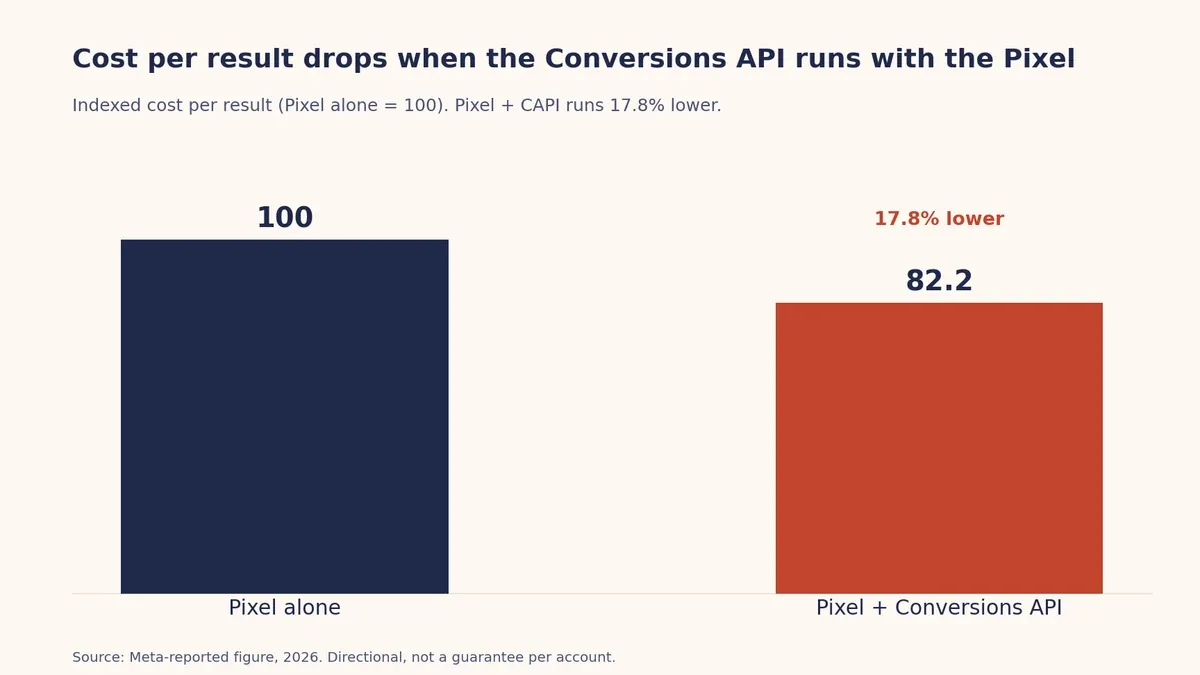
This closes a real gap. Browser-based tracking keeps losing signal to blockers, iOS limits, and consent prompts, and the server-side path recovers a chunk of what the Pixel alone drops. Meta puts a number on it: advertisers running the Conversions API alongside the Pixel saw a 17.8% lower cost per result than those on the Pixel alone. That is Meta's own figure, so treat it as directional rather than a promise for your account, but the direction has been consistent for years.
One operator note. If you already run a solid server-side setup through a tag manager or a partner integration, you do not need to layer the one-click version on top. Existing Pixel users get a notification with a 30-day review window before it switches on, and you can manage exactly which data categories are shared (Meta ads authority Jon Loomer has a clear walkthrough of the setup and its limits). Across Coinis accounts we see the same pattern hold: cleaner event coverage tends to stabilize optimization faster than any single targeting tweak, because the algorithm is only as good as the conversion signal you feed it.
Perplexity joined the official AI connectors
Meta's Ads AI connectors let an external assistant plug into your Ads Manager through Meta's official MCP server, so you can ask about account performance and explore campaign data in plain language. The roster started with Claude and ChatGPT in late April. In the May wave, Perplexity joined them as a supported agent.
Perplexity is an interesting third option because it behaves more like a conversational search engine than a pure language model. For account questions that benefit from pulling in current context, that framing fits. The bigger story is the trend underneath it. Campaign management is moving toward natural-language interfaces, where you describe what you want and a layer of automation handles the mechanical steps. The connectors are read-and-analyze helpers today, not full autopilots, so the operator still owns the strategy. But the direction is clear, and it rewards teams that already think in terms of clean data and clear briefs.
What to check in your account this week
You do not need a full audit. Four checks cover the changes above.
First, open your custom audiences and find every one built on purchase events. Confirm the retention window is what you actually want, not the 730-day default. Set suppression lists short and loyalty audiences long, deliberately. Second, look at any audience you use as an exclusion in prospecting and make sure the wider window did not quietly choke your reach.
Third, check your Events Manager for the Conversions API prompt. If your event coverage is weak and you have no server-side setup, turn it on. If you already have a clean server integration, review it and skip the duplicate. Fourth, if your team is curious about the AI connectors, treat them as a reporting and analysis layer for now and keep a human on the optimization decisions.
The thread tying all of this together is signal quality. A longer audience window, a stronger conversion feed, and an AI layer that reads your account all reward the same thing: clean inputs and intentional structure. Meta keeps automating the mechanical parts of buying, which means the edge moves to the work above the machine, namely the creative you test and the offers you put in front of the right people.
Spend less time on the mechanical parts
That is the work Coinis is built to compress. Paste a product URL and the platform turns it into image, video, and UGC ads that match Meta's specs, then launches them and lets the AI optimize around your conversion signal. You can build a Facebook ad straight from a product URL, write the copy with AI from the same brand profile, and check what is running in your niche with the Meta Ads Library browser. Once campaigns are live, AI optimization and performance tracking keep the loop tight so your cleaner signal actually gets used.
Meta is handing you a stronger signal layer and a wider audience window. The accounts that win this quarter are the ones that pair that with more creative shots on goal, not fewer. Try Coinis AI and spend your hours on the offer, not the resizing.

Isidora Matovic
Author
Social media enthusiast and a full time researcher. She takes digital presence very seriously and that is why you are always in touch in what is going on with us! Follow us for more posts like this.