
You built the ad on Coinis. The product shot is clean, the copy is tight, the fan-out covers every ad size you need. You upload it to Meta or TikTok and move on to the next campaign.
Then the ad gets flagged, or worse, it runs with a label you didn't choose, because neither platform treats "AI made part of this" as optional information anymore. It's a checkbox in the upload flow, and skipping it is a compliance problem, not a style choice.
The Label Isn't New, But It's Not Optional Either
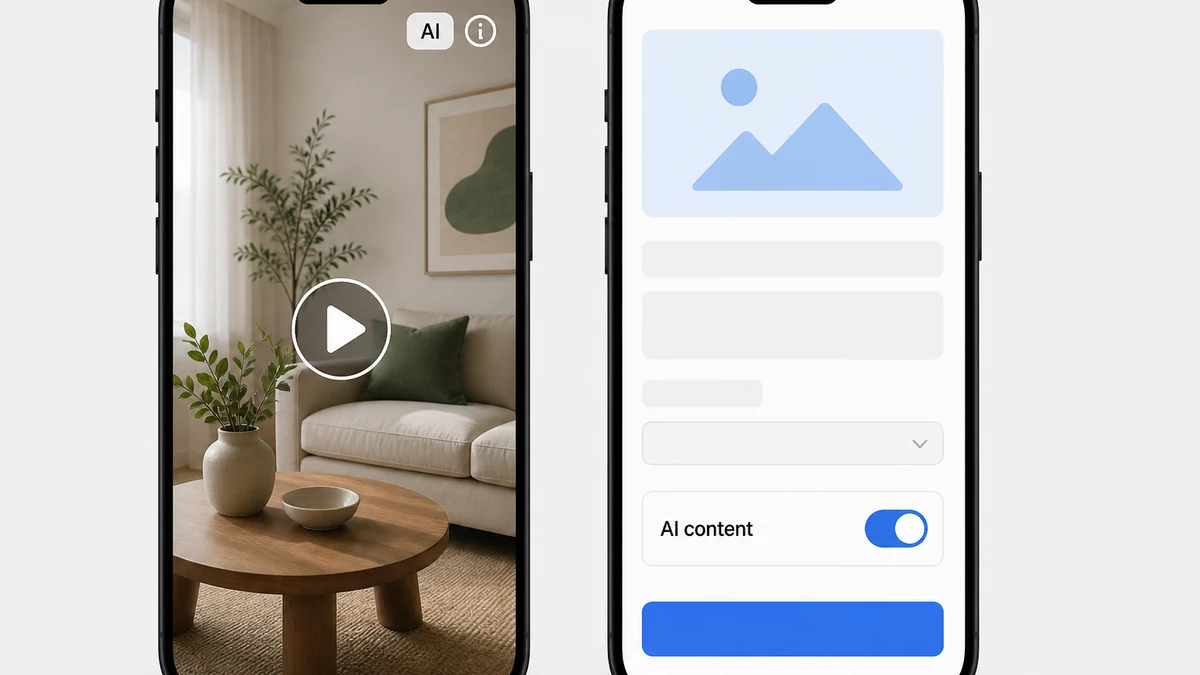
Meta already attaches an "AI info" label to ads automatically. Its own Business Help Center explains that Meta applies this label when an ad is created or significantly edited with Meta's own generative tools (Background Generation, Image Generation, Add Animation) or when Meta detects that a third-party generative AI tool touched the creative, using industry-standard detection methods like C2PA metadata (Meta Business Help Center, "About AI info on ads created or edited with generative AI tools," 2026). You find the label through the ad's three-dot menu under "About this ad." In some regions, advertisers can also self-disclose, and the label then sits right next to the Sponsored tag (Meta Business Help Center, 2026).
TikTok runs a parallel system that puts more of the decision in the advertiser's hands. Its Ads Manager includes an AI-generated content disclaimer toggle: a checkbox in the ad creation flow labeled "This ad contains AI-generated content." Advertisers are required to switch it on for any TikTok ad (not a Spark Ad, which follows the separate organic-content disclosure flow) that contains image, video, or audio that is completely AI-generated or significantly modified by AI (TikTok Ads Manager Help Center, "Add disclaimers to ads in TikTok Ads Manager," 2026). TikTok's own advertiser guide puts a number on how far this has already gone: more than 3 billion videos labeled as AI-generated content on the platform as of July 2026 (TikTok, "AI Safety Essentials for Advertisers," 2026).
Neither platform treats the label as a penalty. Meta's help documentation frames it as context, not a flag. TikTok's own guide is explicit: "A label is information, not a warning. It does not say 'do not trust this,' it tells people what is in the content" (TikTok, "AI Safety Essentials for Advertisers," 2026). The problem isn't the label itself. It's shipping an ad without checking whether the box needed to be checked.
One Toggle You Can't Take Back
TikTok's mechanic has a detail that trips up anyone used to editing a live campaign after launch: once you submit an ad with the AI-generated content disclaimer on, you cannot change it or unselect it unless you swap the actual video or image file. Duplicating the campaign, or reusing the same ad in a new one, resets the toggle entirely, so it has to be re-applied every time the same AI-made creative gets reused in a new ad (TikTok Ads Manager Help Center, 2026). An ad team running the same winning Coinis-generated creative across five campaigns needs to re-check and re-apply the toggle five times, not once.
Meta's side has its own wrinkle. The AI info label can trigger even when you didn't touch a Meta generative tool at all. If Meta's detection flags third-party AI metadata on an uploaded image or video, the automatic label appears whether you asked for it or not (Meta Business Help Center, 2026). An ad built on Coinis and uploaded as a finished file falls into exactly this category: Meta can apply the label on detection, independent of anything the advertiser declared.
Where Coinis Fits, and Where It Doesn't
Coinis generates the creative. It doesn't publish to Meta or TikTok, and it doesn't set either platform's disclosure toggle for you. That step happens inside each platform's own Ads Manager, at upload, by the advertiser. What a generation platform can do is make sure the advertiser knows the toggle exists before the ad ships, not after a rejection notice shows up.
The practical workflow for anything generated in Ad Studio:
- Generate the creative on Coinis through whichever tool produced it, an image fan-out via
generate_image_templates, a repaired product photo viaenhance_asset_proxy, or a resized/localized version of an existing creative viarevise_creative_resize. - Before upload, check which platform it's going to. TikTok asks for an explicit, manual toggle on every qualifying ad. Meta may apply its label automatically whether you flip anything or not, but you can still confirm it's accurate under the ad's "About this ad" menu after upload.
- On TikTok specifically, flip the "This ad contains AI-generated content" toggle during ad creation, not after. Once submitted, that setting locks to the file. Swapping creative means reapplying it.
- Reusing the same AI-made creative in a new campaign or a duplicated one, re-check the toggle. Duplication resets it on TikTok, and a fresh upload gives Meta's detection a fresh pass.
- Keep platform policy compliance separate from Coinis's own output. Coinis building the ad doesn't change what either platform requires once the file leaves the platform. The generation step and the disclosure step are two different jobs, done in two different places.
What Happens If You Skip It
TikTok's ad-disclaimer documentation is specific about misuse, not just omission: incorrect use of the disclaimer feature, including custom text that doesn't match the actual disclosure requirement, results in the ad being rejected during review (TikTok Ads Manager Help Center, 2026). Meta doesn't frame a missing label as an instant ad rejection in its general advertiser documentation, but it does carry a harder line for one category: ads about social issues, elections, or politics must disclose whenever the ad contains a photorealistic image, video, or realistic-sounding audio that was created or edited with AI tools, a requirement Meta states plainly applies "whenever" that condition is met, not just when convenient (Meta Business Help Center, "About AI info on ads created or edited with generative AI tools," 2026).
This is why the check belongs in the workflow before the ad goes live, not in a post-rejection scramble. A flagged or rejected ad burns the time it took to build it on Coinis in the first place.
FAQ
Does Coinis add the disclosure label for me? No. Coinis generates the ad. The disclosure toggle lives inside Meta Ads Manager and TikTok Ads Manager, set by the advertiser at upload or ad creation. Coinis has no publishing integration that sets it on your behalf.
Do I need to disclose a photo that was only lightly touched up, like a resize or a color fix? TikTok's own guidance distinguishes significant AI modification from minor edits. Its Community Guidelines (which the Ads Manager disclosure requirement points back to) treat things like light adjustments, color grading, small cropping, or noise reduction as not requiring disclosure, reserving the requirement for substantial or transformative AI changes. Meta's documentation doesn't draw that same bright line for ads generally, only for the social-issue/election/political category, so when in doubt on Meta, check the ad's "About this ad" panel after upload to see whether the automatic label applied.
Can I turn the TikTok toggle off after I submit the ad? Not without changing the actual video or image file. TikTok's help documentation states the setting locks once submitted. Swapping the creative is the only way to change it, and duplicating the campaign resets the toggle rather than carrying it forward.
Does the AI label hurt ad performance? Neither platform's documentation claims a direct penalty tied to the label itself. TikTok's advertiser guide states explicitly that the label is informational, not a negative signal, and that AI content disclosed up front performs on its own creative merits.
What if I reuse the same Coinis-generated creative in five different campaigns? Check the disclosure setting in every one of them separately. TikTok resets the toggle on any new campaign or duplication, even when the underlying file is identical to one you already disclosed.
Generate the Ad, Then Check the Box
Coinis builds the creative fast. The disclosure toggle is a separate, five-second step that lives on the platform where the ad actually runs, and skipping it is the kind of mistake that costs more time than it saves. Build the next ad in Ad Studio, and check the disclosure setting on the platform side before it goes live, not after a rejection notice does it for you.
Sources
- Meta Business Help Center, "About AI info on ads created or edited with generative AI tools," 2026: https://www.facebook.com/business/help/1010479435004531
- TikTok Ads Manager Help Center, "Add disclaimers to ads in TikTok Ads Manager," 2026: https://ads.tiktok.com/resources/help/article/add-disclaimers-to-ads
- TikTok, "AI Safety Essentials for Advertisers," 2026 (advertiser guide, updated October 6, 2026): https://ads.tiktok.com/business/library/AI_Safety_Essentials_for_Advertisers_on_TikTok.pdf
- TikTok Ads Manager Help Center, "About ad disclaimers in TikTok Ads Manager," 2026: https://ads.tiktok.com/resources/help/article/about-ad-disclaimers-in-tiktok-ads-manager

Isidora Matovic
Author
Social media enthusiast and a full time researcher. She takes digital presence very seriously and that is why you are always in touch in what is going on with us! Follow us for more posts like this.