

You spent real money getting traffic to that product page. Then the shopper opened your hero image and it was dim, noisy, or shot on a cracked countertop with a dust speck on the label. They left. Not because the product was wrong. Because the photo told them it might be.
This is the step almost nobody in performance advertising talks about, the raw photo you're about to turn into an ad creative. Everyone obsesses over hooks, angles, and ad copy. Few people stop to ask whether the source photo itself is dragging the whole campaign down before a single dollar gets spent on media.
What the data actually says about bad photos
Retailers took back an estimated 16.9% of everything they sold in 2024, a number the National Retail Federation and Happy Returns put at roughly $890 billion in returned merchandise across the US retail industry (NRF/Happy Returns, "2024 Consumer Returns in the Retail Industry," December 2024). Return reasons vary, but a well-documented chunk of them trace back to one thing: the product looked different than the photo promised. Blurry detail, wrong color temperature, a background so cluttered the actual item gets lost. All of it sets an expectation the real product then fails to meet.
The click side is just as concrete. A 2020 study in Decision Support Systems by Xia, Pan, Zhou, and Zhang ("Creating the Best First Impression: Designing Online Product Photos to Increase Sales," Decision Support Systems, Vol. 131, 2020) modeled how specific photo attributes in e-commerce search results affect click-through and sales, and found that concrete photo elements (background choice, logo placement, model presence) measurably move whether a listing gets clicked at all, before anyone reads a word of copy. The photo isn't a supporting asset next to the ad. In a scroll feed, the photo is the ad's first three seconds.
Put those two findings together and the shape is obvious: a flawed source photo taxes you twice. It suppresses clicks in the ad itself, and it taxes whatever sales survive the click with a higher return rate on the back end. Fixing the photo before it becomes a creative asset is cheaper than paying for both problems downstream.
The fix step nobody templates
Ad Studio's photo-repair layer runs on enhance_asset_proxy, a single tool that covers the entire "make this existing photo usable" job: upscaling a low-res supplier photo, sharpening a slightly soft shot, denoising a grainy phone photo taken in bad light, correcting white balance and exposure, restoring a scratched or dusty old photo, swapping out a bad background, and inpainting an unwanted object out of frame. It's the repair step that sits before generation, not instead of it. Fix the source, then hand the fixed photo to generate_image_templates to build the actual ad.
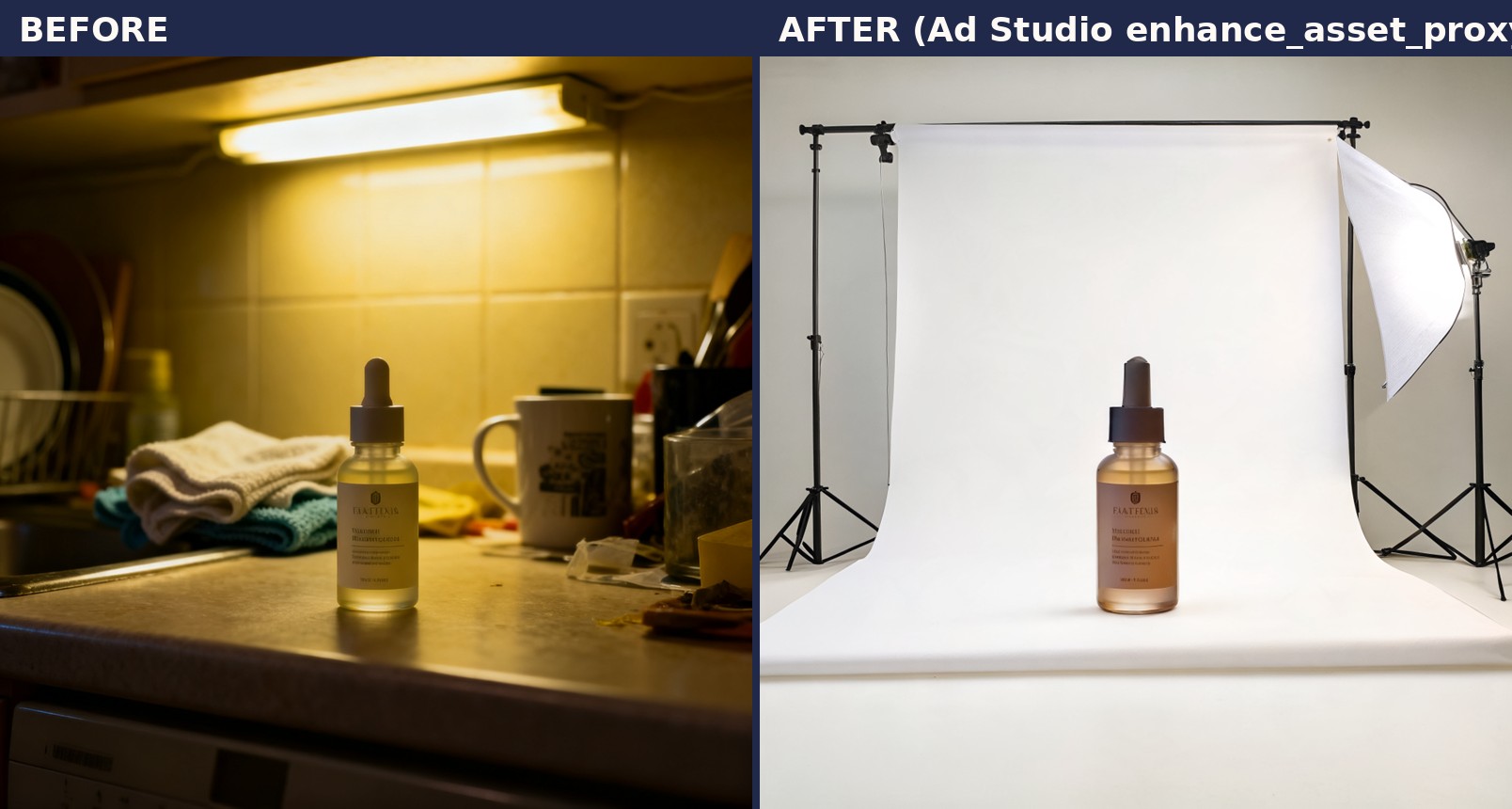
The exact prompt shape for the call above followed the tool's documented pattern: pick the operation by what's actually wrong with the photo (topaz-lighting with model: "Adjust V2" for exposure and white balance, recraft-replace-background with a prompt describing the new background, topaz-denoise with model: "Strong" for a grainy shot), pass the source imageUrl, and preview the cost before firing. On this photo the actual flaw was the cluttered, dim countertop behind the bottle, so recraft-replace-background was the right op, previewed at 9 tokens before running. Because this surface rejects unknown params instead of silently ignoring them, only the fields the specific op actually documents get sent, never an invented mask or a guessed background prompt.
Why this matters more than another prompt trick
Every "how to write a better ad prompt" article assumes the input photo is already good. In practice, most small and mid-size advertisers are working from whatever the supplier sent, or a phone photo shot in a warehouse under one fluorescent tube. That photo goes straight into the ad-generation pipeline, and the flaws it carries (the dim lighting, the soft focus, the cluttered background) don't get fixed. They get amplified across every size and language variant generate_image_templates and revise_creative_resize produce downstream. One bad source photo becomes twenty bad ad creatives instead of one.
Running the source through the right enhance_asset_proxy operation first means every downstream generation (every aspect ratio, every localized variant, every UGC or cinematic preset built from that product) inherits a clean base instead of compounding a flaw. It's a five-minute step that changes the ceiling on everything built after it.
Building this into how you actually work
Before a product photo goes anywhere near a generation preset, run it through one question: is anything about this photo actively working against the sale? Too dark, too soft, wrong background, visible damage on an otherwise fine shot. If yes, that's an enhance_asset_proxy job, not a "we'll fix it in the ad copy" problem. Pick the operation that matches the actual flaw rather than reaching for a generic "enhance" pass, because a lighting fix and a denoise pass solve different problems and the tool prices them differently. Preview the cost, run the fix, then move to Ad Studio's actual ad-generation step with a source photo that isn't fighting the creative.
This is the same discipline that separates a one-off generated image from a repeatable, launch-ready ad: fix the input once, then let the template pipeline fan it out across every format and market without dragging the same flaw through all of them. That's what turns a photo-repair tool into a launch-ready ad, not just a cleaner single image.
FAQ
Does fixing a photo's lighting or sharpness actually change ad performance, or is it a cosmetic step? The studies above tie photo attributes directly to click-through and to return rates, which is the performance side of an ad campaign, not just aesthetics. A photo that reads as low-effort or unclear reduces the odds someone clicks and increases the odds someone who buys sends it back.
Can this fix a genuinely blurry, out-of-focus photo? No, and it's worth being honest about that limit. Sharpening operations recover detail that's present but soft. They can't invent detail from a photo where the actual focus was missed. A genuinely out-of-focus photo needs to be reshot, not sharpened.
What's the difference between this and just re-shooting the product? Time and cost, mostly. A reshoot is the right call when the product itself, the angle, or the composition is wrong. A repair pass is the right call when the composition and shot are fine but the technical execution (light, noise, background, minor damage) is holding the photo back.
Does this replace the upscaling tool Coinis already has? No. revise_creative_upscale is specifically for resolution. enhance_asset_proxy covers everything else a photo might need beyond resolution: lighting, sharpness, noise, background, restoration, and inpainting. Use whichever matches the actual flaw, or both in sequence for a photo that has more than one problem. The background-swap example above pairs naturally with the standalone background remover feature when all you need is a quick manual cutout instead of a full repair pass.
Where does this fit in the Ad Studio workflow? Before generation, not instead of it. Fix the source photo with enhance_asset_proxy, then run the corrected photo through generate_image_templates to build the actual launch-ready ad set across formats.
Sources
- National Retail Federation and Happy Returns, "2024 Consumer Returns in the Retail Industry," December 5, 2024. https://nrf.com/research/2024-consumer-returns-retail-industry
- Xia, H., Pan, X., Zhou, Y., and Zhang, Z.J., "Creating the Best First Impression: Designing Online Product Photos to Increase Sales," Decision Support Systems, Vol. 131, 2020. https://doi.org/10.1016/j.dss.2019.113235

Isidora Matovic
Author
Social media enthusiast and a full time researcher. She takes digital presence very seriously and that is why you are always in touch in what is going on with us! Follow us for more posts like this.