

Pull up one of your own SKUs on every channel you sell it on. Amazon shows the pure white background your bulk-upload template demanded two years ago. Etsy shows a warmer, handmade-style shot you added last spring because that's what the marketplace's own best-practice guide recommended. Your Shopify store shows whatever the most recent photographer sent over, shot against a different backdrop entirely. Same product. Three different brands, by accident.
This isn't a dropshipping problem, where the issue is that your photo is identical to a dozen competitors'. It's the opposite failure: your own catalog doesn't even agree with itself. A seller who started on one marketplace, expanded to two more, and refreshed a product line here and there over several years ends up with a visual patchwork nobody planned and nobody is happy with once they finally look across every channel at once.
Why this is a measured problem, not a vibe
Mirakl's own guidance for multi-marketplace sellers names the mechanism plainly: every new marketplace a seller joins means reformatting listings and resizing images to fit that platform's own requirements, and that process "often leaves your brand looking disjointed instead of polished and reliable." The consequence isn't abstract. Salsify's 2025 Consumer Research report found that 54% of shoppers have abandoned a sale specifically because product content wasn't consistent from one channel to the next, and 71% have made a return because a product didn't match what they saw in the listing.
Evinent's analysis of multi-vendor catalog operations adds the mechanical root cause: image quality and format inconsistencies compound as a catalog grows across suppliers, time, and platforms, and Syndigo's 2025 Product Experience report found 75% of consumers form a negative opinion of a brand the moment they spot incomplete or inconsistent product information, up from 62% just two years earlier. That's a trust problem measured at the exact moment a shopper is deciding whether to click "Add to Cart" or back out to a competitor's listing.
Amazon's own Seller Central product image guide is explicit about why this matters for its own platform specifically: main images must share a pure white background (RGB 255, 255, 255) "to create a consistent shopping experience for customers across search and product detail pages." That's Amazon enforcing consistency inside its own four walls. It says nothing about whether that same product looks like the same brand once a shopper clicks through to your Etsy shop or your own site, which is exactly the gap most multi-channel sellers never get around to closing.
The three-way split, and why it's worse than it looks
Walk through what actually causes this drift, because it rarely happens in one bad decision:
Different launch dates, different habits. The photo you shot when you first listed a product in 2023 reflects whatever camera, lighting, and background you had available that week. The photo for the same product line added in 2025 reflects a different setup, a different photographer, or a different outsourced photo vendor entirely.
Different platforms, different rules. Amazon wants pure white. Etsy's own seller guidance leans toward warmer, lifestyle-style shots that read as handmade and personal. Meta and TikTok ad creative wants something that stops a scroll, not something optimized for a static product grid. Following each platform's own best advice, individually, is exactly how a catalog ends up visually fractured.
Different hands on the catalog. A seller who outsources photo editing to more than one freelancer or agency over the years, even briefly, imports whatever color grading, cropping habit, or background choice each one happened to use that week. None of it is wrong in isolation. None of it agrees with the rest of the catalog either.
The fix people reach for first, going back and reshooting everything, is exactly the kind of project that never gets prioritized. It needs a studio day, a shipped sample, and a schedule slot that a working catalog of dozens or hundreds of SKUs never has room for.
What you can fix without a reshoot, on Coinis
Ad Studio has two tools that solve this without touching a single physical product. Neither one requires a new photoshoot, a sample shipment, or a design hire.
generate_image_templates builds fresh ad creative from one product photo across your output formats (square, story, landscape). Point it at your best existing photo for a SKU and it becomes the template for how that product should look everywhere, not just on the one channel the photo was originally shot for.
revise_creative_variate is the tool built specifically for this kind of cross-channel normalization. It anchors to an existing image and changes only what you tell it to, background, lighting, color grading, while keeping the product itself, its angle, and its scale identical. Run your Amazon white-background shot through it with a prompt describing your brand's actual visual style, and the output is the same product with the same brand look your Etsy and Shopify listings should already share.
Here's what the normalization looks like once the same bottle runs through all three treatments:
Worked example: one SKU, three channels, one visual identity
Take a product that currently exists in three different photo treatments across three channels: a flat white Amazon main image, a warmer lifestyle Etsy shot with a wood-table background, and a third, slightly different crop used on the brand's own Shopify store. Here's a variation brief built to pull all three toward one consistent look without reshooting any of them:
Source: the plain white-background Amazon main image, product centered, flat studio lighting.
Target style: [brand]'s actual visual identity, warm neutral background tone, soft directional light from the upper left, consistent crop ratio and product scale across every channel output.
Keep: product geometry, color accuracy, label legibility, scale relative to frame.
Change: background, lighting mood, color grade only.
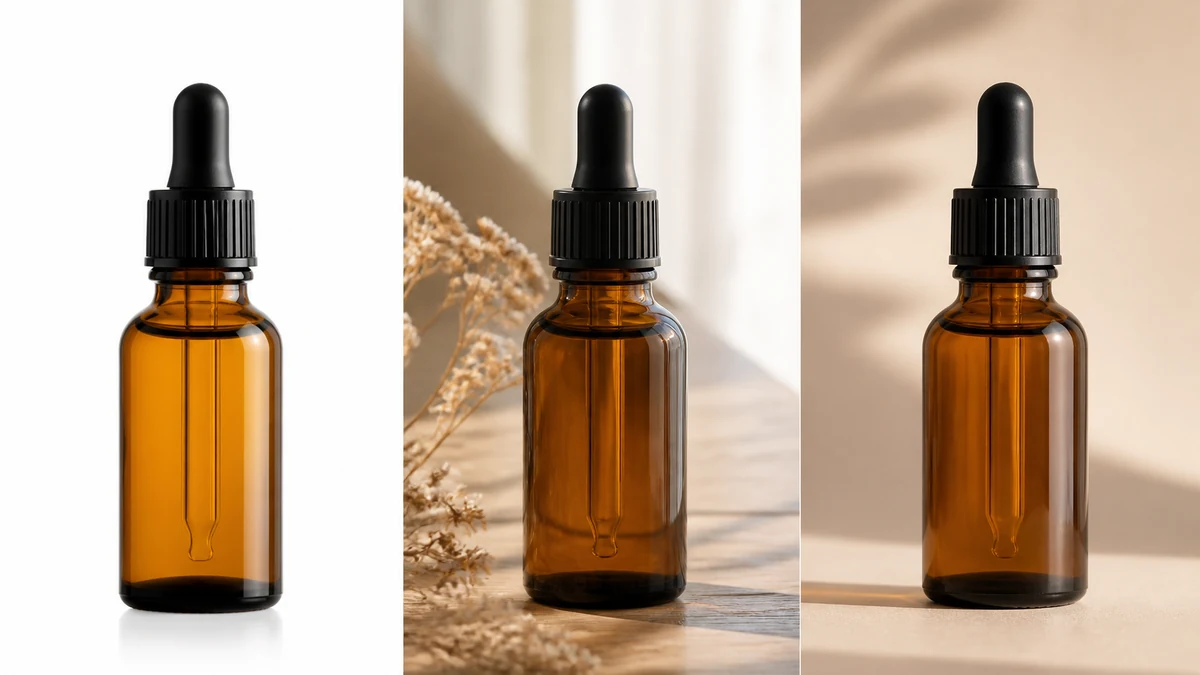
Note on this image: mcp.coinis.dev, the live pipeline behind generate_image_templates and revise_creative_variate, is mid-outage as this article published (a recurring tampered-issuer credential incident under investigation). The panel above is an illustrative mockup of the same transformation, not a real tool render. For the real generate_image_templates and revise_creative_variate output on an actual product photo, see the dropshipping unique-photo article and the ad-variation generator article, both built on confirmed-live MCP renders.
What comes out the other side is a single visual identity applied consistently whether the shopper first meets the product on Amazon, Etsy, or the brand's own site, built from photos that already exist rather than a new shoot scheduled for a date that keeps slipping.
Building this into a standing habit, not a one-time cleanup
A one-time catalog cleanup fixes today's drift. It doesn't stop a new freelancer, a new platform launch, or a new product line from reintroducing the same problem six months from now. The fix that actually holds is treating "what does our brand look like" as a locked style brief, not a memory: write down the exact background tone, lighting direction, and crop ratio once, in the same kind of plain-language prompt used above, and reuse that same brief every time a new photo needs to go out to a new channel.
That's also the point where this stops being a one-off photo-repair job and becomes a repeatable ad pipeline for any ecommerce brand. Once a SKU's photos are visually consistent across channels, the same corrected images are ready to go straight into a launch-ready ad, not just a cleaner product listing.
FAQ
Does fixing catalog photo consistency help SEO or just conversion? Both. Google's own product-image guidance values accurate, consistent imagery for Shopping listings, and a shopper who trusts what they see is a shopper more likely to complete a purchase rather than bounce to re-check a competing listing.
Do I need to reshoot my whole catalog to fix this? No. revise_creative_variate works from photos you already have. It changes background, lighting, and color grade while keeping the product itself untouched, which is the whole point of using an existing image as the anchor rather than requiring a new one.
Can I use this across more than two channels at once? Yes. The same source photo and the same style brief can be reused for every channel's output format, Amazon, Etsy, Shopify, and ad creative for Meta or TikTok, from one corrected source image.
Will this fix a catalog with hundreds of SKUs? The workflow is per-SKU, but because the style brief itself is reusable (the same background/lighting/crop instructions apply to every product), the manual effort per additional SKU drops to running the same prompt against a new source photo, not re-deriving a new visual treatment each time.
Does Amazon's white-background requirement conflict with having one consistent brand look everywhere else? No. Amazon's pure-white rule only applies to that one main image on that one platform. Nothing stops the SAME product from carrying a different, brand-consistent secondary image set on Amazon's own gallery and an identical brand treatment everywhere else. The inconsistency problem is about the OTHER channels drifting from each other, not about Amazon's specific main-image rule being wrong.
Try it on Coinis
Pick one product that looks different across two of your channels right now. Run it through Ad Studio and give every channel the same brand, the same consistent look, built from the photos you already have.
Start building consistent catalog creative on Coinis
Sources
- Mirakl, "How to maintain brand consistency while scaling marketplace operations": https://www.mirakl.com/blogs/brands-sellers/how-to-maintain-brand-consistency-while-scaling-marketplace-operations/
- Salsify, "2025 Consumer Research Report" (54% abandoned sale over inconsistent content, 71% returned over listing mismatch, 87% pay more for a trusted brand): https://www.salsify.com/resources/report/2025-consumer-research
- Evinent, "Multi-Vendor Catalog Management: Why It Breaks at Scale" (Syndigo 2025 Product Experience Report, 75% negative brand opinion from incomplete/inconsistent product information): https://evinent.com/blog/multi-vendor-catalog-management-scale
- Amazon Seller Central, "Product image guide" (pure white RGB 255,255,255 main-image requirement): https://sellercentral.amazon.com/help/hub/reference/external/G1881

Isidora Matovic
Author
Social media enthusiast and a full time researcher. She takes digital presence very seriously and that is why you are always in touch in what is going on with us! Follow us for more posts like this.