
You’ve been here before. It’s day three of a new ad. CPA is running high, conversions are spotty, and you’re not sure if you’re watching a loser bleed budget or a winner that just needs more runway. Knowing when to kill a Meta ad, and when to give it more time, is the decision that separates media buyers who scale from those who just churn budget. You pause it too early. Two weeks later, a competitor is running the same angle and cleaning up.
Or the opposite: you let it run, hoping it’ll turn around. It doesn’t. You’ve just donated another $400 to Meta’s auction.
Here’s what nobody tells you when you’re at the intermediate stage: your creative is probably fine. Your audience is probably fine. What’s killing your margins is the moment you decide to pull the plug or don’t. This framework is about getting that timing right.
If you’re in a bit of a hurry, read this:
- Never make kill decisions during the learning phase. Meta needs ~50 conversions per ad set per week to stabilize. Intervening before that poisons the data.
- Your signals arrive in a specific order, and reading them out of sequence is how you make bad decisions fast.
- First you get CTR and CPC that’s the creative telling you whether it’s doing its job. Then CVR and add-to-cart start coming in, which tells you whether people who clicked actually wanted what they landed on. CPA and ROAS are last. By the time those are meaningful, the story is mostly already written.
- One hard rule that shouldn’t be up for debate: three times your target CPA spent, zero purchases – kill it. Not “give it one more day.” Kill it.
- Also worth separating clearly in your head: an ad that’s live, spending, and not converting is a funnel problem. An ad that’s live and not spending is a delivery problem. Same dashboard, completely different fixes.
- As for timing, days one and two are just expensive noise. If you’re making kill decisions before day five, you’re not optimizing, you’re reacting.
The Core Problem: You’re Making Decisions at the Wrong Time
The ad isn’t usually the problem. It’s the moment you try to fix it. Most media buyers either stop too early or hold too long hoping it turns around. Same mistake, opposite direction.
The difference between media buyers who scale and media buyers who churn budget isn’t instinct it’s having a clear process for when to act and when to wait. And with “Why Meta ads are more expensive in 2026”, getting that timing right matters more than ever.
Not all Meta ads fail the same way and more importantly, they don’t fail on the same timeline. A campaign on day three needs to be read completely differently than one on day twelve.
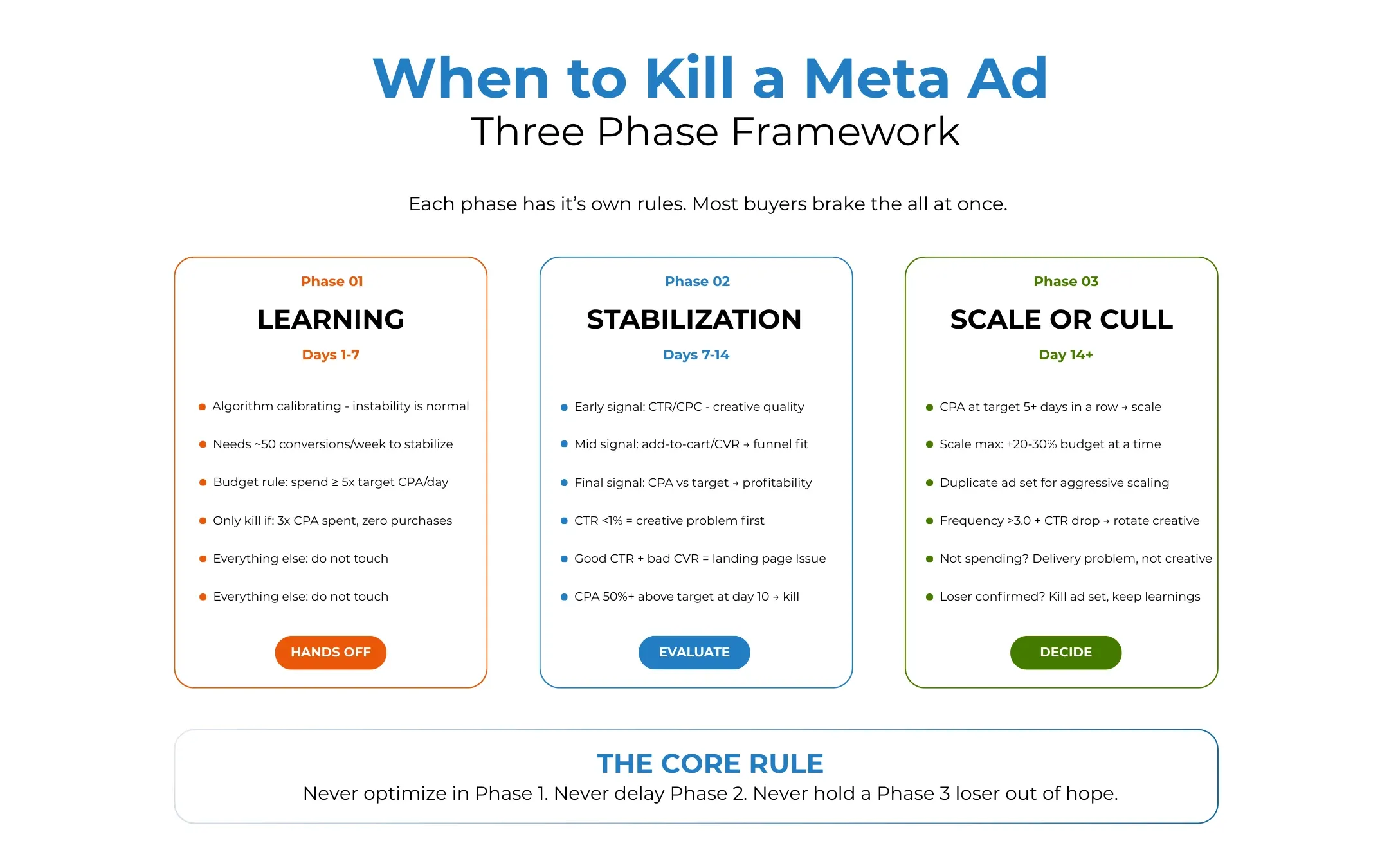
- Phase 1: Learning (days 1–7): The algorithm is calibrating. Performance is unstable by design. Your job is to watch for catastrophic signals only, not optimize.
- Phase 2: Stabilization (days 7–14): The algorithm has data. Performance starts to normalize. This is when you make your first real read on the ad.
- Phase 3: Scaling or culling (day 14+): Clear winners get more budget. Clear losers get paused. Everything in between gets one more test variable changed.
Most media buyers collapse all three phases into one panicked window. That’s the mistake.
Phase 1: Why You Shouldn’t Kill Meta Ads During Learning
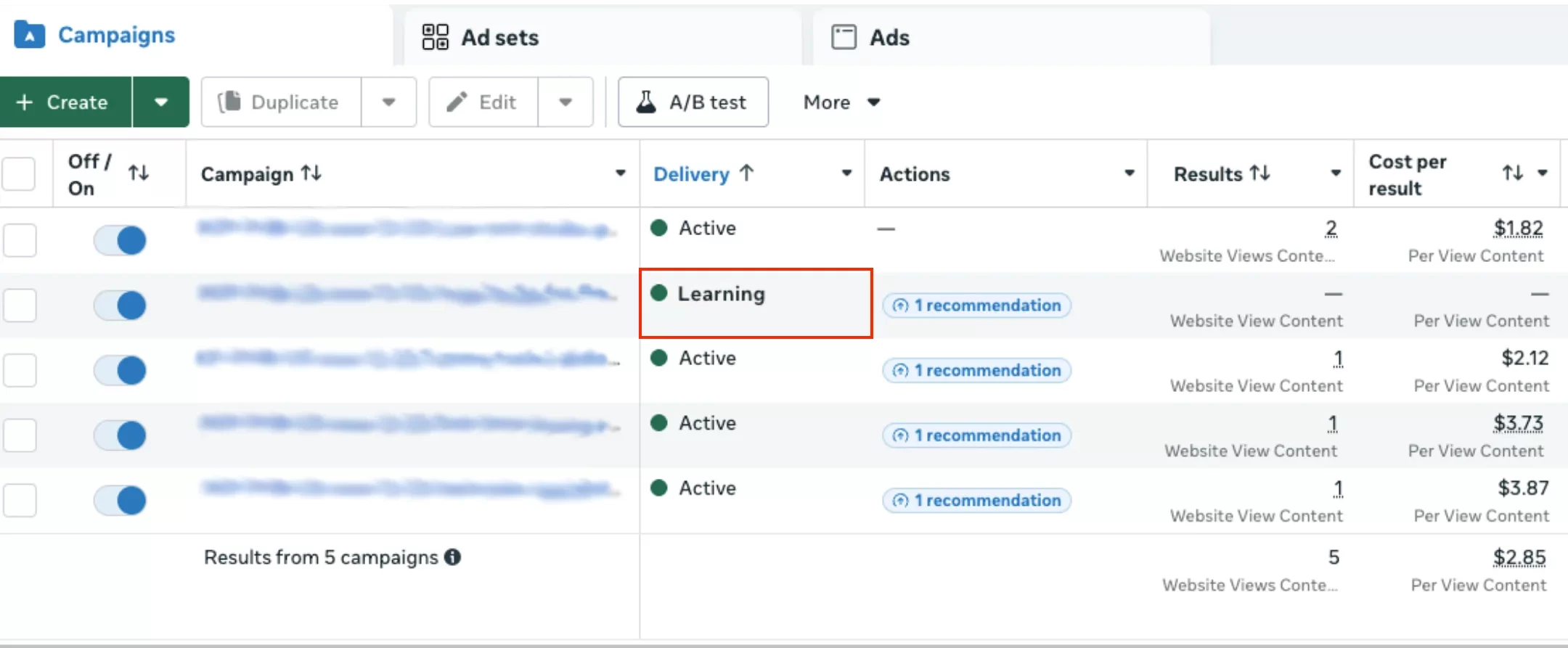
Meta’s learning phase needs about 50 conversion events a week to complete. Until then, the algorithm is still testing audience pockets, placements, delivery windows everything. Performance will swing. That’s not a problem to fix, it’s a process to respect.
Day-two CPA is a draft, not a verdict. The ad that looks expensive today might be your best performer by the end of the week. The one that opens strong might fall apart once delivery locks in. You just don’t know yet and neither does Meta.
The budget math matters here. A good rule of thumb: aim for at least 5× your target CPA per day per ad set. If your target CPA is $40, you need at least $200/day per ad set to generate enough conversion volume for the algorithm to learn. Running below that threshold keeps you in learning limbo indefinitely.
The Only Valid Kill Signals During Learning Phase
There are exactly two reasons to pause an ad during the learning phase:
1. You’re spending 3× your target CPA with zero conversions. This is the hard rule. If your target CPA is $40 and you’ve spent $120 with no purchases, the funnel has a structural problem: wrong audience, broken pixel, landing page mismatch, or an offer that isn’t converting. No amount of additional learning time will fix it.
2. You’ve confirmed a tracking error. A good reason to edit during learning: you discovered a tracking error, or you’re spending at 5× target CPA with no conversions after $500 spent. A bad reason to edit: CPA is 1.5× target on day three, or one ad has lower CTR than another. The first indicates a fundamental problem; the second is normal learning phase variance.
High CPA, low CTR, delivery all over the place — during the learning phase, that’s just Tuesday. Resist the urge to fix it. The worst thing you can do right now is make a change that resets the clock and sends you back to square one.
Phase 2: The Three-Signal Evaluation System
After day seven — or once learning exits, whichever happens first — the data is finally worth something. Not perfect, but real enough to act on. This is where you shift from waiting to evaluating.
The mistake most media buyers make here is pulling up every metric at once and trying to form a verdict. You end up with too many inputs and no clear answer. Work in layers instead. Each signal has its job. Let it do that job before you move to the next one.
First question on the list: is the creative earning attention?
CTR, CPC, hook rate on video, thumbstop — these tell you whether the ad is earning attention and pulling the right people through to click. That’s it. They’re not profitability signals. Funnel signals? No. They’re just the creative’s report card for the top of the funnel.
A weak CTR at this stage means you have a creative problem. Fix that before you touch anything else, because no amount of audience tweaking or budget adjustment will save an ad that isn’t stopping the scroll.
- CTR below 1%: The creative isn’t connecting. The hook, visual, or angle isn’t working. This is a creative problem, not a budget or audience problem. Fix the creative before changing anything else.
- CTR above 2%: The ad is stopping the scroll. Move to mid signals.
- High CTR + high CPC: You’re getting clicks from people who aren’t buyers. Meta is delivering to a broad curious audience, not a purchase-intent one.
Mid Signals – Is the Traffic Qualified?
The metrics here are add-to-cart rate, initiate checkout, landing page CVR, and cost per add-to-cart.
Clicks are cheap. Intention isn’t. Mid signals tell you whether the people coming through are genuinely interested or just curious enough to tap and immediately leave. If your CTR looks healthy but these numbers are soft, the problem isn’t your audience it’s the gap between what the ad sells and what the page delivers.
- Low add-to-cart rate despite decent CTR: Classic landing page or offer problem. The ad is working; the page isn’t selling. Fix the page before killing the ad.
- Strong add-to-cart but weak checkout completion: Checkout friction, price shock at cart, no trust signals, too many form fields, shipping cost reveal.
- Low everything: The creative and funnel are both broken. Start with creative.
Final Signals – Is It Profitable?
Metrics: CPA vs target, ROAS vs break-even, contribution margin per conversion
This is where the kill-or-scale decision lives. By day 7–10, you should have enough purchase data to make a clear read.
- CPA at or below target for 3+ consecutive days: Winner. Begin scaling.
- CPA 10–30% above target: Gray zone. Give it 3 more days. One bad day is data; three bad days is a trend.
- CPA consistently 50%+ above target after day 10: Kill it. The audience or angle isn’t profitable at this budget level.
When to Kill a Meta Ad and When to Wait
Without a defined threshold, every decision becomes a feeling. And feelings on a live dashboard are expensive.
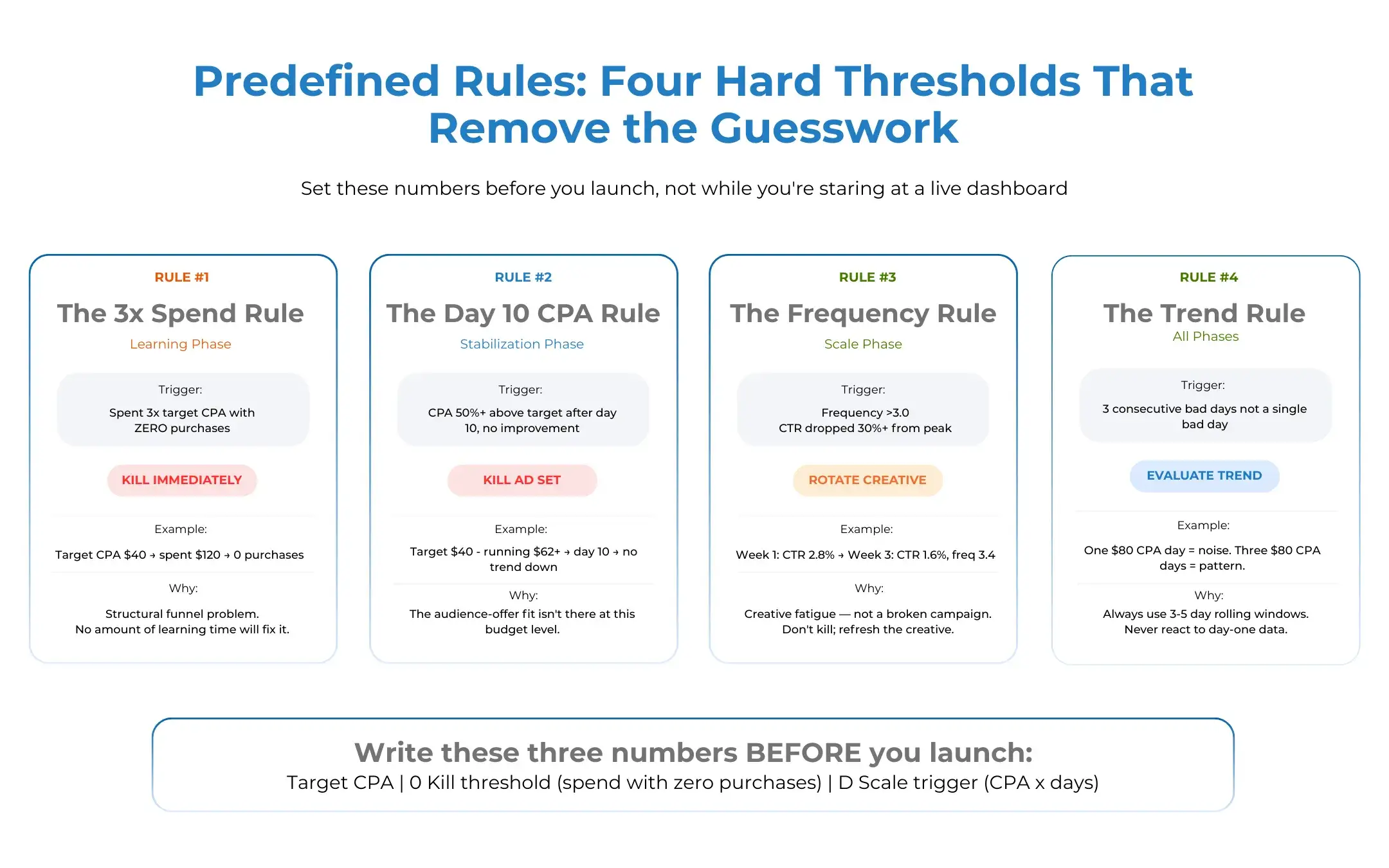
Rule 1: The 3× Spend Rule (Learning Phase) Spent 3× your target CPA with zero purchases? Kill it immediately. Don’t wait for the learning phase to end. Something is structurally broken.
Rule 2: The Day 10 CPA Rule (Stabilization Phase) By day 10, if your CPA is more than 50% above target and showing no downward trend, pause the ad set. Not the whole campaign, the ad set. Test a new creative or audience in a new ad set.
Rule 3: The Frequency Rule (Scale Phase) Ad creative typically needs refreshing every 7–14 days to maintain optimal performance. If frequency has climbed above 3.0 and CTR has dropped more than 30% from its peak, the ad is fatigued not broken. Don’t kill it; rotate a new creative variation into the mix.
Rule 4: The Trend Rule One bad day means nothing. Three consecutive bad days is a pattern. Always evaluate performance over a rolling 3–5 day window, not a single day snapshot. Monitor performance daily but make decisions every 2–3 days. Daily spikes can be misleading, while multi-day trends show whether ads are truly working.
The Scaling Rules: When to Push Budget
Knowing when to kill is only half the framework. Knowing when to commit more budget is the other half and it’s where most intermediate buyers leave money on the table by being too cautious.
You’re ready to push budget when all of these are true, not just one or two of them:
- CPA is at or below target for 5+ consecutive days
- The ad set has exited the learning phase (Active status, not Learning Limited)
- CTR is stable or increasing, not declining
- Frequency is below 2.0 (you haven’t exhausted your audience yet)
The rule most media buyers learn the hard way — every time you make a significant change to an active ad set, Meta treats it like a new one and restarts the learning phase. All that data you accumulated, gone.
If things are working, increase the budget by 20–30% at a time and give it a few days before touching it again. Want to scale faster than that? Duplicate the ad set and increase the budget on the copy. The original keeps running, the learning stays intact, and you’re not gambling a working campaign on an aggressive budget jump.
The Gray Zone: The Hardest Meta Ad Kill Decisions
Most ads don’t fail cleanly. Here are the patterns that trip people up most and what they’re actually telling you.
“Good CTR, Bad CPA”
The ad is getting clicks but not conversions. Before killing it, run through this checklist:
- Is the landing page consistent with the ad’s promise? Message match kills conversion rates silently.
- Is page speed acceptable? A 3-second load delay can cut CVR in half.
- Is the checkout process frictionless? Surprise shipping costs at cart kill conversions.
- Is the pixel firing correctly? A broken conversion event makes a profitable ad look like a loser.
If all four check out and CPA is still bad after day 10, the audience-offer fit isn’t there. Kill the ad set, keep the creative, test a new audience.
“No Spend at All”
This isn’t a performance problem, it’s a delivery problem. Your bid is too low to win auctions, your audience is too narrow, or your ad is stuck in review. Check your bid strategy, audience size (aim for 1M+ for most ecommerce tests), and ad status before assuming the creative is the issue.
“Works for 5 Days Then Dies”
Classic creative fatigue pattern. Track frequency by creative, CTR trends over time, and CPA deterioration curves. Every account burns creatives at a different speed. Learn yours. The fix is a creative rotation system, not a kill. Build 3–5 variations of your winner and rotate them before fatigue sets in.
The Only Cheat Sheet You Need
Stop scrolling back through the article. Here’s the whole thing in one table.
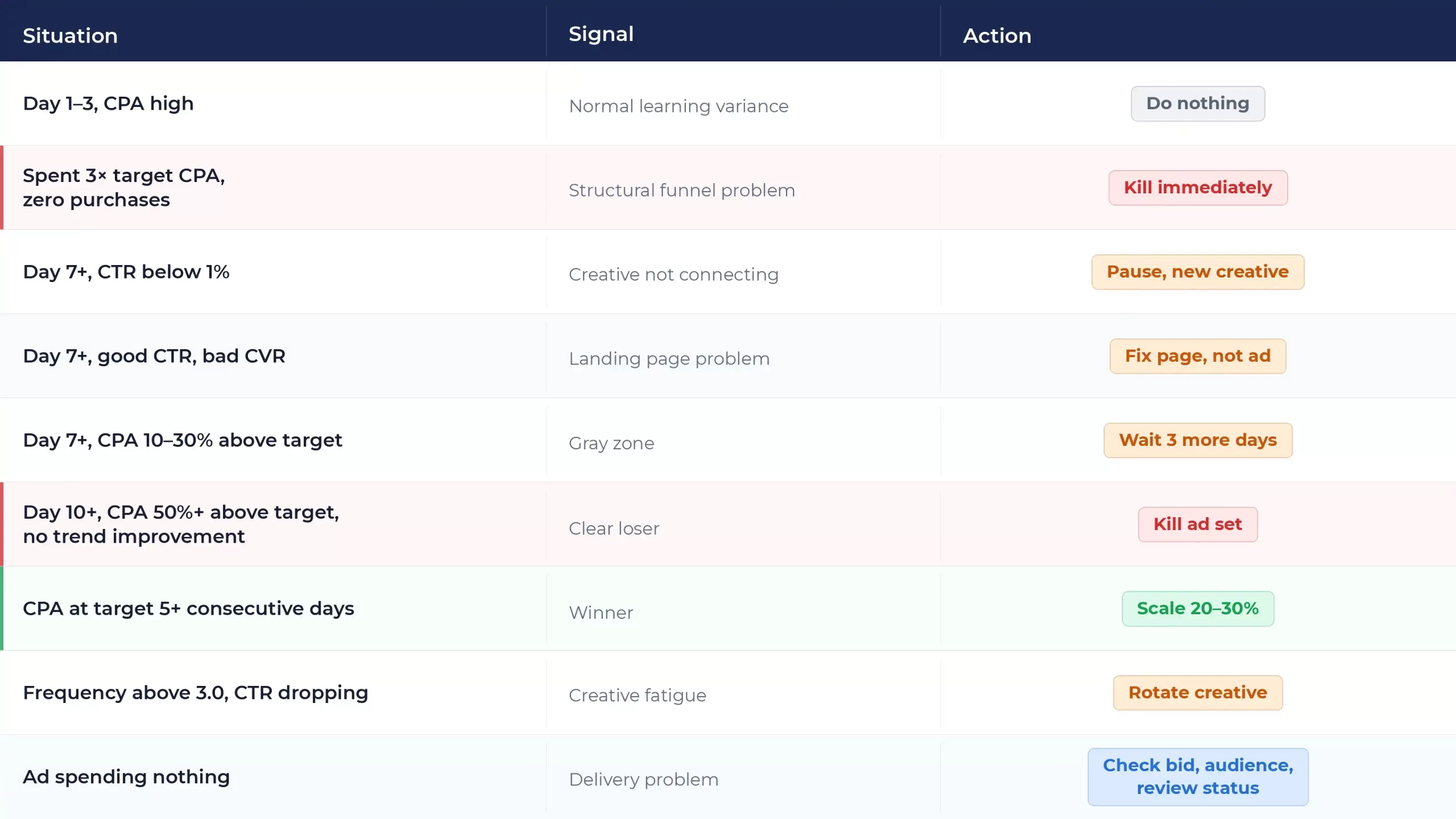
Every scenario covered above, save it for later.
Set Your Rules Before You Start
Nobody makes good decisions at 11pm watching budget drain. Write your numbers down before you start. That’s the whole secret.
Before the campaign goes live, before you’ve spent a dollar, write down three numbers. Not after. Not when things get uncomfortable. Your target CPA. The spend level at which you pull the plug if nothing’s converted. The CPA and time window that earns more budget.
Most bad calls at this stage aren’t made from lack of knowledge. They’re made in the moment, under pressure, with incomplete data. The platform is built to make you react. Having the numbers written down in advance means you’re responding to a plan instead.
One Last Thing
At $500–$2K a day, the framework doesn’t break, your ability to manually execute it does. AdForce is built for exactly that gap. One view, all your campaigns, no tab switching.


Isidora Matovic
Author
Social media enthusiast and a full time researcher. She takes digital presence very seriously and that is why you are always in touch in what is going on with us! Follow us for more posts like this.