

A contractor pulls out a phone at the end of a job, fires the built-in flash because the crawl space or the attic or the evening driveway is too dark otherwise, and gets a photo where the finished work is lit like a mugshot: a hot white blowout on whatever is closest to the lens, a background that has gone almost completely black because the flash killed all the ambient light behind the subject, and hard shadows stacked right where the actual repair or install sits. That photo, taken between jobs with no time to reshoot, is usually the best one available. It is also the one that ends up in the ad account exactly as shot.
Nobody chooses this look. It is what a single on-camera flash does in a dim, cluttered space when there is no second light to fill the shadows or soften the falloff. A HVAC tech photographing a new unit in an unlit basement, a roofer shooting a finished job at dusk, a plumber capturing a repair inside a cabinet: all three end up with the same flash artifact, and all three ship it straight into whatever ad size the campaign needs next.
The lead is expensive enough without a photo that looks unfinished
Home services is not a category where a bad photo just costs a little reach. LocaliQ's 2025 benchmark of over 3,200 search ad campaigns found the category-wide average cost per click for home services businesses sitting at $7.85, with air conditioning installation and repair alone averaging $9.68 and electricians running $12.18 (LocaliQ, "2025 Search Ad Benchmarks for Home Services," 2026). A separate industry analysis of 3,211 home-service search campaigns found cost per lead rising year over year for 69% of advertisers, up an average of 10.51%, with HVAC near $45 a lead, plumbing near $52, and roofing near $79 (referenced in PipelineOn's "2026 Home Service Marketing Statistics," 2026, sourced from LocaliQ's own benchmark study). Every one of those clicks and leads is paying to land on an ad built from whatever photo was on hand. A blown-out flash and a black background is not a stylistic choice at that price. It reads as an unfinished job before anyone reads the offer.
Trust compounds the problem. BrightLocal's Local Consumer Review Survey 2026 found that photos and video attached to a business's reviews and listings are one of the review factors consumers weigh most heavily when deciding whether they feel positive about a local business (BrightLocal, "Local Consumer Review Survey 2026: Star Ratings Keep Rising, Old Reviews Don't Cut It," February 2026). A flash-blown job photo is the opposite of the appealing image that survey is describing. It looks like proof the work happened, shot in a hurry, rather than proof the business is good at what it does.
Why the exact conditions contractors shoot in are the ones that wreck a flash photo
Most product-photo advice assumes daylight, a studio, or at least a room with even ambient light. Contractor work does not happen there. It happens in a crawl space, an attic, a mechanical closet, a driveway after sunset, a job that has to get photographed the moment it is finished because the crew is already loading the truck for the next one. A single on-camera flash in one of those spaces has nowhere else to go: it hits the nearest surface hard, the light falls off a cliff past a few feet, and everything past that falloff line goes black. The finished install, the repaired unit, the new roof section, ends up sitting in a bright hot patch surrounded by nothing, instead of looking like it belongs in a real home.
That means the flaw shows up on a predictable schedule: every finished job, every testimonial shot a homeowner agrees to, every equipment photo for a seasonal promo, taken in whatever light was available at the time, flash included, blowout included. Fixing that photo once after the fact is far faster than sending a crew back with proper lighting gear for a job that is already closed out.
Fix the flash blowout before you multiply the photo
Ad Studio's repair layer, enhance_asset_proxy, exists for exactly this step. One tool covers the full set of repair operations, sharpening, denoising, lighting and exposure correction, background replacement, object removal, chosen through a single model field that pairs the specific fix to the specific flaw. For a flash-blown subject sitting against a crushed black background, the right approach is a masked exposure repair paired with a background fill: recraft-inpaint with a mask drawn around the blown-out hotspot and the dead-black area behind the subject, paired with a prompt describing a natural, evenly lit version of the same space (the same crawl space, attic, or driveway, just lit as if a second fill light had been there). The mask stays scoped to the flash artifact and the crushed background, so the actual work, the unit, the repair, the finished roofline, is never altered.
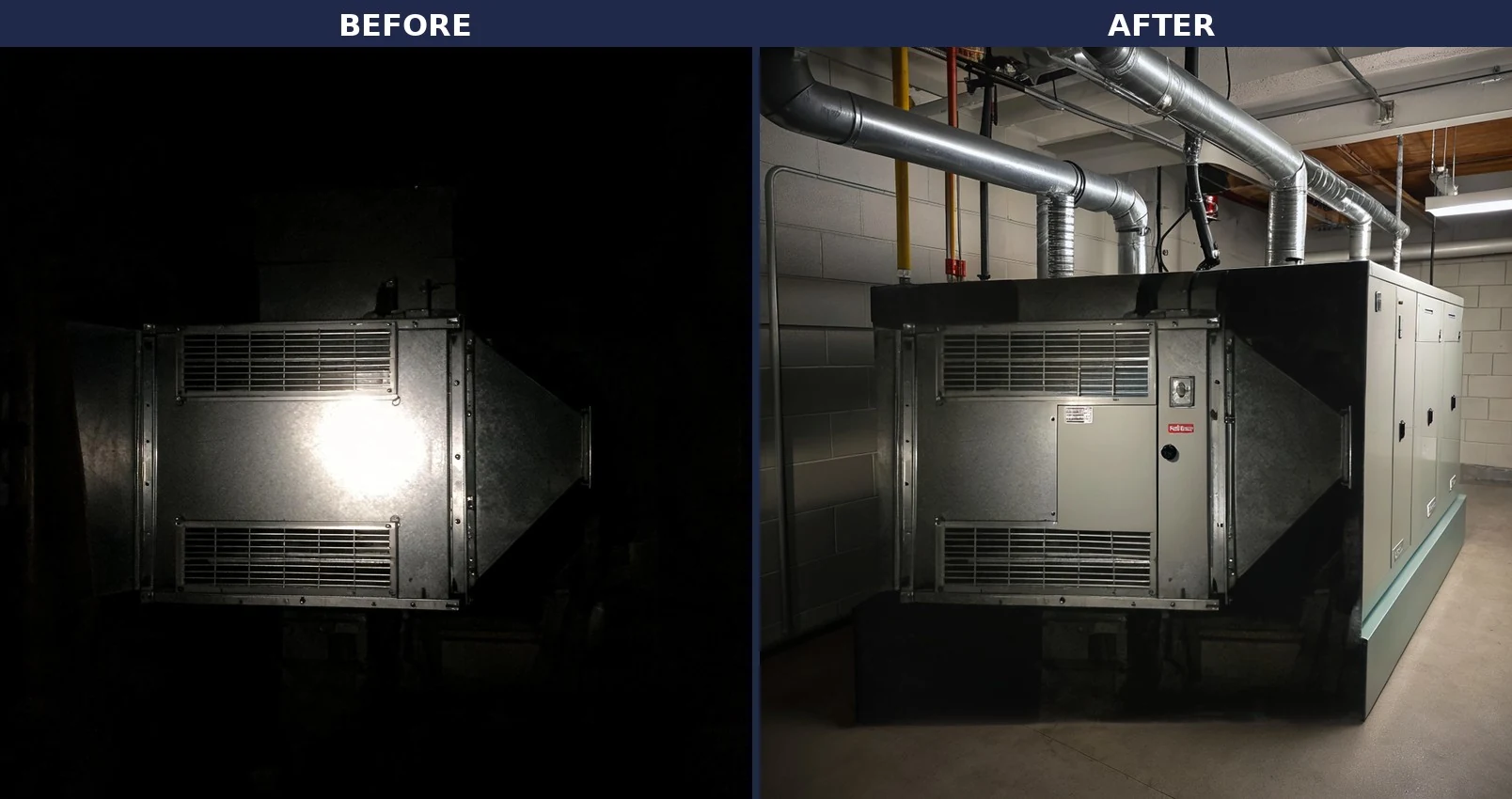
Once the source photo is clean, the fan-out step is generate_image_templates, Ad Studio's primary image-ad generator. One corrected job-site photo becomes a square Facebook post, a 9:16 Story, and a horizontal Display banner in one pass, sized to what each placement actually expects, without sending a crew back to a job that is already closed and without re-fixing the same flash blowout on five separate files.

Building this into a contractor's actual job cadence
A contractor's photo supply does not stop after one campaign. Every closed job is a potential testimonial, every seasonal push (spring HVAC tune-ups, fall roof inspections, holiday-lighting installs) needs fresh proof of work, and nearly all of it gets shot on a phone with whatever light is available at the moment the crew wraps up. The order matters every time: repair the photo first with enhance_asset_proxy (flash blowout, crushed background, uneven exposure), and only then hand the clean file to generate_image_templates for the ad-size fan-out. Doing it in the other order just resizes or restyles a photo that still has the flash artifact baked in, producing five flawed variants instead of one clean set.
This is the same creative-fatigue problem already covered in mobile game ad creative fatigue: a business running the same one usable photo past the point an audience has already seen it, because there is no second clean shot to rotate in. A contractor is exposed to that risk on nearly every job, since most usable photography happens in a rushed, low-light moment right after the work is done. A corrected shot that can survive a background fill and a full ad-size fan-out gives a contractor the same rotation without sending a crew back to a finished job, the same fix already applied to a car dealership's reflective-surface problem and a gym's mirror-wall reflection problem.
FAQ
Does enhance_asset_proxy change what the job actually looks like? No. The mask is drawn only around the flash hotspot and the crushed black area behind the subject, not the work itself. The unit, the repair, the finished roofline, or the fixture stays exactly as installed. What changes is the lighting artifact that was hiding it.
Will the fixed photo still look like it was shot on a real job site? Yes. The repair targets the exposure problem the flash created, not the presence of the actual site (a crawl space, an attic, a driveway). A corrected photo still reads as a real job, just without the hotspot-and-blackout look a single on-camera flash produces.
Does this apply to HVAC, plumbing, roofing, and general contractors the same way, or is it trade-specific? The flaw is the same across every trade that shoots job-site photos with a single on-camera flash in a dim or cluttered space: HVAC techs in mechanical closets, plumbers under sinks or in crawl spaces, roofers finishing at dusk, electricians in unlit panels. The fix does not change by trade.
Do I need a different photo for every ad platform, or does one corrected shot cover all sizes? One corrected shot covers all sizes. generate_image_templates handles the resizing and cropping into each platform's spec from that single clean source, which is the entire point of fixing the photo once instead of five times.
The Coinis angle
A contractor does not need a second visit or a lighting rig for a job that is already closed out. Repair the flash-blown photo already on a phone with Ad Studio's enhance_asset_proxy, then turn it into a full ad-ready set with generate_image_templates, and land the whole thing as a launch-ready ad through Ad Studio's templates instead of exporting raw images and building the ad by hand.
Sources
- LocaliQ, "2025 Search Ad Benchmarks for Home Services (+Expert Tips & Insights)," last updated July 15, 2026. https://localiq.com/blog/home-services-search-advertising-benchmarks/
- PipelineOn, "2026 Home Service Marketing Statistics for Contractors" (citing LocaliQ's 2025 benchmark of 3,211 US home service search campaigns for HVAC/plumbing/roofing cost-per-lead figures), 2026. https://pipelineon.com/blog/home-service-marketing-statistics/
- BrightLocal, "Local Consumer Review Survey 2026: Star Ratings Keep Rising, Old Reviews Don't Cut It," February 11, 2026. https://www.brightlocal.com/research/local-consumer-review-survey/

Isidora Matovic
Author
Social media enthusiast and a full time researcher. She takes digital presence very seriously and that is why you are always in touch in what is going on with us! Follow us for more posts like this.