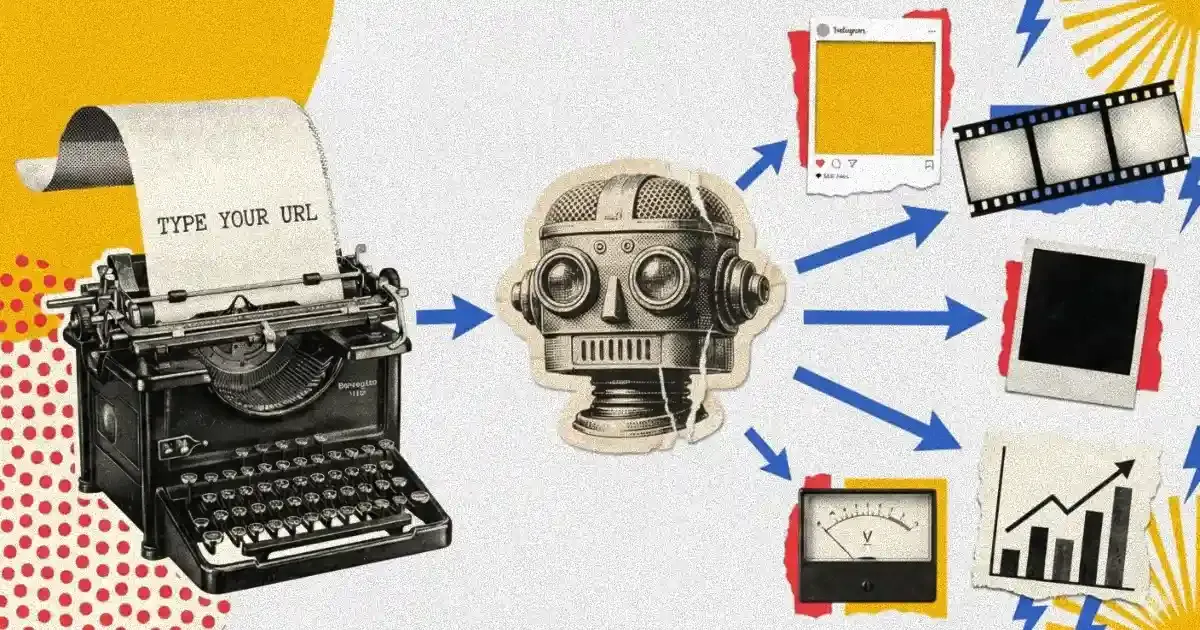
You paste a URL. Thirty seconds later, you have a Meta-ready image ad, a video ad, and three copy variants. That is the pitch for AI ad creative generation, and it is accurate, the technology does exactly that.
The part nobody explains is what happens between the URL and the creative that actually converts. Most store owners treat AI generation like a vending machine: insert URL, collect ads. Spoiler: the machine needs better ingredients. I get it. You paste the URL, the creative looks fine, you run it, nothing happens. So you assume AI ads just don't work for your product or at all. They do actually, you just fed the machine garbage (pardon my French.)
AI ad creative generation works. The gap is almost always in how store owners set it up, not in the AI itself.
What AI Actually Does When You Paste a Product URL
Before you can use this tool well, you need to understand what it does. AI creative generation is not magic, it is structured extraction followed by structured output.
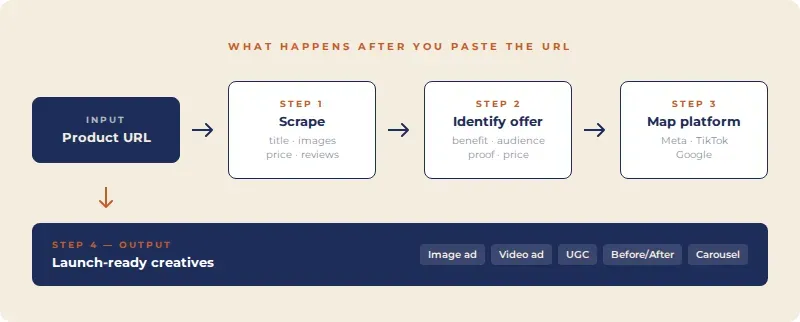
When you paste a product URL into a platform like Coinis, the AI does four things in sequence.
First, it scrapes the page. The system reads your product title, description, bullet points, price, images, and any social proof visible on the page: reviews, star ratings, "bestseller" badges. It also picks up brand signals: color palette, font style, tone of voice in your copy.
Second, it identifies your offer. This is where most store owners are surprised. The AI is not just reading your product it is extracting what your product does and for whom. A $49 face serum with 4.8 stars and "reduces fine lines in 14 days" will generate very different creatives than a $49 face serum described only as "premium skincare formula."
Third, it maps the creative to the platform. Image ads for Meta have different dimensions, safe zones, and text density rules than TikTok video ads or Google Display. The AI applies format-specific constraints automatically. A creative built for Meta feed is not the same as one built for Stories, even with the same product.
Fourth, it generates variants. Good AI creative platforms generate multiple options, different hooks, different visual treatments, different calls to action — so you can test rather than guess.
This is the full sequence. Understanding it tells you exactly where to intervene to get better outputs.
Why Most Store Owners Get Weak Creatives
The URL paste is step one, not the whole process. The single biggest reason store owners get weak AI creatives is that they feed the AI a weak product page and expect it to compensate.
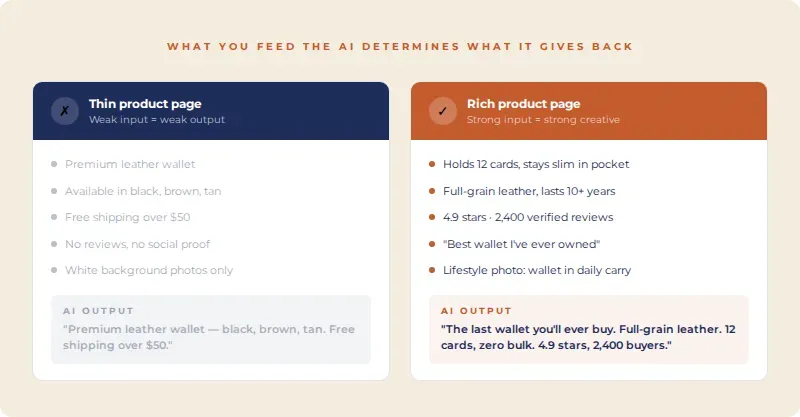
Thin product descriptions produce thin creatives. If your product page says "High quality leather wallet, available in black, brown, and tan. Free shipping over $50." - that is exactly what your creative will say. The AI cannot invent benefits you have not communicated. It can only surface and reframe what exists on the page.
The fix is not to write better AI prompts. It is to have a product page that answers the questions a customer actually has: What does this do? Who is it for? Why is this better than the alternative? What happens if I buy it and it doesn't work? Those answers feed the AI with material it can turn into hooks, headlines, and benefit statements.
Generic product photos produce generic creatives. AI image ad generation uses your existing product images as a foundation. If you only have white-background studio shots, your creatives will look like every other ecommerce ad on Meta. Lifestyle images: product in use, product in context, product with a person, give the AI dramatically more to work with.
You do not need a full photo shoot. One or two strong lifestyle shots alongside your standard product images can shift your creative quality significantly. Some of the best performing ad images I've seen were shot on an iPhone 12 in someone's kitchen. Context beats production value almost every time.
Not selecting the right format kills performance before launch. A video ad and an image ad are not interchangeable, even for the same product. Video ads perform best for products that need demonstration how it works, what it looks like in use, before/after. Image ads and carousels work better for products where the visual alone sells like fashion, home decor, food.
Most store owners generate one format and run it everywhere. The right move is to generate multiple formats, match them to placement, and let performance data tell you which format wins for your specific product.
The Format Match That Most Store Owners Skip
This is the mechanism that separates store owners who get results from AI creatives and those who don't.
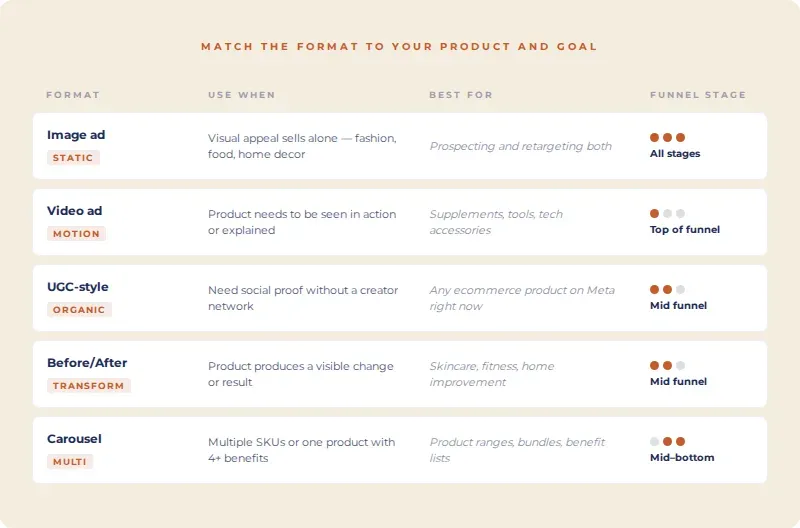
Every ad format has a job. Understanding the job of each format and matching it to your product and funnel stage is what turns AI generation from a time-saver into a performance tool.
AI Image Ads work at every funnel stage but convert best for products with strong visual appeal or clear social proof. The creative is fast to consume and cheap to produce at volume. Run these for retargeting and prospecting both.
AI Video Ads are top-of-funnel tools. They stop the scroll and explain. If your product needs more than three words to describe if there is a mechanism, a transformation, or a use case to show video is where the AI's generation capability pays off most. A 15-second video explaining why your supplement works differently costs the same tokens as a static image but carries twenty times more information.
UGC-Style Creatives are the format that performs best right now on Meta for ecommerce. They look like organic content, not ads. They trigger lower friction in the feed. AI-generated UGC is not a perfect replacement for real creator content, but for store owners without a creator network, it is a functional alternative that runs while you build one.
Before/After Ads are purpose-built for transformation products: fitness, skincare, home improvement, organization. If your product produces a visible change, this format will consistently outperform standard image ads because it does the comparison work for the customer.
Carousel Ads work for product range and multi-benefit communication. If you have multiple SKUs or a single product with four distinct benefits, carousel gives each one its own frame. Do not use carousel for single-benefit products, you will pad it and dilute the message.
The Offer Problem AI Cannot Fix
AI creative generation amplifies your offer. It does not rescue a weak one.
If your offer is "10% off your first order" and your competitor's offer is "Try it free for 30 days, pay only if you love it" the AI can make your 10% off creative look polished, but it cannot change the gap between those two offers. I mean, no tool can.
Before you generate a single creative, be honest with yourself about three things.
Is there urgency? Most store owners skip urgency because they don't want to seem pushy. Meanwhile the competitor with "only 12 left in stock" is cleaning up. Is that number real? Usually not. Does it work? Every single time. Use real urgency when you have it: actual low stock, a price going up, a sale ending Friday. When you don't have it, make the offer good enough that people don't need a timer to decide.
Is there specificity? "Lose weight fast" is not an offer. "Lose up to 12 lbs in 30 days with one daily capsule" is an offer. Nobody stops scrolling for some basics. They stop for numbers, timelines, and claims specific enough to be questioned. If your product page is full of words like "effective" and "powerful" and "premium" rewrite it. The AI will thank you, and so will your CTR.
Is there proof? I'll believe Maria who posted a photo and said the dress runs true to size way before I believe your ad. People don't trust brands, they trust other people. A star rating, a review count, a before/after, anything that shows someone else already took the risk. Without it, you're just a stranger asking for money.
Fix the offer and the page copy first, then generate creatives - in that order.
What a Good AI Creative Generation Workflow Looks Like
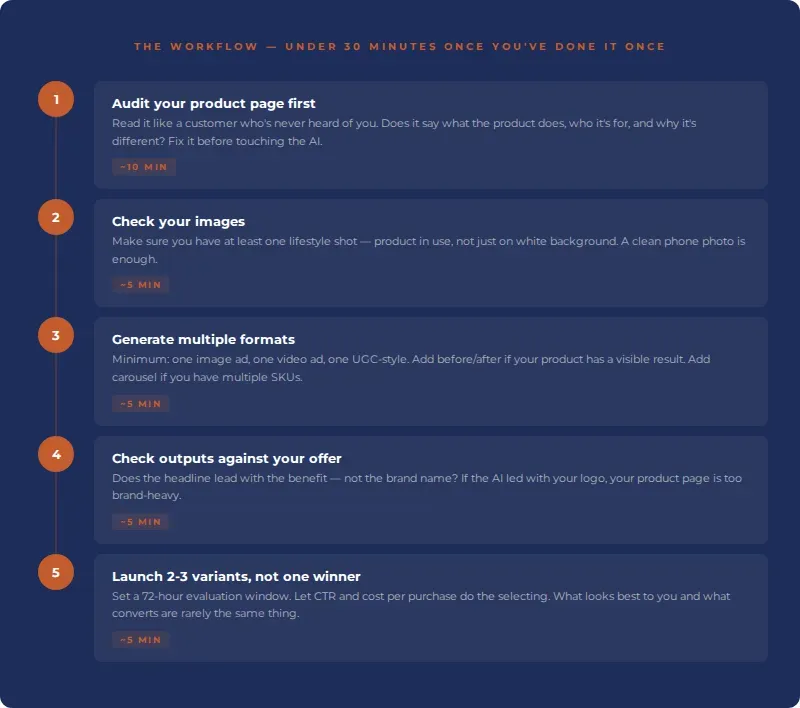
You can do this in under 30 minutes once you have done it once.
Step 1: Audit your product page before you touch the AI. Read it like a customer who has never heard of you. Does it answer what the product does, who it is for, and why it is different? If not, fix it. You are not writing for the AI you are writing for the customer. The AI benefits as a side effect.
Step 2: Make sure you have at least one lifestyle image. It does not need to be professionally shot. A clean, well-lit phone photo of your product in use is enough. Upload it alongside your standard product images.
Step 3: Generate multiple formats. At minimum: one image ad, one video ad, and one UGC-style creative. If your product is transformational, add a before/after. If you have multiple SKUs, add a carousel.
Step 4: Review outputs against your offer. The AI will surface what is most prominent on your page. Check that the headline and hook match your actual offer — not just your product name. If the creative leads with the brand name instead of the benefit, that is a signal your product page is too brand-heavy and not benefit-heavy enough.
Step 5: Launch with a testing structure, not a winner. Do not pick the creative that looks best to you and call it done. Launch two or three variants, set a 72-hour evaluation window, and let performance data select. What looks good to you and what converts are rarely the same thing. CTR and cost per purchase are.
The Compounding Advantage of AI Creative Volume
One thing that does not get discussed enough: the real advantage of AI creative generation is not the speed of making one creative. It is the ability to maintain creative volume over time without proportional cost increases.
Meta's algorithm needs fresh creatives. Creative fatigue starts within 7-14 days for most ecommerce audiences at typical spend levels. That means you need a continuous supply of new variants: new hooks, new visuals, new formats, just to hold performance steady.
For a solo store owner, that is impossible to sustain manually. You are not a creative team. You have a business to run.
AI generation changes the equation. You test more, you refresh faster, and your account never goes cold while you wait for new assets. When a creative fatigues, you generate three replacements in the time it used to take you to brief a designer. Pair that with Coinis AI optimization and the rotation happens automatically, no manual monitoring needed.
The store owners who get the best results from AI creative platforms are not the ones who generate one perfect creative. They are the ones who build a rotation system: generate, test, refresh, repeat and let volume and data do the selection work.
Get Your First AI-Generated Creative Live Today
Coinis generates launch-ready ad creatives from your product URL: image ads, video ads, UGC-style creatives, before/afters, and more, and deploys them directly to Meta, Google, and TikTok from one panel.
Paste your URL, generate your first creative in under 60 seconds, and see what your product looks like when the AI has a well-structured page to work with.
Start free on Coinis no credit card required.

Isidora Matovic
Author
Social media enthusiast and a full time researcher. She takes digital presence very seriously and that is why you are always in touch in what is going on with us! Follow us for more posts like this.