

Every other preset in this series starts with a persuasion idea: a review quote stamped on a product, a side-by-side comparison, parts exploded apart to show what's inside. This one has no idea at all. It strips everything out and leaves one thing: the product, alone, on pure white.
That's not a style choice. It's a requirement. Amazon's own Seller Central guide states plainly that a main product image needs "a pure white background (RGB color values: 255, 255, 255)" and must show the product filling at least 85% of the frame. Google Merchant Center's image policy recommends the same plain, neutral background for most categories and will flag an image for disapproval if it carries so much as a price callout, a watermark, or a "Buy Now" overlay. Before a brand ever builds a review-quote ad, a before-and-after demo, or a flat-lay bundle shot, it needs this one compliant photo to exist first.
Where the term comes from
"Packshot" predates ecommerce by decades. It's industry shorthand from television advertising for the clean, isolated shot of a product and its packaging shown at the close of a commercial, the moment the ad hands the viewer back to the thing they're supposed to go buy. The word stuck, and when online retail needed a name for the same kind of image, product photographers and marketplaces kept using it: a packshot is the product alone, no props, no scene, no distraction.
GS1, the organization behind the barcode standard most retailers build their product-data feeds on, codifies this into an actual spec: its product image standard defaults to a white (RGB 255, 255, 255) or transparent background specifically so the image isolates cleanly and drops into any catalog, banner, or listing without rework. Amazon and Google didn't invent the packshot. They just turned a television-advertising habit into a mandatory technical requirement.

What the packshot preset actually does
generate_image_preset_agent's ecommerce-packshot preset takes an existing product photo, catalogue photo included, and delivers the product alone on a pure white background: no text, no logo, no props, unless the brief specifically asks for one. The preset's own description calls it "the product alone on pure white, ready for a marketplace listing," which is the exact job Amazon's and Google's own image rules describe.
This is the quietest preset in the whole mini-series, and that's the point. The social-proof preset stamps a review quote onto a product shot. The comparison-vs preset sets a product against a generic alternative side by side. The exploded-view preset takes a product apart to show its internals. The knolling preset arranges a full kit into an organized overhead flat lay. The ugly-ad preset deliberately roughs a product shot up. Every one of those builds something on top of a photo. The packshot preset is the one that makes the photo those other presets can build on top of in the first place: a clean, compliant base image, generated from whatever source photo a seller already has on hand, even a messy one shot on a phone against a cluttered desk.
Worked example: from cluttered desk shot to compliant main image
Take a product photographed casually, a pair of over-ear headphones sitting on a wood desk with a coffee mug and some loose papers in the background, lit unevenly by window light. The brief for the preset:
Preset: ecommerce-packshot
Product: [source product photo URL]
Background: pure white (RGB 255, 255, 255), no gradient, no shadow gradient beyond a light contact shadow
Framing: product fills roughly 85% of the frame, centered, fully visible, nothing cropped
Avoid: any added text, logo, watermark, badge, or second copy of the product in frame
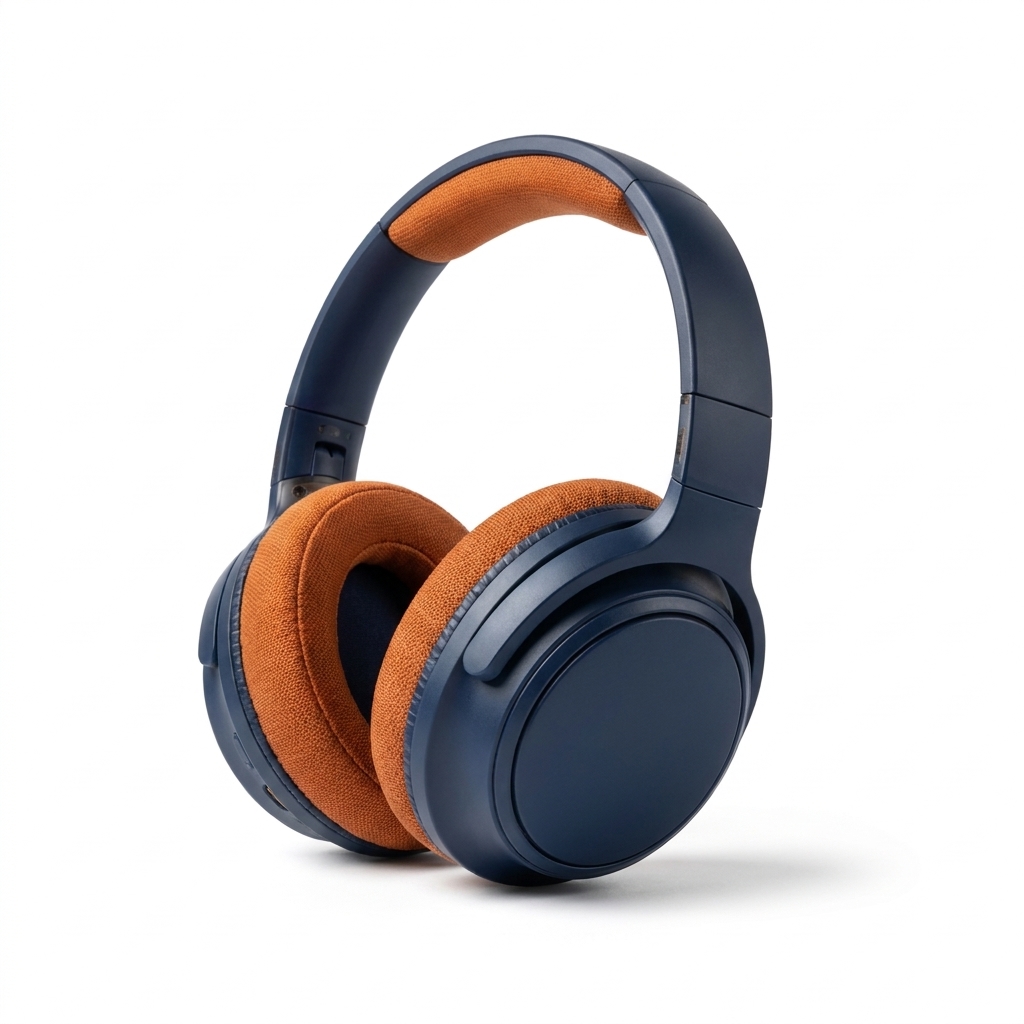
A real worked example, generated via generate_image_preset_agent with preset='ecommerce-packshot': the same navy-and-orange over-ear headphones from a cluttered wood-desk source photo (coffee mug, loose papers, uneven window light), stripped to a pure white background, centered, filling most of the frame, with only a light contact shadow and zero added text or logo.
The result should look like something shot in a lightbox with a seamless paper backdrop, not something composited after the fact with a visible edge around the product.
Why this is the preset to run first, not an afterthought
A seller who skips the compliant main image doesn't just get a worse-looking listing. On Amazon, failing to meet the main-image requirement can get an image rejected outright, and if no compliant main image exists, Amazon can pull the listing from search entirely until one is supplied. Google Merchant Center disapproves images carrying promotional overlays, placeholder graphics, or missing backgrounds rather than just docking their visibility. The packshot isn't the creative part of the ad. It's the part that decides whether the listing shows up at all, the same base image a Google Shopping ad or an Amazon product listing needs before anything else gets built on top of it.
That makes it the logical first preset to run on a new product, before the social-proof version, before a flat-lay bundle shot, before anything else in this series. Get the clean compliant base image first. Build the creative variations from there.
When to reach for this preset (and when not to)
Reach for ecommerce-packshot any time a product's only available photo is a lifestyle shot, a phone photo, or anything with a background that isn't pure white, and a marketplace listing or main catalog image needs to exist. It's a weaker fit for social or paid-ad creative that benefits from a styled scene, a lifestyle context sells a product's use case in a way a bare white background never will. Use the packshot preset for the main listing image and the compliance-first base photo. Reach for a different preset in this series once that base photo exists and the goal shifts to selling rather than listing.
FAQ
Is a white background actually required, or just recommended? It depends on the platform. Amazon requires it for the MAIN image specifically, pure white, RGB 255, 255, 255. Google Merchant Center recommends it strongly and will disapprove an image for unrelated reasons (overlays, placeholders) more often than for background color alone, though a plain neutral or white background is still the safest default for most product categories.
Does the packshot preset add drop shadows or reflections? The preset's own description says it adds no text or logo unless the brief specifically asks for one. A light, realistic contact shadow is part of a believable packshot and can be requested in the brief. Anything more stylized should be left for a different preset.
Can I use my existing lifestyle photo as the source? Yes. The preset's own documentation states explicitly that "the catalogue photo counts" as the source image, meaning whatever photo already exists on a product listing can be the starting point, even one shot in a real-world setting rather than a studio.
What happens if I don't provide a product photo? The run stops and asks for one. The preset has nothing to isolate without a starting image.
Try it on Coinis
Before the review-quote ad, the comparison shot, or the flat-lay bundle photo, every listing needs one plain, compliant base image. Generate it once, and every other ad in this series builds on top of it.
Start building compliant product images on Coinis
Sources
- Amazon Seller Central, "Product image guide" (MAIN product image requirements): https://sellercentral.amazon.com/help/hub/reference/external/G1881?locale=en-US
- Google Merchant Center Help, "Image link [image_link]" (image requirements and best practices): https://support.google.com/merchants/answer/6324350?hl=en

Isidora Matovic
Author
Social media enthusiast and a full time researcher. She takes digital presence very seriously and that is why you are always in touch in what is going on with us! Follow us for more posts like this.