

A bakery photographs what is already sitting in the display case, because that is the fastest way to get a real product photo without pulling a fresh tray and setting up a separate shoot. The case has its own overhead fluorescent tubes running all day for food-safety and merchandising reasons, and the pastries themselves are often finished with a glossy sugar glaze or a shiny egg wash specifically so they catch light and look tempting under the case's own lighting. Both of those choices work great for a customer standing at the counter. Neither works for a camera.
The fluorescent tubes push a cool, faintly green cast across the whole frame that a phone or point-and-shoot camera's auto white balance often cannot fully correct, so the croissants and cakes come out looking slightly sickly instead of golden. On top of that, the same glossy glaze that looks appetizing in person throws back a hard, blown-out highlight straight into the lens, a specular hotspot bright enough to erase the actual texture underneath it: the flaky lamination on a croissant, the crackled sugar shell on a crème brûlée tart, the piped detail on a frosted cake. The two problems stack in the same shot. A baker or shop manager grabbing a quick case photo for a social post or a seasonal ad ends up with pastries that read both washed-out in tone and blown-out in highlight at once.
Bakery photos carry more selling weight than most food categories
Bakery items are an impulse and aesthetic-led purchase category more than almost any other food segment: a customer is rarely searching for a specific croissant by name, they are reacting to how the photo makes the pastry look. Academic research on food photography and purchase intent backs this up directly: a controlled study of 101 participants found that food advertising images increase purchase intent by making the product look more enticing and visually appealing, with the visual treatment of the food itself driving the effect independent of the product's actual recipe or ingredients (Detta, H. et al., "Effect of Colorful Food Photography and Consumer Intentions to Purchase Food and Beverages," Eduvest - Journal of Universal Studies, 2024). A pastry that photographs green-tinted and texture-flattened is working against the exact mechanism that gets someone to tap "order" or stop scrolling on an ad.
Why the case that sells the pastry ruins the photo of it
Fluorescent lighting has a long-documented color-rendering problem in food retail specifically. Grocery and food-service lighting guidance points to this as a core reason retailers have shifted display-case lighting toward higher color-rendering-index sources: older fluorescent tubes render food colors inaccurately, and the industry's own fix has been swapping in LED fixtures with a color-rendering index in the 80-95+ range precisely because standard fluorescent tubes fall short of showing food's true color under glass (Relumination, "Grocery Lighting with LEDs: A Complete, Ready-to-Use Guide for Merchandising, Savings, and Experience," 2014, updated 2025). Most independent bakeries are not about to re-fixture their entire display case lighting system to fix a photo problem, which means the color cast a fluorescent case throws is a fact of the shooting environment, not something a phone camera's white balance setting reliably undoes.
The second half of the problem is a straightforward optics issue. A specular highlight is the direct, mirror-like reflection of a light source off a shiny surface, and the smaller and more concentrated the light source relative to the reflective surface, the harder and brighter that highlight renders (Strobist, "Lighting 102: Controlling Specular Highlights," 2016). A glossy pastry glaze under a compact overhead fluorescent tube is close to a worst case for this: a small, intense light source reflecting off a curved, high-gloss surface produces a tight, blown-out hotspot rather than a soft, spread-out sheen. Once that highlight blows past the camera sensor's dynamic range, the pixel data underneath it is gone, not just dim, so no amount of after-the-fact brightness or contrast adjustment brings back the crumb structure or the icing detail that hotspot is sitting on top of.
Fix the case light and the glaze hotspot before you multiply the photo
Ad Studio's repair layer, enhance_asset_proxy, handles both defects in the same corrective pass. The tool exposes exposure correction, denoising, sharpening, background replacement, object removal, and inpainting through a single model field, so the right operation gets paired to the right flaw instead of running one generic "enhance" filter over the whole image. A fluorescent color cast spans the entire frame, so that part of the correction uses a full-frame mask targeting the true, neutral color of the pastry case: what the croissant's actual golden-brown tone and the cake's actual frosting color look like under even, accurate light, not the green-tinted version the tubes produced. The glaze specular blowout is the opposite kind of flaw, a small, localized hotspot rather than a whole-frame problem, so that correction uses a tight mask hugging only the blown-out highlight itself, with a minimal prompt describing just the missing glaze texture and crumb detail underneath, nothing about the surrounding case or background.
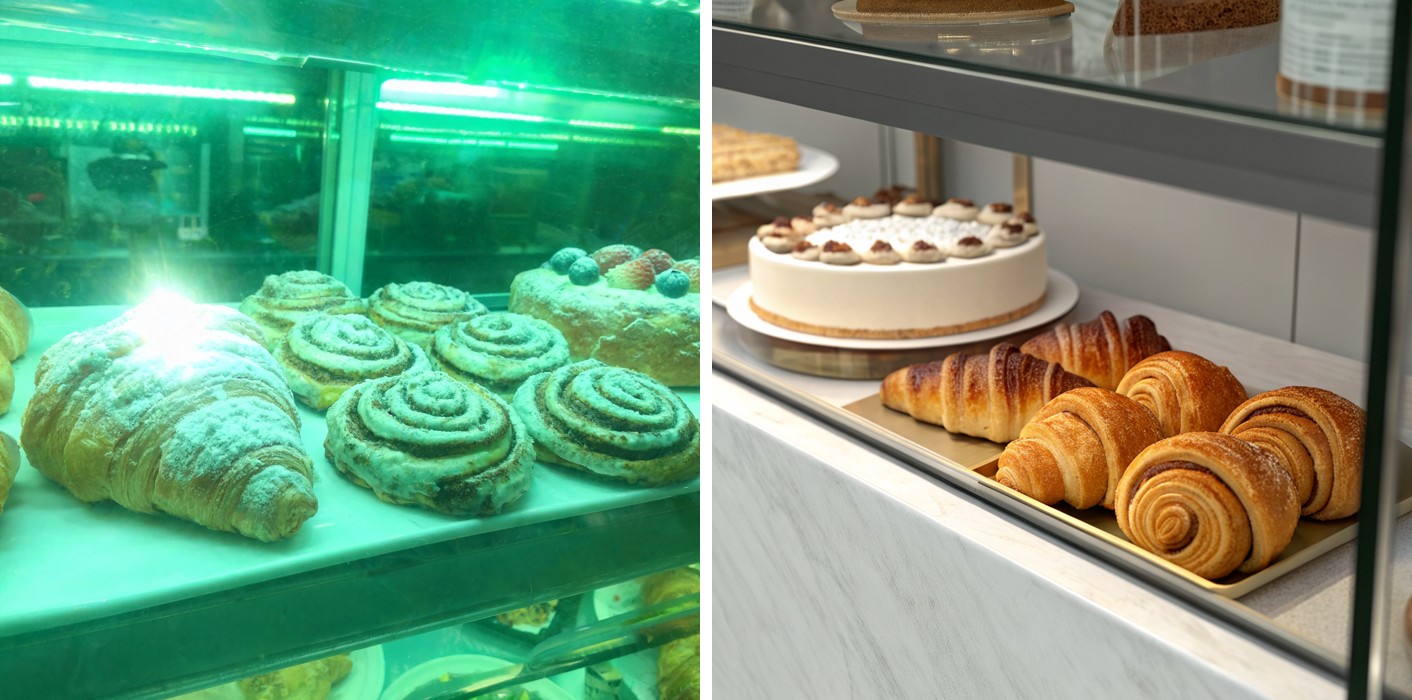
With a corrected case photo in hand, generate_image_templates, Ad Studio's primary image-ad generator, turns that single shot into a square feed post, a vertical Story crop, and a horizontal Display banner in one pass, matched to what each placement expects.

Building this into a daily case-rotation habit
A bakery's case contents change constantly: a new seasonal pastry, a limited holiday cake design, a fresh batch that photographs better than yesterday's tray. Reshooting under a studio light rig every time a new item hits the case is not realistic for most bakery operations, which means the fluorescent case light and the glaze's own glossy finish are recurring facts of the shot, not a one-time setup mistake to fix once. The order matters every time: correct the color cast and the glaze hotspot first with enhance_asset_proxy, then hand the corrected file to generate_image_templates for the ad-size fan-out. Doing it in the other order just resizes a photo that still has the green cast and the blown-out glaze baked in, producing three flawed variants of the same problem instead of one clean set.
This is the same category of shooting-environment defect already covered for a restaurant's steam-fogged plating shot and a beauty brand's whole-photo color-cast problem, and the glaze hotspot itself is the same specular-blowout mechanism already covered for a jewelry brand's polished-metal glare, just applied to sugar glaze instead of polished metal. A corrected case photo that survives both fixes and a full ad-size fan-out gives a bakery a rotation it can actually keep up with a new item hitting the case every week.
FAQ
Does enhance_asset_proxy change what the pastry actually looks like? No. The correction targets the display case's fluorescent color cast and the glaze's blown-out highlight, not the pastry's actual recipe, size, or shape. The croissant's real lamination, the cake's real frosting design, the tray's real layout stay exactly as photographed. What changes is the color balance and the highlight detail the camera sensor could not capture correctly in one exposure.
Will the corrected photo still look shiny and appetizing, or does the glaze look flat after the fix? It still reads as a glossy, freshly glazed pastry. The correction restores texture and detail underneath the hotspot, it does not remove all shine and flatten the surface to a matte finish. A well-corrected glaze photo keeps its sheen while showing the crumb and icing detail a blown-out highlight was hiding.
Does this apply to every bakery item, or just glazed pastries? The fluorescent color cast affects every item in the case regardless of finish. The specular blowout specifically shows up on anything with a glossy surface: glazed donuts, egg-washed pastries, fondant-covered cakes, chocolate-dipped items. A plain matte item like a scone or a dusted cookie mostly needs the color-cast correction alone.
Do I need a different photo for every ad platform, or does one corrected shot cover all of them? One corrected shot covers every size. generate_image_templates handles the resizing and cropping into each placement's spec from that single clean source, which is the entire point of correcting the photo once instead of every time a new format is needed.
The Coinis angle
A bakery does not need a photography studio or a case relighting project to get a color-accurate, texture-true product photo. Correct the fluorescent wash and the glaze specular blowout on the case photo already sitting on a phone with Ad Studio's enhance_asset_proxy, then turn it into a full ad-ready set with generate_image_templates, and land the whole thing as a launch-ready ad through Ad Studio's templates instead of exporting raw images and building the ad by hand.
Sources
- Detta, H., Shabrina Samsulhadi, Z., Jonathan, G., & Iqbal Syarib, A., "Effect of Colorful Food Photography and Consumer Intentions to Purchase Food and Beverages," Eduvest - Journal of Universal Studies, 4(4), 2024. https://eduvest.greenvest.co.id/index.php/edv/article/view/1056
- Relumination, "Grocery Lighting with LEDs: A Complete, Ready-to-Use Guide for Merchandising, Savings, and Experience," 2014 (updated 2025). https://www.relumination.com/led-lighting-better-choice-grocery-store/
- Strobist, "Lighting 102: Controlling Specular Highlights," 2016. https://strobist.blogspot.com/2016/07/lighting-102-controlling-specular.html

Isidora Matovic
Author
Social media enthusiast and a full time researcher. She takes digital presence very seriously and that is why you are always in touch in what is going on with us! Follow us for more posts like this.