

A flooring retailer photographs the same carpet twice in one week. Nothing changed. No spill, no sun damage, no cleaning mishap. But in one shot a section near the doorway reads noticeably darker than the rest of the room, like water soaked in and dried unevenly. The carpet installer has a name for this and it isn't a stain: pile reversal, also called watermarking or shading. It is one of the most common service calls in the flooring industry, and it is murder on product photography consistency.
What's actually happening to the carpet
Cut-pile carpet is made of yarn tufts standing up from a backing. Light hits the side of each tuft differently depending on which way it leans. When the pile lies in one direction, a patch of carpet reflects light one way and looks one shade. When foot traffic, furniture weight, or even temperature and humidity changes push some of those tufts to lean a different way, that patch reflects light differently and reads as a different shade, even though the yarn color hasn't changed at all.
The Carpet and Rug Institute's own technical bulletin describes it plainly: pile reversal "creates a permanent change in the carpet's appearance caused by the difference in the way light reflects off the sides and tip of a yarn as the pile lays in different directions. Shaded areas appear light from one direction and dark from another direction. After a period of use, carpet may look as though water has spilled on sections of the carpet, hence, the term 'watermarking' or 'highlighting'" (Carpet and Rug Institute, 2018). The Carpet Institute of Australia's technical bulletin confirms the same mechanism independently, noting it is also called "pooling" or "puddling" and shows up as patches lighter or darker than the surrounding pile (Carpet Institute of Australia, 2014).
Two things make this a genuine photography problem rather than just a customer-service issue. First, it can happen on brand-new carpet during shipping, rolling, and installation, well before any customer ever walks on it, so a retailer's own catalog shot can carry shading that has nothing to do with wear. Second, the Carpet and Rug Institute's bulletin is explicit that "there is little which can be done to return the carpet to its original appearance" once pile reversal sets in physically. A relighting setup, a different camera angle, a color-correction pass in Lightroom: none of it fixes pile tilt, because the problem isn't light or color. It's the geometry of the fiber itself.
Why this is worse for ads than it sounds
A showroom customer standing over a shaded patch barely notices it. The eye adapts and the human brain reads "carpet" long before it reads "watermark." A still photo doesn't get that grace. Crop a section of shaded carpet into a square Instagram ad or a 9:16 Story frame and the shading reads as a flaw, a stain, or a manufacturing defect, exactly the kind of thing that makes a shopper bounce off a flooring ad before they ever get to the price. And because the same roll of carpet can photograph clean from one angle and visibly watermarked from another, a retailer often doesn't discover the problem until the ad is already running and the click-through rate quietly underperforms.
This is also a structural-sameness problem the same way flat lighting kills texture on quilted mattress surfaces: the fix isn't "take a better photo," it's correcting what the surface is already doing to the light after the shutter clicks.
Fixing it without reshooting the carpet
Coinis's photo-repair tool treats a shaded or watermarked carpet patch the same way it treats a glare streak on glass or a blown-out highlight on polished metal: as a localized region to repair, not a reason to restage the whole shoot. The correction follows the same recipe already proven on product photos with physical surface flaws: a tight mask drawn around only the shaded patch, paired with a prompt describing the desired end state in neutral terms (an even, uniform pile color and texture matching the surrounding carpet) rather than naming any specific color or describing the flaw itself. Naming a hue in a repair prompt is a known way to send an inpainting model chasing the wrong target instead of simply restoring consistency, so the instruction stays deliberately plain: match the surrounding pile, nothing more.
mcp.coinis.dev is under a security hold as of this writing, so the worked example below is an illustrative still generated separately, not a live render from Coinis's own repair tool. A real enhance_asset_proxy recraft-inpaint render on the same defect class is already live in Coinis's product-photo-repair article.
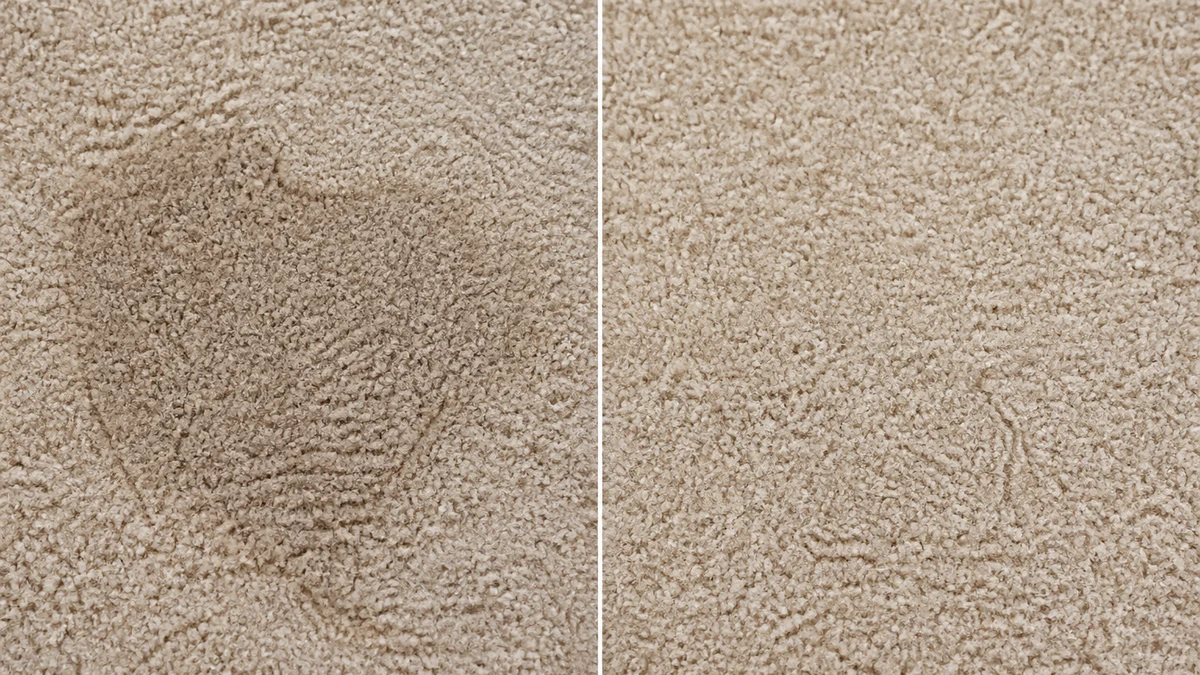
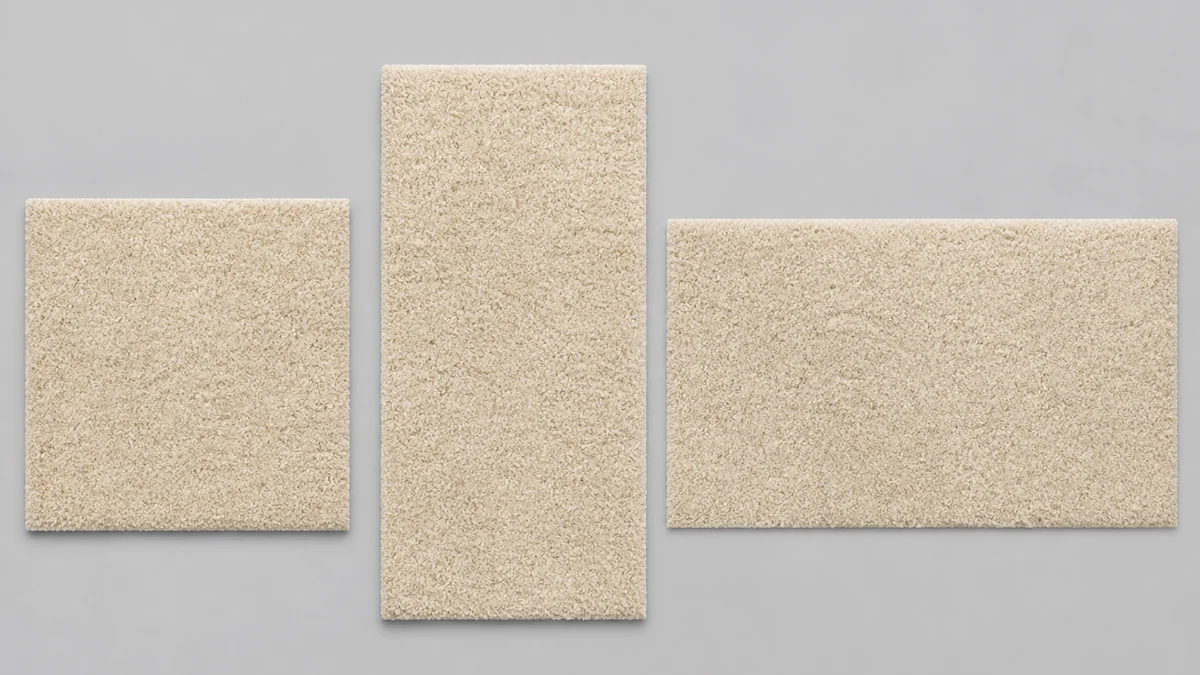
Once the single source photo reads clean and consistent, the same image becomes every format a flooring retailer actually needs to run: a square catalog crop, a vertical Story frame, a landscape banner for a comparison-shopping site. Coinis's multi-format generator takes that one corrected photo and produces each ad size from the same source, the same approach already demonstrated on turning one product photo into every ad size, so a single accurate photo of the carpet becomes the only photo the retailer needs to shoot.
The multi-format fan-out below is also an illustrative mockup while mcp.coinis.dev is on security hold. A real generate_image_templates fan-out of a repaired product photo is already live in Coinis's one-photo-every-ad-size article.
What to do with a carpet catalog that already has this problem
Flooring retailers rarely shoot one carpet once. A catalog can run to hundreds of SKUs across styles, colors, and pile heights, and pile reversal doesn't announce itself until someone compares two photos of what should be the identical product and notices one looks faded. The practical move is to treat the fix as part of the normal pre-launch QA pass on any new carpet listing, the same way a retailer already checks for lens distortion on a wide furniture shot or a color mismatch before a product goes live: catch the shaded patch before the photo ever gets fanned out across formats, not after the ad has already run with a visible flaw in it.
For retailers who also sell adjacent flooring categories, the same correction applies to any pile or nap surface with directional fibers, not just wall-to-wall carpet. Area rugs, carpet tile, and even some upholstery fabrics can show the identical light-direction effect, so a single repair workflow covers more of a flooring or home-goods catalog than the carpet SKUs alone.
FAQ
Is pile reversal the same thing as a carpet stain? No. A stain changes the yarn's actual color through a substance soaking in. Pile reversal changes nothing about the yarn's color. It changes which direction the fiber leans, which changes how it reflects light. The Carpet and Rug Institute's bulletin notes shading lines can even cross carpet seams, which a liquid stain never does.
Can a different camera angle or lighting setup fix it for a photo shoot? Sometimes a shift in angle reduces how visible the shading looks, since the effect is viewing-angle dependent. But it isn't a reliable fix across a catalog, since the retailer doesn't control the angle every ad platform crops the photo to later. A post-capture correction that evens out the patch directly is more consistent across every downstream format.
Does pile reversal mean the carpet is defective? Industry technical bulletins treat it as an inherent characteristic of cut-pile carpet construction, not a manufacturing defect, though it is more visible on some pile types (dense, cut, solid-colored) than others (patterned, loop-pile). It can happen to carpet that is otherwise completely normal.
Does this fix work on rugs and carpet tile too, not just wall-to-wall carpet? Yes. Any surface with directional pile or nap can show the same light-direction shading, so the same localized correction approach applies to area rugs and carpet tile product photography as well.
The Coinis angle
A flooring retailer doesn't need a reshoot every time a carpet sample shows shading under studio lights. One corrected photo, run through Coinis's photo-repair tool and then fanned out with the multi-format generator, becomes a full set of launch-ready ad creative. Build it as a template once in Coinis Ad Studio and every new carpet SKU that comes through the catalog gets the same clean treatment without a single extra photo shoot.
Sources
- Carpet and Rug Institute, "Pile Reversal Watermarking Shading" technical bulletin (2018): https://carpet-rug.org/wp-content/uploads/2018/08/Pile-Reversal-Watermarking-Shading.pdf
- Carpet Institute of Australia, "Permanent Pile Reversal Shading" technical bulletin (2014): https://www.carpetinstitute.com.au/wp-content/uploads/2014/02/Carpets0272Shading6pp.pdf

Isidora Matovic
Author
Social media enthusiast and a full time researcher. She takes digital presence very seriously and that is why you are always in touch in what is going on with us! Follow us for more posts like this.