

A clean white-background packshot answers one question: what does this product look like. It does not answer the next one a shopper actually asks before buying: where would this live in my life, and does it fit there. A travel mug photographed against pure white says nothing about whether it fits in a car cupholder. A yoga mat on a seamless studio floor says nothing about whether it looks right rolled out in a cramped apartment living room. That gap is exactly what the lifestyle preset closes.
generate_image_preset_agent's ecommerce-lifestyle preset takes one product photo and places it inside a believable real-world scene, in use, in the kind of setting a shopper already pictures for themselves. Same product. Different job: not proving what it is, but proving where it belongs.
Why context sells harder than isolation, for the right products
A pure white packshot is not wrong. It is a compliance requirement on most marketplaces (Amazon's main-image rule, Google Merchant Center's plain-background recommendation) and it is the right choice when a shopper already knows what they want and just needs to confirm the item matches the listing. But a cold feed scroller, someone who has never searched for this product and has no listing to compare it against, needs a different kind of proof. They need to see the product doing the thing it is for, somewhere that looks like a place they'd actually be.
This is the same psychological mechanism real-estate listing photos lean on with staged rooms instead of empty ones: a shopper who can picture themselves already using something is closer to buying it than a shopper looking at a specimen on a seamless backdrop. The lifestyle preset is the ad-generation version of staging.
What the preset actually does
Feed it a single product photo, the catalogue photo counts, and the preset composites the product into a new, plausible real-world environment and lighting setup that fits how the product is actually used. No second product gets added to the scene, and no competing brand gets invented to share the frame. The output is one image: the real product, placed somewhere believable, lit like it belongs there.
The packshot preset is the preset this one inverts. Packshot strips every trace of context away, pure white, nothing added, built for marketplace compliance. Lifestyle does the opposite: it adds context back in, built for a scroll-stopping ad or a hero banner where the goal is desire, not confirmation. Run packshot first when a clean base photo is needed, then lifestyle second when that same photo needs a story around it.
Worked example: giving a product a place to belong
Take an insulated stainless steel travel mug with a screw-on spill-proof lid. Photographed alone against white, it looks like any travel mug. The brief for the preset:
Preset: ecommerce-lifestyle
Product: [source product photo URL]
Scene: resting in a car's center console cupholder, morning light through the windshield, a blurred commute-ready dashboard just visible behind it
Style: natural daylight, shallow depth of field on the background, product stays sharp and unaltered, no second product or competing brand visible in frame
Constraints: do not alter the product's shape, color, or branding. No invented text or logo anywhere in the scene
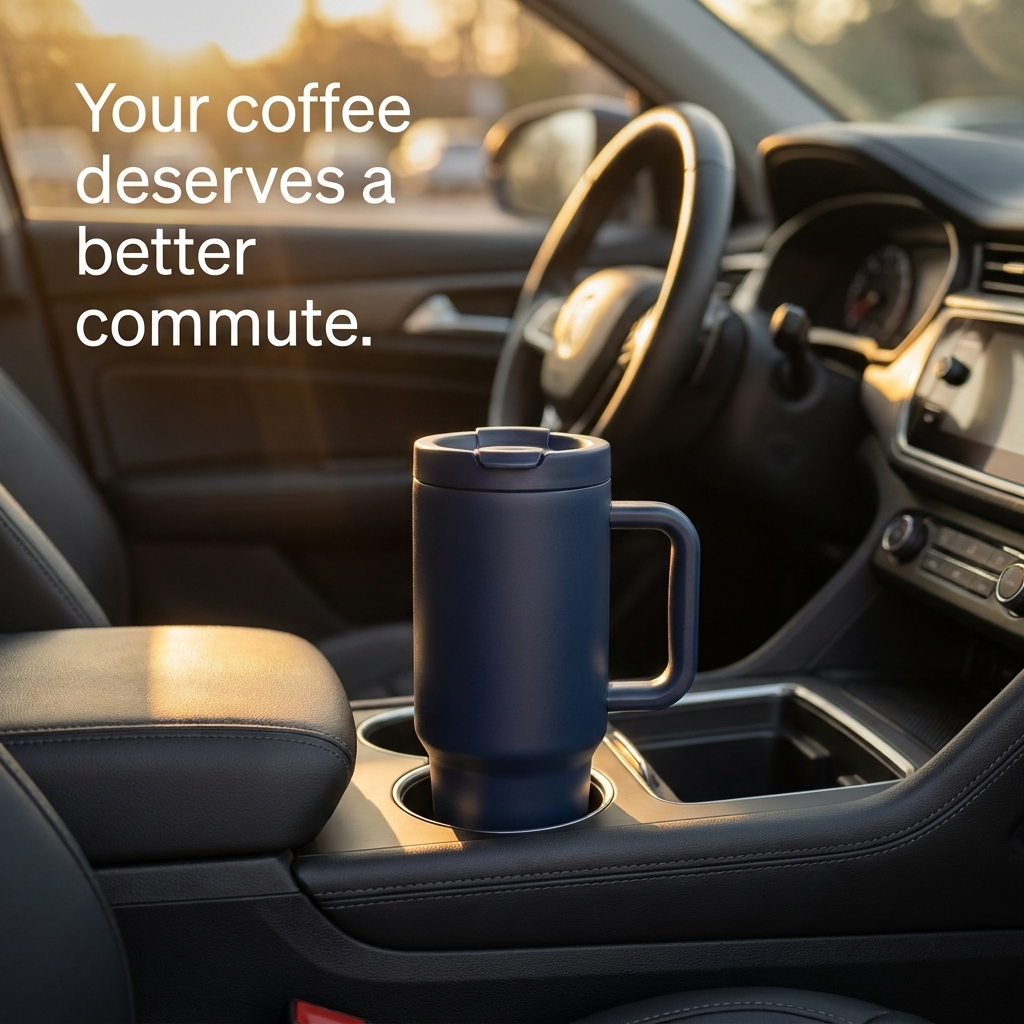
A real worked example, generated via generate_image_preset_agent with preset='ecommerce-lifestyle': the same travel mug, unaltered, set inside a car cupholder scene with morning light, zero second product in frame, zero invented branding.
The one hard rule for this preset is the inverse of the one that governs statistics-data or feature-infographic: there, the risk is a fabricated number or a fabricated feature. Here, the risk is a fabricated scene that misrepresents how or where the product is actually used, or a scene that quietly introduces a second brand's product for comparison. The scene has to be plausible and honest, not just pretty.
Where this fits in the preset lineup
Every preset in this mini-series builds something different on top of a base product photo. The packshot preset isolates the product for marketplace compliance. The in-hand preset adds one human hand for scale and tactility, a smaller context cue than a full scene. The feature infographic preset keeps the product isolated but adds callout labels explaining its specs. The comparison-vs preset sets the product against a generic alternative side by side. The lifestyle preset is the one built for products that sell on where they fit into a life, not on a feature list or a side-by-side comparison, run it after a packshot or product photo already exists as the source.
When to reach for this preset (and when not to)
Reach for ecommerce-lifestyle when a product's appeal depends on picturing it in use: home goods, outdoor gear, apparel accessories, kitchenware, anything where "where would this go" is a real question a shopper asks before adding to cart. It is a strong fit for the exact kind of product a lifestyle influencer photo would normally sell, minus the cost and turnaround of an actual photo shoot.
It is a weaker fit for a product whose entire value is a spec or a number (reach for statistics-data or feature-infographic instead), or a product sold almost entirely on a marketplace listing where a compliant white background is the only image that matters (reach for packshot).
FAQ
Does the scene need to match the product's literal, real-world use case? Yes. A believable, specific scene (a travel mug in a cupholder, not a travel mug floating in an abstract gradient) is what makes the format work. A vague or generic scene reads as stock photography, which defeats the point.
Can the preset add a second product or a competing brand to the scene for contrast? It should not, and the brief should explicitly forbid it. Treat any output that introduces an unplanned second product or a recognizable competing brand as a failed generation to re-roll, the same discipline already applied to comparison-vs's own explicit no-real-competing-brand rule.
Does this replace an actual product photo shoot? For most ad and social use cases, yes, since the point is a believable scene fast, not a literal documentary photo of a real customer's home. For packaging or a flagship hero image where total creative control matters, a real photo shoot still has its place.
Can I use an existing packshot as the source, or does it need to be a raw, unedited photo? A clean isolated photo (a packshot-style base image) works well as the source since the preset only needs a clear view of the product to place into the new scene, no existing background to fight with.
Try it on Coinis
A product photographed against white proves what it is. A product photographed in a scene a shopper recognizes proves where it belongs in their life. Generate a lifestyle placement from an existing product photo and give the next ad a setting, not just a subject.
Start building lifestyle ads on Coinis
Sources
- Baymard Institute, "Product Page UX: Secondary Product Images" (ecommerce product-page usability research, same source cited in the sibling feature-infographic article for the shopper-decision-speed framing): https://baymard.com/blog/secondary-product-images
- Amazon Seller Central, "Product image guide" (marketplace main-image vs. secondary-image conventions, the packshot-vs-lifestyle distinction referenced in this article's packshot comparison): https://sellercentral.amazon.com/help/hub/reference/external/G1881?locale=en-US

Isidora Matovic
Author
Social media enthusiast and a full time researcher. She takes digital presence very seriously and that is why you are always in touch in what is going on with us! Follow us for more posts like this.