

A plumbing supplier or fixture brand photographs a faucet, a shower head, or a tub filler straight off the display shelf, and the chrome comes back looking used. Not because the fixture is used. Because the shelf water, the last customer's fingerprints, and months of showroom humidity left a fine white film across every polished surface, and a camera pointed straight at chrome does not forgive a film like that. It reads as cloudy haze instead of a mirror-bright highlight, and it sits right on the part of the photo a shopper is supposed to trust the most.
This is not the same problem as automotive chrome glare or a jewelry ring's blown-out hotspot. Those are lighting problems on a clean surface. This is a surface problem that lighting cannot fix, because the deposit is physically on the fixture, not in the light hitting it.
Why a showroom rinse does not solve this before the shoot
Hard water deposits are mineral residue, mostly calcium and magnesium carbonate, left behind every time water evaporates off a surface instead of getting wiped dry (Frameless Shower Doors, "What Removes Hard Water Stains from Glass Shower Doors," December 2025). Fresh deposits sit on top of the chrome and wipe off with the right cleaner. Left long enough, though, the same minerals start etching into the surface at a microscopic level, and that etched texture scatters light instead of reflecting it cleanly, which is what turns a shiny fixture hazy even after a fresh wipe-down (Frameless Shower Doors, same source).
A showroom floor model gets touched, rinsed, and re-displayed dozens of times before anyone photographs it. Even a fixture that looks fine to a walking customer under ambient store lighting can show a faint milky film once a macro lens and a direct flash blow it up to ad size. Photography guides that cover bathroom shoots are blunt about this: fixtures need to be "polished, shiny, and turned to the center position for a consistent appearance" before the camera comes out, and streaks on any glass or chrome surface in frame are treated as a non-negotiable fix, not a stylistic choice (BoxBrownie, "Scrubbing Up for the Spotlight: 7 Tips for Bathroom Photography Prep"). Most catalog and ad shoots do not get that pass. The photo that exists is the one taken in whatever condition the display fixture happened to be in that day.
The math on a plumbing ad account that ships a hazy fixture
Plumbing is not a category where a soft photo just costs a little reach. LocaliQ's benchmark of over 3,200 home-services search ad campaigns puts the average cost per click for plumbing at $10.49 and the average cost per lead at $129.02 (LocaliQ, "2025 Search Ad Benchmarks for Home Services," 2026). A separate benchmark tracking $14.6 million in Google Ads spend across 524 plumbing contractors in Q1 2026 found the average non-branded cost per lead running even higher, at $183, with the top quartile of accounts sitting below $107 and the bottom quartile above $253 (SearchLight Digital, "Plumbing Google Ads Cost Per Lead: 2026 Benchmarks," Q1 2026). Every one of those clicks is paying to land on whatever creative the campaign is running. A fixture photo with a visible mineral haze does not read as a stylistic quirk at that price. It reads as a used or poorly maintained product, which is exactly the wrong impression for a fixture brand trying to sell newness and finish quality.
Trust compounds the problem the same way it does across every other home-services category. BrightLocal's Local Consumer Review Survey 2026 found that an appealing photograph accompanying a product or review is one of the top factors consumers weigh when deciding whether they feel positive about a business, cited by 36% of respondents (BrightLocal, "Local Consumer Review Survey 2026," 2026). A cloudy chrome photo is the opposite of appealing. It looks like proof nobody checked the shot before it shipped.
Fix the surface, not the light
Ad Studio's repair layer, enhance_asset_proxy, handles this as a targeted correction rather than a reshoot or a repolish. One tool covers upscaling, sharpening, denoising, lighting and white-balance fixes, background swaps, and masked repairs, all through a single model field matched to the specific flaw. A hard water film sitting across a curved chrome surface is a texture problem confined to the fixture's own visible face, not a whole-frame lighting issue, so the correction that fits is a masked inpaint: a mask drawn tightly around the chrome, paired with a prompt describing the same fixture with a clean, unblemished polished-chrome finish, so the fix rebuilds only the surface texture and leaves the fixture's shape, finish color, and any control markings exactly as photographed.
This is a repair step, not a redesign. It does not change the faucet model, does not add a shine effect the fixture does not naturally have, and does not alter anything outside the masked surface area.
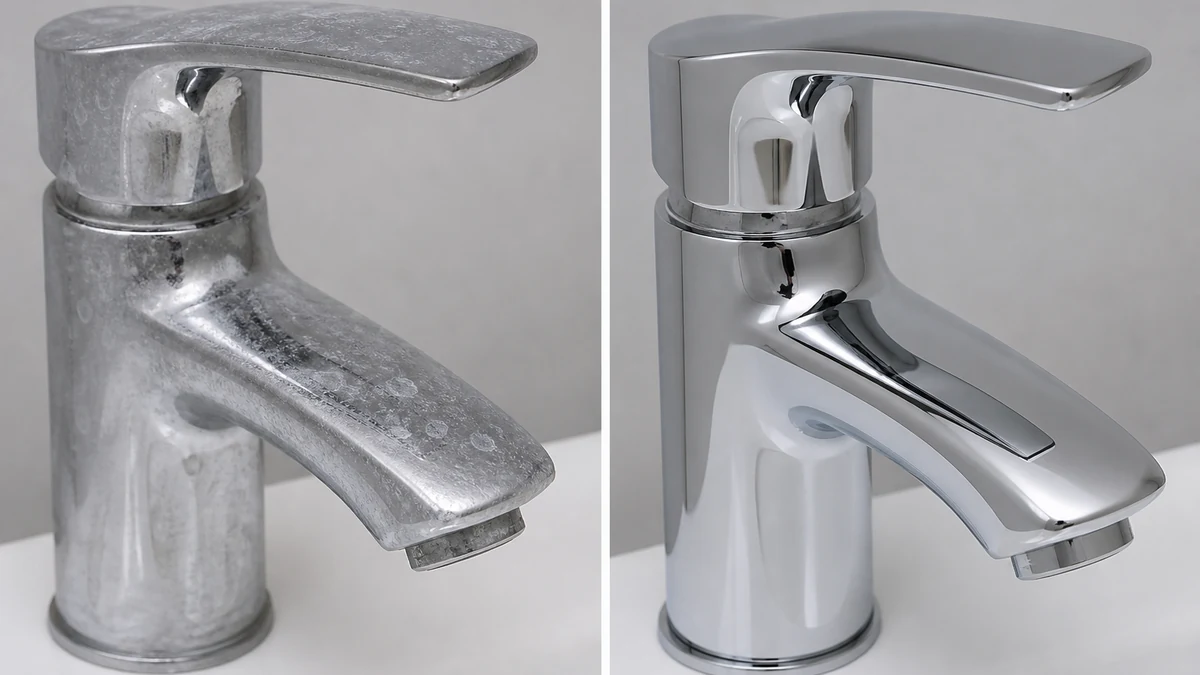
mcp.coinis.dev is in an extended OAuth outage as this article went to press, so the before/after above is a vision-QA'd illustrative still generated directly through OpenAI's image model rather than a live enhance_asset_proxy render. For a real enhance_asset_proxy recraft-inpaint repair on a comparable localized surface defect, see the electronics flat-screen reflection fix.
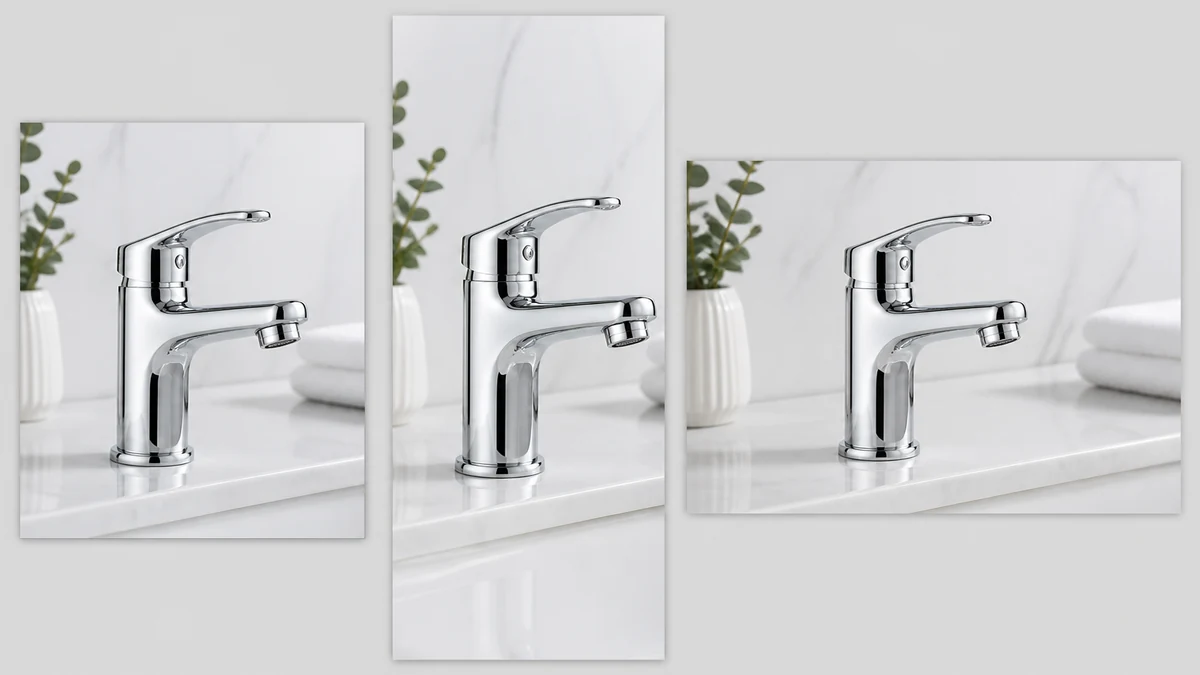
Once the chrome reads clean, the fan-out step is generate_image_templates, Ad Studio's primary image-ad generator. One corrected fixture photo becomes a square feed post, a 9:16 Story, and a horizontal Display banner in one pass, cropped and composed for each placement, without rewiping the same shelf display and rebooking the same shoot three more times.
Building this into a fixture catalog's actual workflow
A plumbing supplier or fixture brand's catalog does not hold still at one SKU. New finishes, new collections, and seasonal showroom refreshes all need a clean hero shot before any of them can go into an ad account, and a showroom floor model accumulates a fresh mineral film again within days of the last cleaning. The order matters every time: repair the specific surface flaw first with enhance_asset_proxy, confirm the fixture's own shape and finish are untouched, and only then hand the clean file to generate_image_templates for the size fan-out. Resizing a hazy photo before fixing it just multiplies the same film across every ad size instead of solving it once.
This is the same underlying pattern already proven across other reflective and finish-sensitive product categories: an electronics brand's screen-reflection problem, a jewelry brand's blown-out specular hotspot, and an automotive dealer's windshield and chrome glare are all versions of the same lesson: a reflective or polished surface fails differently depending on what is actually on or in that surface, and the fix has to be scoped to the real flaw rather than treated as one generic filter. It also connects to a contractor's job-site flash photo problem: both are home-services categories where the photo on hand, not a fresh reshoot, is what actually ends up funding the ad account.
FAQ
Does the fix change anything about the fixture itself? No. The masked inpaint rebuilds only the surface texture using the fixture's own shape as reference. Model, finish color, and any control markings stay exactly as photographed. What changes is the mineral film that was sitting on top of the chrome.
Can I just clean the fixture before shooting instead? Yes, and that is still the right first step for anything new. But a showroom floor model rebuilds a fresh film within days of the last wipe-down, and light etching from long-term deposits can leave a faint haze even right after cleaning, which is exactly why a repair step exists for whatever photo is already on file.
Does this work on brushed or matte finishes, not just polished chrome? Yes, with the mask scoped to the fixture's actual visible surface either way. A matte or brushed finish shows the haze as a duller, more uneven patch rather than a bright cloudy sheen, but the same masked-repair approach applies.
Do I need a different photo for every platform's ad size? No. generate_image_templates handles the cropping and composition into each platform's spec from one corrected source photo, which is the entire point of fixing the surface once instead of on five separate exports.
The Coinis angle
A faucet or fixture photo with a hard water film across the chrome does not need a rebooked shoot to become usable. Repair the one photo already on file with Ad Studio's enhance_asset_proxy, confirm the fixture itself is untouched, then turn it into a full ad-ready set with generate_image_templates, and land the result as a launch-ready ad through Ad Studio's templates instead of exporting a hazy photo and building the ad by hand. A plumbing or kitchen-and-bath business running a launch-ready ad account needs that clean chrome every time a new SKU or showroom refresh ships.
Sources
- Frameless Shower Doors, "What Removes Hard Water Stains from Glass Shower Doors," December 15, 2025. https://www.framelessshowerdoors.com/what-removes-hard-water-stains-from-glass-shower-doors/
- BoxBrownie, "Scrubbing Up for the Spotlight: 7 Tips for Bathroom Photography Prep." https://www.boxbrownie.com/b/scrubbing-up-for-the-spotlight-7-tips-for-bathroom-photography-prep
- LocaliQ, "2025 Search Ad Benchmarks for Home Services (+Expert Tips & Insights)," 2026. https://localiq.com/blog/home-services-search-advertising-benchmarks/
- SearchLight Digital, "What Is a Good Cost Per Lead for Plumbing Google Ads? (2026 Benchmarks)," Q1 2026. https://searchlightdigital.io/plumbing-google-ads-cost-per-lead/
- BrightLocal, "Local Consumer Review Survey 2026: Star Ratings Keep Rising, Old Reviews Don't Cut It," 2026. https://www.brightlocal.com/research/local-consumer-review-survey/

Isidora Matovic
Author
Social media enthusiast and a full time researcher. She takes digital presence very seriously and that is why you are always in touch in what is going on with us! Follow us for more posts like this.