

You just ran a 45-minute webinar. The Zoom recording looks clean on your laptop: clear screen share, readable slides, your face in the corner looking like a person worth listening to. You clip the best two minutes, the part where you actually say the thing that sells the course, and you push it into Meta Ads Manager as a video ad. A day later you pull it up on your phone to check how it's performing, and the slide text is a smeared gray block. Your face has a faint blocky halo around it every time you move. The chart you built to prove your point is now an abstract painting.
Nothing you did was wrong. The file you uploaded was fine. What happened is that two separate compression passes ran on your video between your laptop and the feed: the one your screen-recording tool already applied, and the one Meta's own servers apply the moment you upload, re-encoding your file to its own bitrate and format targets regardless of what you sent. Neither pass is lossless. Stack them on footage that is mostly static UI text and a talking head and the result is the specific kind of ugly that screen-recorded content gets, and polished b-roll usually doesn't.
Why screen-recorded video breaks differently than filmed video
Video compression works by throwing away detail it bets you won't miss, mostly in color and in areas that barely change between frames. For most filmed video that bet pays off, because real-world footage has gradual color blends and constant small motion that hide the loss. A webinar recording is the opposite kind of content on both counts.
Compressed video formats store color at lower resolution than brightness, a technique called chroma subsampling. Standard 4:2:0 subsampling, used by H.264 and most of the codecs Meta and YouTube transcode into, keeps full detail for brightness but samples color at a quarter the resolution, merging color information across blocks of pixels (en.wikipedia.org/wiki/Chroma_subsampling). On a nature shot or a product photo, you don't notice, because color edges in real scenes are soft already. On a slide deck, every letter is a hard-edged color boundary against a flat background, exactly the pattern chroma subsampling blurs hardest. Small text, colored underlines, highlighted cells in a spreadsheet, all take the discarding personally.
The second mechanism is macroblocking. Encoders divide each frame into small square blocks and compress each one based on how much it changes from the last frame. A talking head against a static slide is almost all static block, except for your face and hands, which move every frame. Push the bitrate down (which is exactly what a platform re-encode does to save bandwidth) and the encoder runs out of bits to spend on the moving region, so it falls back to coarse block approximations there instead, producing the blocky, smeared look around a moving face while the static slide text next to it sits there compounding the chroma loss from mechanism one (forasoft.com/learn/video-quality/articles-vqm/compression-artifact-field-guide). Two different failure modes, stacked in the same frame, both triggered by the specific thing webinar and course-recording footage is made of: static high-contrast text plus one small moving subject.
Meta's own technical documentation confirms the re-encode step itself is unavoidable on the platform side: Meta recommends H.264 video in MOV or MP4 format with a frame rate at or below 30fps and specific bitrate ranges by resolution, and uploads outside those targets get transcoded down regardless of source quality (facebook.com/business/help/162540111070395). You are not fighting one compression pass. You are fighting your screen-recorder's pass, then Meta's pass on top of it, on footage built almost entirely out of the two things compression damages worst.
What this actually costs a course creator or coach
This isn't a cosmetic complaint, especially if the ad copy around the clip is doing its job pulling in coaching clients through a well-written hook. The slide is usually the whole pitch: the pricing breakdown, the before-and-after screenshot, the "here's exactly what's inside" curriculum list. If the text on it is unreadable, the ad is asking someone to trust a claim they can't verify, scrolling past at the exact moment the proof should have landed.
The stakes are real money. The global online education market is projected to reach $279.3 billion by 2029, and the US alone already accounts for nearly $100 billion of that (statista.com, cited via ruzuku.com/learn/articles/state-of-online-courses-2026, 2026). Grand View Research separately sizes the broader education-technology market at $187.0 billion in 2025 (grandviewresearch.com/industry-analysis/education-technology-market). It's a crowded, fast-growing market spanning everything from solo coaching businesses to full online education platforms, where a huge share of buying decisions start with a video ad showing exactly what's inside the course, which means a creative that degrades the one thing it's supposed to prove (that the content is real and worth the price) is actively working against every dollar spent promoting it.
Fixing the source, not fighting the re-encode
You can't stop Meta or YouTube from re-encoding your upload. That step happens on their servers after the fact, on every video regardless of source quality. What you can control is what you hand them. Ad Studio's enhance_asset_proxy repair layer, already covered for fixing dim or noisy product photos, runs the same upscale and sharpen operations on video: feeding it a source clip at higher resolution and sharper detail than the final platform re-encode will apply gives the compression pass more signal to work with before it starts discarding, the same principle as shooting a photo at higher resolution than you need so a later crop or compression step has room to lose quality without losing the subject.
The practical fix starts before generation, though. A screen recording meant for an ad should never be exported at native 4K screen resolution and left to shrink. It should be built at the final delivery size from the start, with slide text sized for a phone screen, not a 27-inch monitor, the same "design for the end frame, not your own screen" principle already true for SaaS dashboard screenshots used in ads. Once the source clip exists, run it through enhance_asset_proxy with an upscale/sharpen pass before it goes anywhere near a feed. Ad Studio's multi-format fan-out tool then builds the square, story, and feed versions off that cleaner source, so every format inherits the sharper base instead of each one re-compressing a soft original on its own.
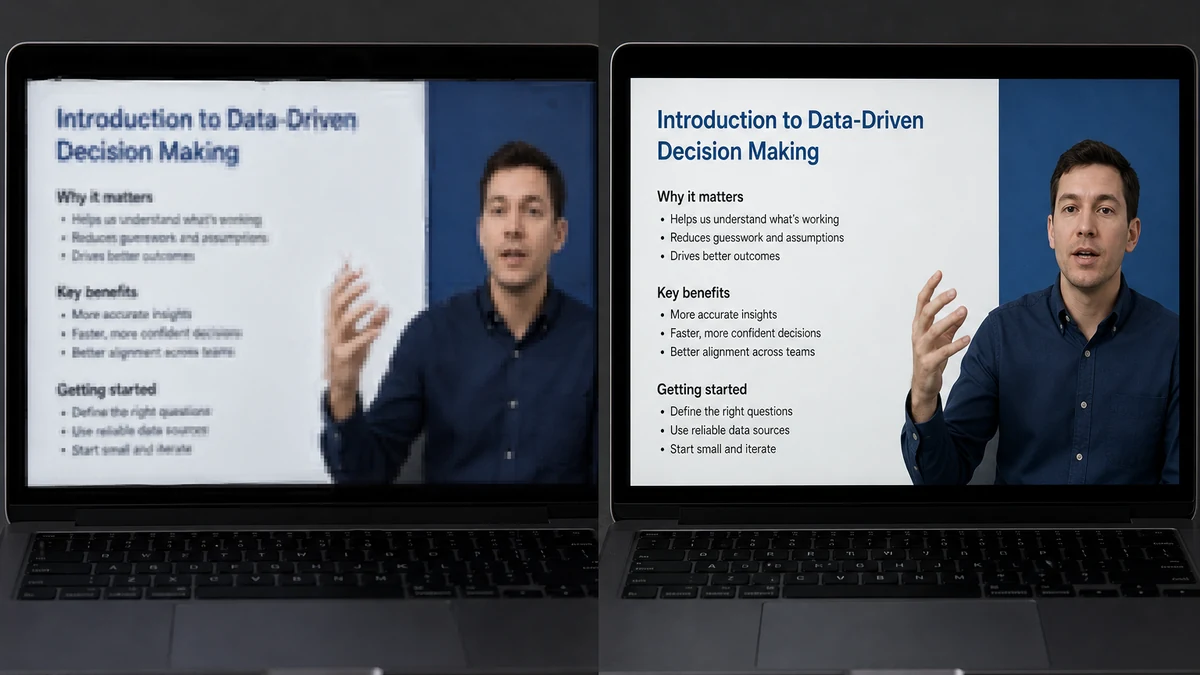
Coinis's own enhance_asset_proxy tool is temporarily unreachable while we work through an mcp.coinis.dev outage, so the comparison above is an illustrative still generated to match the described before/after, not a live tool render. See the fishing-tackle photo fix article for a real enhance_asset_proxy render on a different defect while this is restored.
The same discipline that applies to a product photo applies here: fix the input once, and every downstream ad size, every re-export, every future re-encode by whatever platform you push to next, inherits the fix instead of compounding the original flaw.
Building this into how you actually record
Treat the export settings on your screen recorder as part of the ad brief, not an afterthought. Before any webinar clip becomes a course ad: export at the ad's actual target resolution rather than your monitor's native resolution, keep slide text large enough to survive a second re-encode (bigger than looks necessary on your own screen), and run the clip through an upscale/sharpen pass before the platform gets its turn to compress it further. None of this requires a reshoot. It requires treating the recording export the way you'd treat a product photo: the last chance you have to control quality before someone else's compression algorithm takes over.
FAQ
Will exporting at a higher bitrate fix this on its own? It helps, but it doesn't solve the platform side. Meta re-encodes every upload to its own bitrate targets regardless of what you send, so a higher source bitrate buys you a better starting point, not immunity from the second compression pass.
Why does my face look worse than my slides, or the other way around? Depends on which mechanism dominates your footage. A mostly-static slide with small text suffers more from chroma subsampling (color-edge blur on text). A presenter moving a lot in frame suffers more from macroblocking (the encoder spending its limited bits on the moving region and running out for everything else). Most webinar clips get hit by both at once, in different parts of the frame.
Does this affect YouTube ads the same way Meta ads are affected? Yes, the mechanism is platform-agnostic. Every major ad platform transcodes uploaded video to its own delivery targets. The specific codec and bitrate numbers differ, but the underlying chroma-subsampling and macroblocking tradeoffs are present in essentially every modern lossy video codec.
Is this the same problem as a blurry phone photo? Related but not identical. A blurry photo is usually a capture-time focus or motion problem. This is a post-capture encoding problem that happens even to a perfectly sharp, perfectly focused recording, triggered by what's in the frame (static text plus small motion) rather than how it was shot.
Sources
- Wikipedia, "Chroma subsampling." https://en.wikipedia.org/wiki/Chroma_subsampling
- Fora Soft, "Video Compression Artifacts: The Visual Field Guide," June 24, 2026. https://www.forasoft.com/learn/video-quality/articles-vqm/compression-artifact-field-guide
- Meta Business Help Center, "Requirements for Facebook Live videos." https://www.facebook.com/business/help/162540111070395
- Ruzuku, "State of Online Courses 2026: Market Data, Trends & Creator Revenue" (citing Statista Digital Market Insights). https://www.ruzuku.com/learn/articles/state-of-online-courses-2026
- Grand View Research, "Education Technology Market Size, Share Report, 2026-2033." https://www.grandviewresearch.com/industry-analysis/education-technology-market

Isidora Matovic
Author
Social media enthusiast and a full time researcher. She takes digital presence very seriously and that is why you are always in touch in what is going on with us! Follow us for more posts like this.