
A chrome spinnerbait dangles against dark lake water. A carbon-fiber rod tip cuts across a bright overcast sky. A stainless hook glints under a boat's deck light. Every one of these is a great product shot, and every one of them is exactly the kind of frame that produces a color-fringing defect most anglers, and most brands, never learn to spot: a thin purple or green outline hugging the edge of the metal, visible the moment the photo gets blown up to full size in an ad.
It isn't a lighting mistake and it isn't a sensor glitch. It's a property of the lens itself, and tackle photography walks straight into it more often than almost any other product category.
Why bright metal against a dark backdrop triggers this specific defect
The defect is called chromatic aberration, and the visible purple version of it is often called purple fringing. A camera lens bends different wavelengths of light by slightly different amounts, so red, green, and blue light don't always land on exactly the same focal point. Adobe's own photography education team explains the mechanism plainly: the distortion "creates an outline of unwanted color along the edges of objects in a photograph," and it shows up most "along metallic surfaces or where there's a high contrast between light and dark objects, such as a black wall in front of a bright blue sky" (adobe.com, 2026).
A chrome lure against dark water is that exact scenario, twice over. It's a metallic surface, and it's a hard contrast edge. Wikipedia's entry on purple fringing describes the same failure as an "unfocused purple or magenta 'ghost' image," most severe at short wavelengths near violet, and most pronounced on lenses shot at wide apertures where more light reaches the sensor at once (en.wikipedia.org, 2026). Tackle photography leans into both conditions on purpose: a wide aperture keeps the shutter fast enough to freeze water motion, and a bright, reflective lure is the whole point of the shot.
What actually goes wrong in the ad creative
The failure shows up in a few predictable spots once a tackle photo gets used as ad creative:
- Hook points and spinner blades. The sharpest, brightest edges on the whole product, exactly where a fringe is most likely to appear and most likely to get noticed at full ad size.
- Rod guides against open sky. A thin metal ring against a bright, even background is a textbook high-contrast edge, the same setup Adobe's own example describes.
- Reel bodies under boat or dock lighting. A polished reel housing under a single bright source produces the same lens-dispersion effect at the rim of every reflective curve.
None of this is visible scrolling a phone feed at thumbnail size. It shows up the moment the same photo becomes a full-width banner or a zoomed product-detail shot, where a faint purple or green halo around the sharpest part of the product reads as a cheap camera, not premium gear.
The fix: correct the fringe, not the shot
Coinis Ad Studio's photo-repair layer (enhance_asset_proxy) handles exactly this kind of correction: cleaning up a specific optical artifact around a defined edge without touching the product's actual color, finish, or shape. Instead of trying to re-shoot at a smaller aperture or add a defringe pass in a separate editor, the correction targets the fringed edge directly so the lure's true chrome finish and the rod's true carbon-fiber color come through clean.
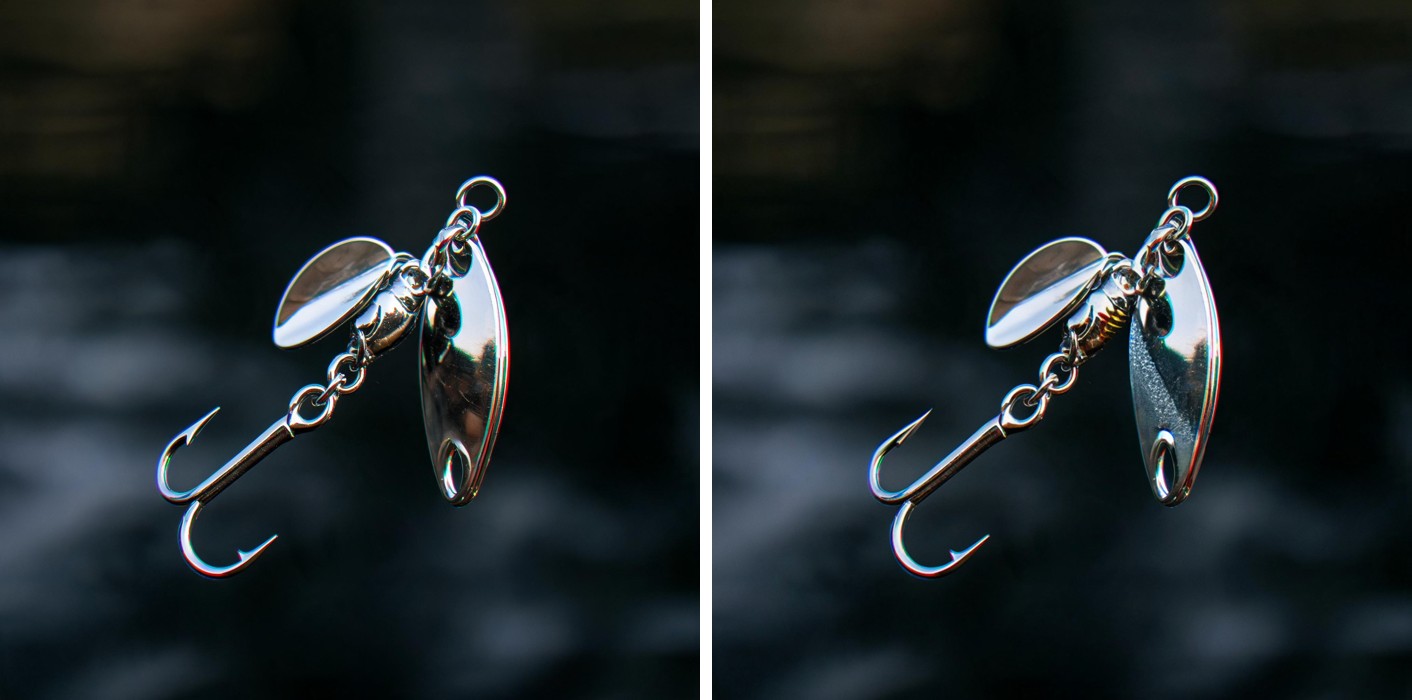
Before and after: the same chrome spinnerbait lure, same dark-water background, fringe corrected on the blade and hook edges via Coinis's enhance_asset_proxy photo-repair tool.
Once the fringe is corrected, the same photo needs to run everywhere a tackle or gear brand actually advertises: a square feed post, a 9:16 Story, a landscape banner for a retargeting campaign. Coinis's multi-format fan-out (generate_image_templates) takes that one corrected source image and produces it across every aspect ratio a campaign needs, so the fix happens once and pays out across the whole media plan.

The corrected lure photo fanned out to three ad formats via Coinis's generate_image_templates.
Why this matters for the category specifically
Fishing apparel and equipment is a $23.3 billion global market in 2026, on track to reach $26.3 billion by 2030, and equipment alone accounted for 93.6% of category revenue in 2023 (grandviewresearch.com, 2026). That's a category built almost entirely around exactly the product surfaces most prone to this defect: polished metal hooks, blades, and reel bodies shot against open water or sky, over and over, catalog page after catalog page. It's the same outdoor-retail pattern already documented across camping and outdoor gear, hunting gear, and sporting goods: outdoor product photography breaks in category-specific ways most brands never learn to check.
A brand that never checks for this loses detail exactly where a buyer looks first, the sharp, reflective edge that signals quality hardware. A faint color fringe around a hook point or a spinner blade doesn't read as "authentic outdoor photography." It reads as a low-end camera, which undercuts the premium positioning most tackle brands are actually trying to sell.
What to do now
- Pull any product photo shot against open water or sky and zoom into the brightest metal edges, hook points, blades, guides, reel rims, not just the overall composition.
- Look specifically for a thin purple or green outline tracing the sharpest contrast edges, the tell that separates this defect from a lighting or exposure problem.
- Run the flawed photo through Coinis's photo-repair tool to correct the fringe without re-shooting at a narrower aperture or losing the fast-shutter water-freeze the original shot needed.
- Fan the corrected photo out to every ad size your campaign needs from that single fixed source, then build the launch-ready ad in Ad Studio using a template built for the platform you're running.
FAQ
Why does this show up on fishing gear more than most other product categories? Chromatic aberration is worst on metallic surfaces against high-contrast backdrops, and tackle photography is built around exactly that combination: chrome lures, blades, hooks, and reel bodies shot against dark water or bright open sky (adobe.com, 2026).
Is this the same problem as glare or a reflection on a lure? No. Glare is light bouncing directly off a surface into the lens. This is a lens-dispersion problem, where different wavelengths of light focus at slightly different points, producing a thin color outline at a contrast edge regardless of glare (adobe.com, 2026, en.wikipedia.org, 2026). They need different corrections.
Does correcting the fringe change the lure's actual color or finish? No. The correction targets the color-dispersion artifact at the edge, not the product's real finish. The lure's true chrome, paint, or carbon-fiber color stays exactly as photographed everywhere else in the frame.
Do I need a different photo for every platform, or just different crops? Once the fringe is corrected, most campaigns only need different crops and aspect ratios of that same corrected image, not new photography for every platform.
Turn the fix into every launch-ready ad
A corrected product edge is the input. The output that actually moves budget is a launch-ready ad built for the platform you're running it on. Coinis Ad Studio takes the fixed photo straight into a template, so a tackle shot that was quietly losing detail at its sharpest edges becomes a finished ad ready to launch, true color intact. See what a fishing and outdoor tackle brand can build on Coinis next.
Sources
- Adobe, "What is chromatic aberration and how do you fix it?," https://www.adobe.com/creativecloud/photography/discover/chromatic-aberration.html (2026)
- Wikipedia, "Purple fringing," https://en.wikipedia.org/wiki/Purple_fringing (2026)
- Grand View Research, "Fishing Apparel And Equipment Market Size Report, 2025-2030," https://www.grandviewresearch.com/industry-analysis/fishing-apparel-equipment-market-report (2026)

Isidora Matovic
Author
Social media enthusiast and a full time researcher. She takes digital presence very seriously and that is why you are always in touch in what is going on with us! Follow us for more posts like this.