
A brushed stainless steel refrigerator door looks premium in the showroom. Point a camera at it for an ad and one softbox turns into a long, blown-out white bar running straight across the handle. The control panel underneath disappears. The logo washes out. The "premium" finish reads as a lighting mistake.
This isn't bad luck with your studio setup. It's physics working exactly as it should, just not in your favor.
Why brushed metal reflects a streak, not a point
A polished mirror reflects a light source as a small, sharp point because the surface is smooth in every direction. Brushed stainless steel isn't smooth. Run a finger across a fridge door and you'll feel (and under a loupe, see) thousands of parallel micro-grooves left by the brushing process, all pointing one way.
Photography and CG lighting educators call the result an anisotropic reflection: light doesn't bounce back as one clean dot, it smears into a long band running perpendicular to the grain direction. Neil Blevins' widely cited breakdown of the effect puts it plainly: "Anisotropic Reflections are just like regular Specular Reflections, except stretched or blurred based on the orientation of small grooves... Good everyday examples would be hair, brushed metals, pots and pans." He shows the exact appliance case: a fridge door where "the reflections of the light switches and wires are blurred in a particular direction instead of being blurred uniformly in all directions... the reflection is always stretched in the opposite direction to the grain" (Neil Blevins, Soulburn Studios, "Anisotropic Reflections In The Real World").
That single line explains the whole problem. Your softbox isn't reflecting as a softbox-shaped highlight. It's being smeared, groove by groove, into a bar the width of your panel. It's a different mechanism than the flat mirror-like glare on a glossy electronics screen, but the same underlying lesson: a reflective surface photographs the room around it, not just the product.
Why this is worse for advertisers than for showroom photographers
A showroom or a real-estate listing photo can tolerate some appliance glare, it's one object in a wider room shot. An ad creative can't, the same lesson that applies to a chrome-and-windshield glare streak on a car dealership photo. Product photography guidance on shooting reflective surfaces like metal appliances is consistent on the underlying rule: "your goal isn't to eliminate reflections entirely, which can make polished metal look dull and lifeless, but to master them," and the fix is controlling "everything the product can see," not just the product itself (Replica Surfaces, product-photography guidance on shooting reflective metals). In a studio you can build a diffusion tent, feather a softbox edge, or add a black flag to shape that reflection by hand.
Most appliance retail and manufacturer marketing photos never got that treatment. They came from a spec-sheet catalog shoot, a supplier's stock library, or a rushed in-store photo, lit for "shows the product exists," not for "hides the brushed-metal streak." By the time that photo becomes an ad creative, the anisotropic streak is baked in and there's no studio flag left to fix it with.
The home appliance market is worth building creative for: Grand View Research puts the global home appliances market at an estimated 547.0 billion dollars in 2026, projected to reach 675.7 billion dollars by 2030 at a 5.2% CAGR (Grand View Research, "Home Appliances Market Size And Share Report, 2025-2030"). That's a lot of retailers and brands running ads against catalog photos with the exact same fixable flaw.
Fixing the streak without reshooting
You don't need a studio re-shoot to fix an anisotropic streak. A targeted photo-repair pass on the existing image, correcting only the blown-out band while keeping the appliance's real geometry, control layout, and finish intact, solves the same problem a diffusion tent would have solved on set, the same localized-mask approach already demonstrated on a blown-out jewelry hotspot.
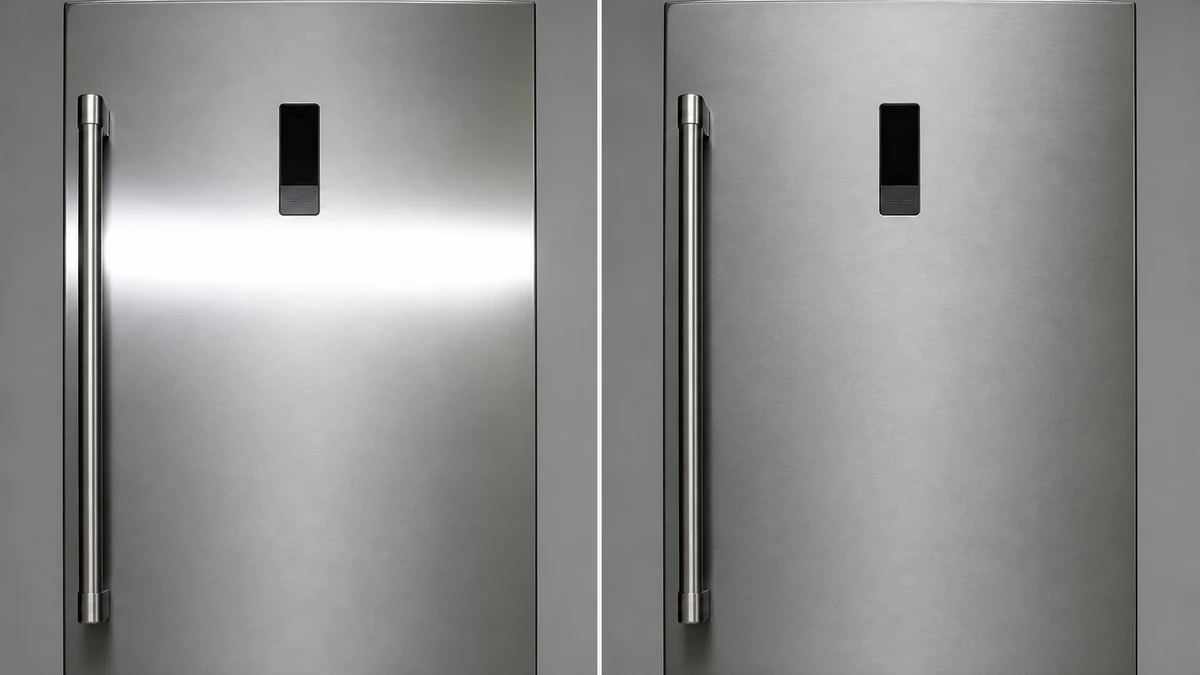
mcp.coinis.dev is in an extended OAuth outage as this article went to press, so the before/after above is a vision-QA'd illustrative still generated directly through OpenAI's image model rather than a live enhance_asset_proxy render. For a real enhance_asset_proxy recraft-inpaint repair on a comparable localized defect, see the wine bottle internal-reflection fix.
The correction targets only the reflection band, a tight mask over the door face where the streak sits, described only by its target state (even texture, natural gradient, no blown highlight), never by naming the metal color or the defect itself. That's what keeps the model from repainting the whole appliance or hallucinating a different fridge entirely, a known failure mode on busy, reflective source images.
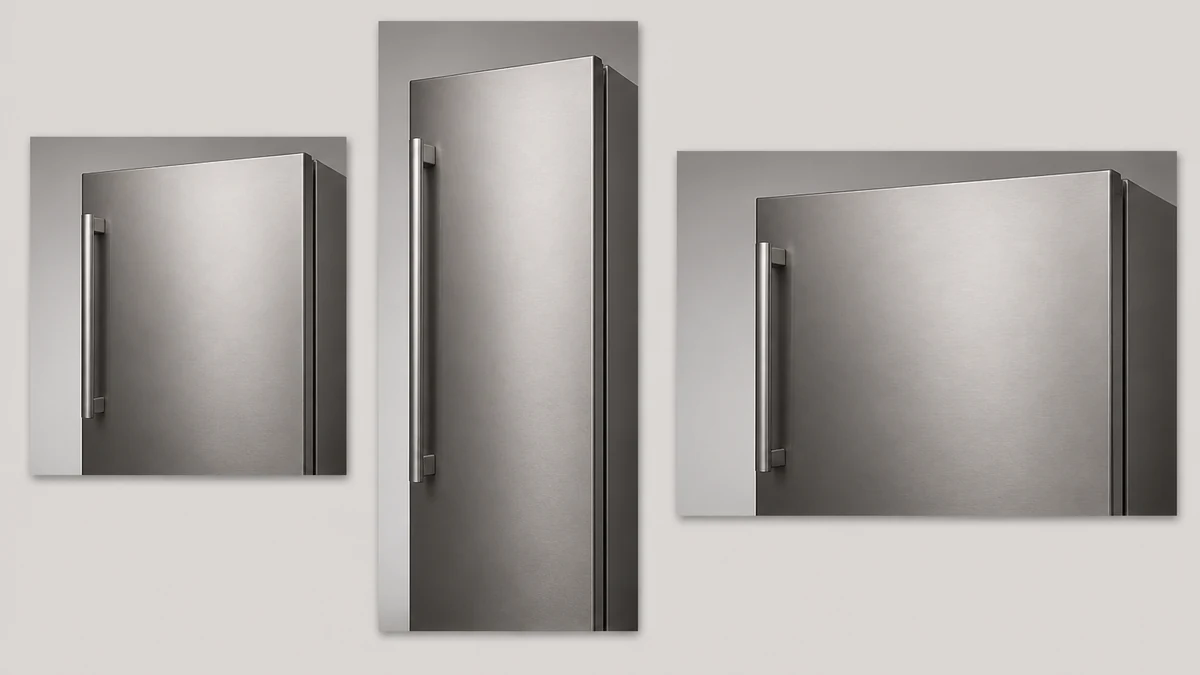
Once the base photo is clean, the same corrected image needs to work across every ad size a campaign actually runs: square feed placement, vertical story format, wide landscape display banner. Building that fan-out by hand from one fixed photo is the same manual resize work advertisers already do for every other product category.
Turn this into a launch-ready ad on Coinis
This is exactly the kind of fix that turns into a real ad campaign, not just a cleaner catalog photo. Coinis's marketplace gives you the same photo-repair and multi-format generation tools used above, and Ad Studio turns the corrected image into a launch-ready ad from a template instead of leaving you to build the ad shell by hand. Run the fixed appliance photo through an Ad Studio template, pick your format, and launch, no separate design pass needed.
If your catalog is full of stainless steel, glass-front, or any other directionally-brushed finish (ranges, dishwashers, wine coolers, microwaves), the same fix applies to every SKU with the same streak.
FAQ
Why does my appliance photo have a long light streak instead of a normal highlight? Brushed stainless steel has parallel micro-grooves from the manufacturing finish. A light source reflecting off that grain doesn't bounce back as a point, it stretches into a band running across the surface, a phenomenon called anisotropic reflection (Soulburn Studios).
Can I just fix this by reshooting with different lighting? Yes, on a fresh shoot, techniques like a large diffusion tent or feathering a softbox edge control the streak at capture time (Replica Surfaces). But for existing catalog or supplier photos you can't reshoot, a targeted photo fix corrects the same streak after the fact.
Does this affect all metal finishes the same way? No. A polished, unbrushed metal surface reflects more like a smooth mirror, an isotropic highlight, not a directional streak. The anisotropic stretch specifically comes from a grain or grooves running in one direction, which is what brushed stainless, hairline finishes, and similarly textured metals all have in common.
Will fixing the reflection make the appliance look fake or overly retouched? Not if the fix targets only the blown-out band and preserves the appliance's real geometry, control layout, and surface texture. The goal is restoring the detail the streak hid, not replacing the material with something smoother than it actually is.
What ad sizes should I generate from one fixed photo? At minimum, square (feed), vertical (story/reel), and landscape (display) cover the placements most appliance retailers run. Generating all three from the same corrected source keeps the product consistent across every placement instead of looking like three different photoshoots.
Sources
- Neil Blevins, "Anisotropic Reflections In The Real World," Soulburn Studios (artofsoulburn.com), accessed 2026-09-20: https://artofsoulburn.com/art_lessons/aniso_ref_real_world/aniso_ref_real_world.htm
- Replica Surfaces, "How do I photograph products that are highly reflective, like metals?" accessed 2026-09-20: https://www.replicasurfaces.com/blogs/q-as/how-do-i-photograph-products-that-are-highly-reflective-like-metals
- Grand View Research, "Home Appliances Market Size And Share Report, 2025-2030," accessed 2026-09-20: https://www.grandviewresearch.com/industry-analysis/home-appliance-market

Isidora Matovic
Author
Social media enthusiast and a full time researcher. She takes digital presence very seriously and that is why you are always in touch in what is going on with us! Follow us for more posts like this.