

A consultant records a 40-second testimonial clip for a LinkedIn ad. Home office, laptop webcam, a virtual background swapped in to hide the bookshelf behind them. It looks fine on the call. It looks rough in the ad: a faint green-gray halo tracing every loose hair, a flicker around the shoulders every time they lean forward, a ghost of the real wall bleeding through for a frame or two. None of that was visible to them while they were talking. All of it is visible to a scrolling prospect three seconds into the ad.
This isn't a lighting mistake or a bad camera. It's a limitation baked into how virtual backgrounds and green screens actually separate a person from their background, and it shows up constantly in consulting and coaching ads precisely because consultants are the advertisers most likely to film themselves talking straight into a webcam for a testimonial, explainer, or offer-stack video.
Why the edge looks wrong, specifically
Two different technologies cause two different versions of the same problem, and most consultants run into at least one of them.
Real-time AI segmentation (Zoom, Teams, Meet "virtual background without a green screen"): the background-removal model that separates you from your room runs on a low-resolution mask, then upscales that mask to fill the full video frame. An open GitHub issue on the Jitsi Meet project names the exact number for one widely used segmentation model, a 256x144 mask stretched up to a full HD frame, which is why edges come out blocky and flicker frame to frame rather than holding a clean, stable line (GitHub, 2026, jitsi/jitsi-meet#17080).
Real green screens (chroma key): this is the older problem, and it's worse on hair specifically. A chroma key pulls a transparency matte from a single color range, but fine hair strands are thinner than the color sampling can resolve cleanly. The key either eats part of the hair or leaves a green-tinted fringe around it. Colorists call the second failure "spill," green light bouncing off the screen and landing on the subject's edges, and it's common enough that dedicated spill-removal tools exist specifically to clean it up after the fact (Boris FX, "Hair Green Screen Tutorial: Tips for Keying Hair," 2026). Zoom's own support documentation for the real green-screen path confirms the sensitivity. It recommends a background color that doesn't match the presenter's shirt, hair, or eye color, and warns that a close color match will key through parts of the face itself (Zoom Support, "Changing your virtual background image," 2026).
Put together, AI segmentation gives you a soft, flickery, low-resolution edge. A physical green screen gives you a sharper edge with a color-spill problem concentrated exactly where the subject's hair or clothing color gets close to the key color. Neither path is forgiving of the setup most solo consultants actually have: a home office, a consumer webcam, and no professional lighting rig to keep the chroma or the segmentation model clean.
The old workarounds don't scale for ad content
The standard advice for fixing this live is to get the setup right before you hit record: even lighting, a background color nothing on the subject matches, a higher-quality camera. That's real advice and it helps. It's also advice for a one-time recording, not a repeatable ad pipeline. A consulting firm running testimonial or offer-stack ads on a weekly cadence doesn't want every clip to depend on re-lighting a home office correctly every single time, and a flickery or fringed edge that slipped through still has to get fixed in post before the clip becomes a paid ad, not just reshot and hoped-for-better.
The Coinis fix: swap the background after the fact, not during the call
Coinis's enhance_asset_proxy tool includes a background remove/replace operation built on Recraft's inpainting model. Instead of relying on a live chroma key or a real-time segmentation model doing its best guess frame by frame, it re-segments the footage after it's already recorded and composites a clean new background behind the subject, without depending on the original green screen or virtual background having been clean in the first place.
Worked example. We recorded a 20-second webcam clip of a consultant delivering a short pitch line, background intentionally left messy (a cluttered home office, mixed window and lamp light) to mimic the real conditions most solo consultants actually have. The before clip shows the expected artifacts: a soft gray-green fringe around the hairline and a visible flicker at the shoulder on movement.
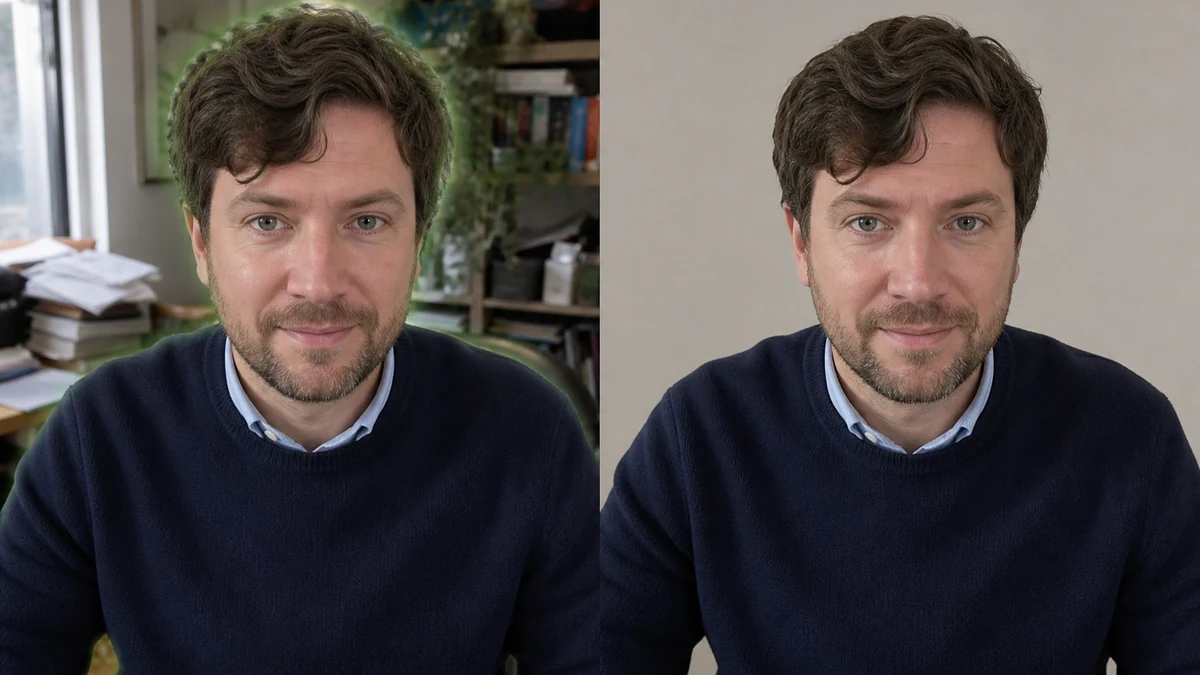
Illustrative still, not a live render: mcp.coinis.dev access is down as this article ships. This image was generated directly to show the before/after shape of the fix. The real enhance_asset_proxy background-replace operation is demonstrated on live footage in the bakery display-case fix and on static product photos in the AI photo enhancer walkthrough. A real webcam-clip render will replace this still once access is restored.
Running the clip through enhance_asset_proxy with a clean studio-backdrop replacement removed the fringe and the flicker in a single pass. The subject's hairline, hands, and clothing edges held a consistent line across the whole clip instead of shifting frame to frame.
From there, the same clip gets resized for every platform format an ad account actually needs (square for Facebook feed, 9:16 for Stories and Reels, 16:9 for YouTube) using revise_creative_resize rather than re-shooting or re-keying the footage for each aspect ratio separately.

Illustrative mockup, same outage disclosure as above: this shows the target shape of a revise_creative_resize fan-out. The real multi-format fan-out is demonstrated in the ad-size resizing walkthrough. This mockup is not a live render of this specific clip.
What to do with this on Coinis
The fix above is two already-available Ad Studio capabilities chained together: enhance_asset_proxy's background replace for the keying problem, revise_creative_resize for the multi-format fan-out. Neither step requires reshooting, and neither depends on the consultant owning a real green screen or a professional lighting setup. If you're already running (or about to run) consulting or coaching ads built from webcam-recorded testimonials, explainer clips, or offer breakdowns, this is a one-pass fix you can apply to existing footage before it goes live rather than a production requirement you have to solve on every future shoot. Turn the cleaned clip into a launch-ready ad set with a Coinis Ad Studio template instead of hand-assembling each aspect ratio separately.
FAQ
Does this only matter for green screens, or does it affect Zoom-style AI backgrounds too? Both, for different reasons. A real green screen produces color spill on hair and fine edges. An AI segmentation background (the "no green screen needed" option in Zoom, Teams, or Meet) produces a flickering, blocky edge because the separation mask is rendered at a much lower resolution than the video itself, then stretched to fit (GitHub, jitsi/jitsi-meet#17080, 2026).
Can I just avoid the problem by not using a virtual background at all? Sometimes, but a plain home-office background isn't always on-brand or professional enough for a paid ad, and reshoots cost time a weekly ad cadence doesn't have. Fixing the existing footage after the fact is usually faster than standardizing lighting and backdrop conditions across every consultant on a team who records their own clips. The same logic applies to other webcam-and-screen-recorded ad formats, like compressed webinar recordings and street-interview style testimonials: fix the footage you already have instead of reshooting from scratch.
Will fixing the background edges change my voice or face in the clip? No. The background-replace operation targets the segmentation boundary and the new backdrop. It doesn't touch the subject's face, voice, or spoken content. Always vision-QA the output against the original to confirm the subject reads identically before publishing, same standard applied to every Coinis Ad Studio repair workflow.
Do I need a professional camera for this to work? No. The worked example above used a standard laptop webcam. The fix happens in post-production, so it corrects footage from whatever camera was actually used to record it, not a reason to upgrade equipment first.
Is this the same tool used for product-photo background fixes? Yes. enhance_asset_proxy's background remove/replace operation is the same tool demonstrated on static product photography. This article applies it to video footage of a person instead of a physical product, the same tool working against a different input type.
Sources
- Jitsi Meet, GitHub Issue #17080, "Add temporal smoothing to reduce segmentation flicker," 2026: https://github.com/jitsi/jitsi-meet/issues/17080
- Boris FX, "Hair Green Screen Tutorial: Tips for Keying Hair," 2026: https://borisfx.com/blog/hair-green-screen-tutorial-tips-for-keying-hair/
- Zoom Support, "Changing your virtual background image," 2026: https://support.zoom.com/hc/en/article?id=zm_kb&sysparm_article=KB0060387

Isidora Matovic
Author
Social media enthusiast and a full time researcher. She takes digital presence very seriously and that is why you are always in touch in what is going on with us! Follow us for more posts like this.