

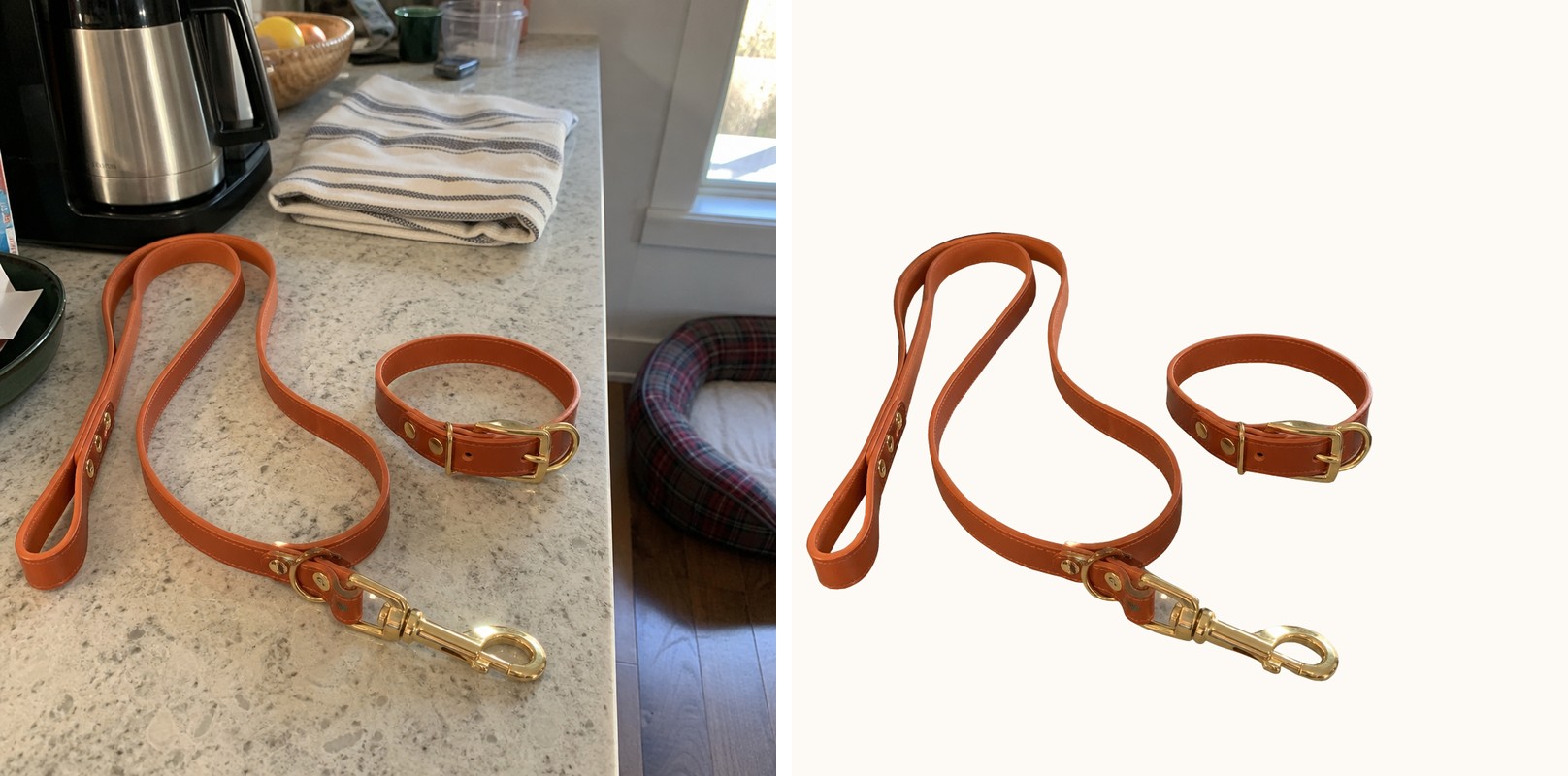
A leash, a feeder, a chew toy gets photographed fast, on a kitchen counter or a living room floor, because the product needs to ship a listing today and there is no studio booked. The shot works fine for a marketplace thumbnail. It falls apart the moment it becomes an ad, because the couch cushion, the tile pattern, and the half-visible dog bed in the background are all competing with the product for the same eight square inches of a phone screen.
That backdrop problem is different from a lighting or reflection defect. Nothing is broken about the photo technically. The product is in focus, exposure is fine, colors read true. The problem is everything else in the frame that was never meant to be part of the ad.
Why a busy background costs more than it looks like it should
A plain backdrop is the single most repeated rule across ecommerce photography guidance for exactly this reason: a cluttered or inconsistent background pulls the eye away from the product and forces a viewer to do the work of finding what they're supposed to look at (Adobe Business, "A Guide to Effective Product Photography for Ecommerce"). On a shelf or a search results page that friction costs a click. On a paid ad, scrolled past in under a second, it can cost the entire impression.
Pet product buying has kept growing regardless of that friction. The American Pet Products Association's 2026 State of the Industry data puts total U.S. pet industry expenditures at $158 billion in 2025, projected to reach $165 billion in 2026 (APPA, "U.S. Pet Industry Reaches $158 Billion in 2025, Poised for Continued Growth in 2026," March 2026). That volume means more brands competing for the same feed, and a product photo that looks like a phone snapshot of a kitchen counter is an easy thing for a scrolling thumb to keep scrolling past.
The reshoot fix doesn't scale past the first SKU
The standard advice for this exact problem is a plain sweep backdrop: a uniform, light-colored surface set up specifically to isolate the product from anything else in the room, because it gives the clearest contrast between subject and background and removes the ambient clutter a real room always has (Adobe Business, same guide). That's a real fix, and it works, for one photo, shot once, under one setup.
It stops working the moment a catalog has more than a few SKUs. A leash brand selling four colors, three lengths, and a matching harness needs the same clean backdrop behind every single variant, re-lit and re-shot every time a new one comes in, or the catalog ends up with some products on a clean sweep and others still sitting on whatever counter was closest that day.
Fix the background before the photo goes into every ad format
Ad Studio's repair layer, enhance_asset_proxy, treats a busy background as a correction on an existing photo rather than a reason to reshoot it. The tool's background-replace operation swaps out everything behind the product for a clean, brand-consistent backdrop, while leaving the product itself, its shape, color, texture, and any printed branding, untouched. This is a whole-frame swap rather than a small masked patch, since the entire area around the product needs replacing, not one localized flaw inside it.
The result is the same product, photographed once on a kitchen counter, now sitting on a clean studio-style backdrop with the room clutter gone entirely.
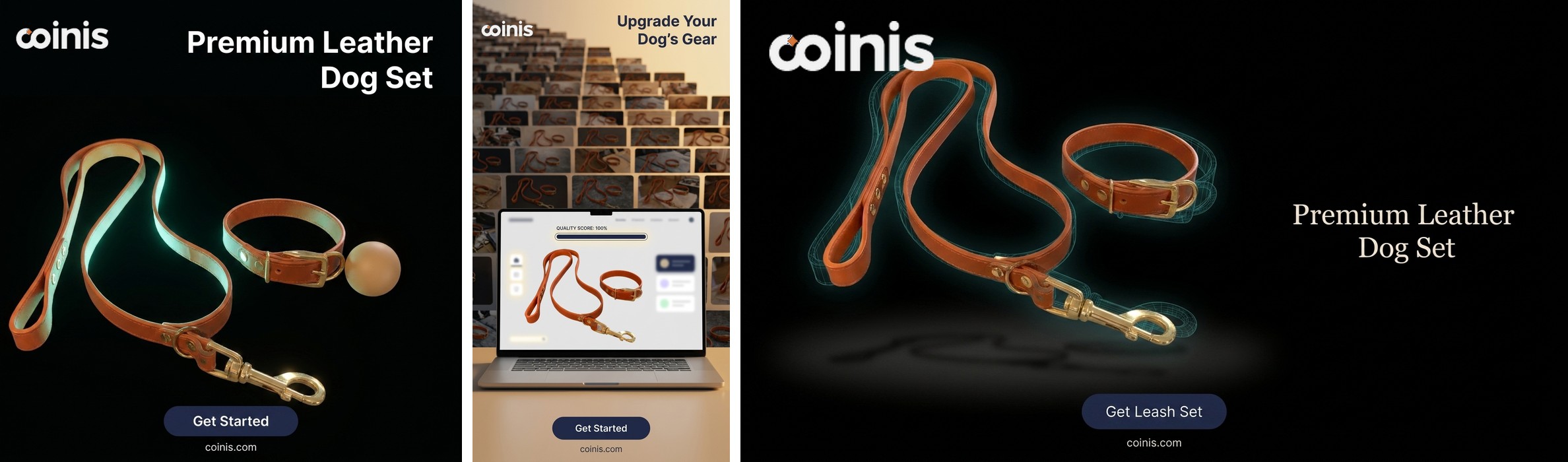
Once the background reads clean, the fan-out step is generate_image_templates, Ad Studio's primary image-ad generator. One corrected product photo becomes a square feed post, a 9:16 Story, and a horizontal Display banner in one pass, built from the same clean source instead of separately re-shot or re-edited for each placement.
Building this into a pet brand's actual catalog
A pet accessories or gear line rarely holds still at one SKU. Colorways, sizes, and seasonal bundles ship on a rolling basis, and each one needs a usable hero photo before it can go into any ad format on any platform. The order matters every time: replace the background first with enhance_asset_proxy, confirm the product itself is untouched, and only then hand the clean file to generate_image_templates for the size fan-out. Fanning out a cluttered photo into six ad sizes just multiplies the same distracting kitchen counter across every format instead of removing it once.
This is the same repair-then-generate pattern already proven across other product categories with their own specific photo flaws: an electronics brand's mirrored screen reflection, an apparel catalog's Merchant-Center-rejected background, and a supplement bottle's glare band over the label are all versions of the same lesson: the flaw sitting between a usable product photo and a launch-ready ad is rarely the product itself, and fixing it once beats reshooting it every time a new variant ships. It also connects to mobile game ad creative fatigue: a brand stuck on one usable hero shot per SKU keeps running that same shot until performance drops, because there's no clean second angle to rotate in without redoing the whole shoot.
FAQ
Does the background fix change anything about the product? No. The background-replace operation swaps out everything behind the product while leaving the product's shape, color, texture, and branding exactly as photographed.
Is a full background swap different from the localized repairs used on other categories, like a glare spot on a bottle? Yes. A glare spot or reflection is a small masked region inside an otherwise fine photo. A busy background is the entire area around the product, so the correction that fits is a whole-frame background replacement, not a tight mask around one flaw.
Do I need a different photo for every platform's ad size? No. generate_image_templates handles the cropping and composition into each platform's spec from one corrected source photo, which is the entire point of fixing the background once instead of on five separate exports.
What if the original photo includes a pet or a person in the background? Keep the worked example and any repair scoped to the product itself. If a real photo has a person or animal in frame, treat that as a reason to choose a different source photo for this workflow rather than editing around them, since the fix here is a backdrop swap, not a subject removal.
The Coinis angle
A pet product photo shot on a kitchen counter doesn't need a studio booking to become usable. Repair the one photo already on file with Ad Studio's enhance_asset_proxy, confirm the product itself is untouched, then turn it into a full ad-ready set with generate_image_templates, and land the result as a launch-ready ad through Ad Studio's templates instead of exporting a cluttered photo and building the ad by hand.
Sources
- Adobe Business, "A Guide to Effective Product Photography for Ecommerce." https://business.adobe.com/blog/basics/guide-effective-product-photography
- American Pet Products Association, "U.S. Pet Industry Reaches $158 Billion in 2025, Poised for Continued Growth in 2026," March 2026. https://americanpetproducts.org/news/u.s.-pet-industry-reaches-158-billion-in-2025-poised-for-continued-growth-in-2026

Isidora Matovic
Author
Social media enthusiast and a full time researcher. She takes digital presence very seriously and that is why you are always in touch in what is going on with us! Follow us for more posts like this.