

Walk into a tutoring center, test-prep classroom, or learning center's demo room to shoot a photo for an ad, and the display screen at the front of the room is often the whole point of the shot. It is also the thing most likely to come back looking broken. Instead of a readable curriculum slide or a clean whiteboard capture, the photo shows a washed-out glowing patch dead center on the screen, fading to dim at the edges, with no amount of slide content actually legible inside the blown-out area.
What's actually happening to the screen
Most classroom and demo-room projection screens are not flat matte surfaces. They use a high-gain or retroreflective coating designed to bounce a projector's light back toward the audience more efficiently than a plain white wall would, which is exactly what a small classroom with ambient light and a modest projector needs. The tradeoff, documented in projector-screen technical guides from AWOL Vision and Valerion, is that this coating does not scatter light evenly in every direction. It reflects most strongly back toward a narrow cone centered on the projector's own beam angle, and drops off sharply outside that cone. A viewer sitting dead-center in the room sees a bright, even image. A camera positioned anywhere else, which is most photo angles a staff member or marketer actually shoots from, sees the brightness falloff directly: a hot, blown-out patch where the lens happens to sit closest to that reflective cone, and a dimmer, flatter image everywhere else on the same screen.
Home-theater enthusiasts have documented this exact failure mode for years in troubleshooting threads. An AVSForum thread on a 1.3-gain screen describes hotspotting worsening specifically from a short throw distance, the projector sitting closer to the screen than the screen was designed for, concentrating the reflective cone into a smaller, brighter area. A Reddit r/projectors thread on an ALR (ambient-light-rejecting) screen puts it the same way from the viewer's side: "that's a hotspot. It's where the light is bounced back to you under the best angle." The mechanism is consistent across every source: it is a property of the screen's coating interacting with viewing angle and throw distance, not a camera setting, not a lighting mistake, and not something a photographer can dial out by changing exposure.
Why this is a different problem from a glossy screen's mirror reflection
A flat glossy electronics display reflects the room back at the camera like a mirror: window frames, studio lights, the photographer's own silhouette show up as a recognizable reflected image. A projection screen's hotspot is not a reflected image of anything in the room. It is a brightness gradient baked into the coating's own directional reflectance, visible as a glowing patch with no discernible shape or content, just a washout that happens to sit wherever the camera's angle lines up with the screen's reflective cone. Relighting the room does not fix it, because the problem is not insufficient or uneven ambient light, it is the screen itself behaving like a narrow-angle mirror for the projector's beam specifically. Moving the camera to a different seat in the room helps a live viewer, but a marketing photo usually needs to be shot from a specific flattering angle that shows the whole classroom, the same angle most likely to catch the hotspot dead-on.
This also means the fix is not "buy a better camera" or "turn on more lights." Those remedies work on an exposure problem. A hotspot is a directional-reflectance problem sitting on the screen's own surface, present in the photo regardless of how well the rest of the room is lit.
Fixing it after the fact
Coinis's photo-repair tool (enhance_asset_proxy, the recraft-inpaint operation) treats a blown-out screen hotspot the same way it treats any other localized optical defect already demonstrated in this series, jewelry's blown-out specular highlight, a glossy electronics display's mirrored reflection, or a gaming keyboard's clipped RGB channel, with the mask shaped to hug just the hotspot region rather than the whole screen or the whole room.
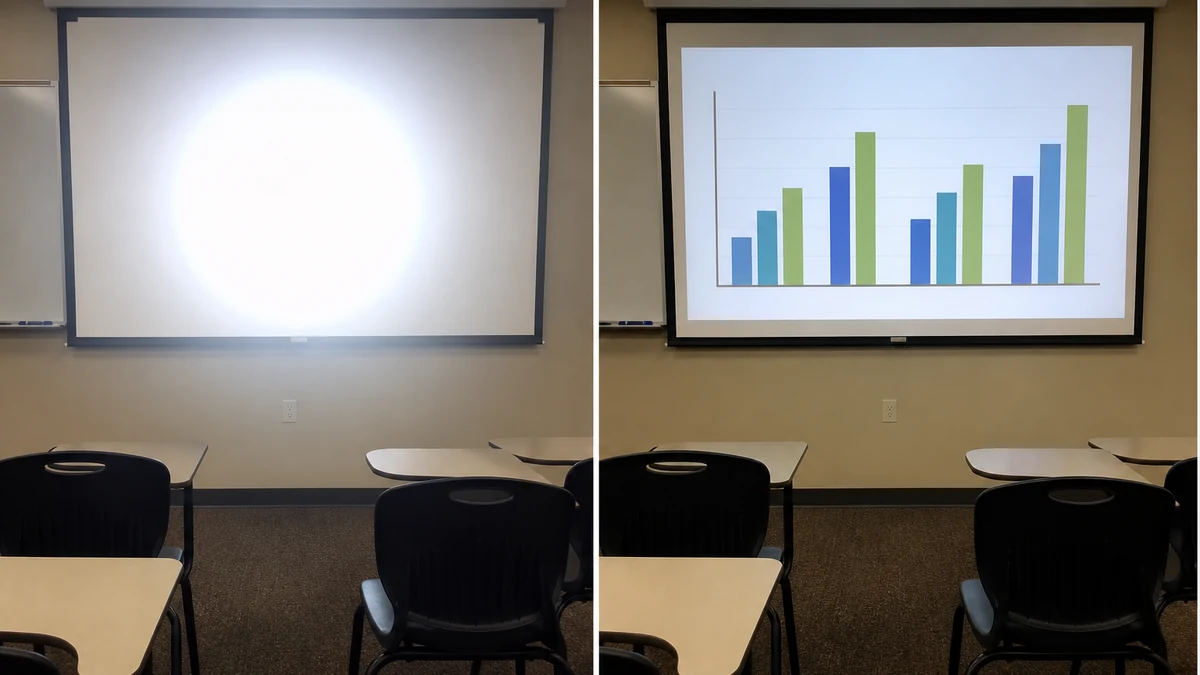
mcp.coinis.dev is in an extended OAuth outage as this article went to press, so the before/after above is a vision-QA'd illustrative still generated directly through OpenAI's image model rather than a live enhance_asset_proxy render. For a real enhance_asset_proxy recraft-inpaint repair on a comparable localized screen defect, see the electronics flat-screen reflection fix.
The masking discipline follows the same pattern as every other localized fix in this series: the mask covers only the blown-out hotspot area itself, measured off the real source photo, and the correction prompt describes only the fix, evening out the brightness across the screen so the actual slide content underneath becomes legible, with no change to the classroom, furniture, students' desks, or anything outside the screen. The goal is restoring legibility to content that was always on the screen, not inventing new slide text or a different lesson. This sits alongside a related but distinct problem already covered in this series: a dashboard screenshot shrunk into a small ad frame loses legibility from pure information density, a scaling problem with no optical defect involved. Here the screen was never too information-dense, it was simply unreadable because of how the light bounced off it in this one photo.
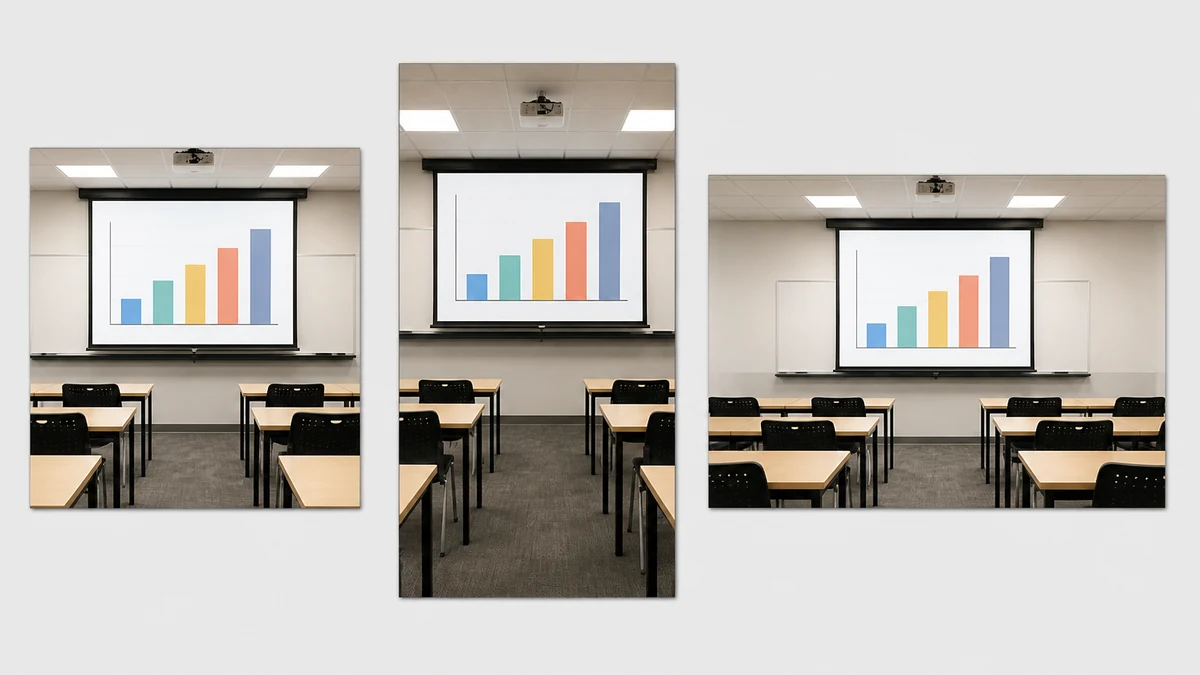
Once the base photo is clean, Coinis's generate_image_templates tool rebuilds it into the formats a tutoring center or learning center actually needs for enrollment-season advertising: a square feed post, a vertical story crop, a wide landscape banner, all pulled from the one corrected classroom photo instead of a second site visit and a second round of scheduling around when the room is free.
What to do with the fixed photo
A corrected classroom photo is still just a corrected photo. The step that turns it into something that actually runs as an ad is Coinis's Ad Studio, which takes the repaired image and the same multi-format fan-out shown above and assembles it into launch-ready ad creative with copy, the template-to-launch-ready step that sets Ad Studio apart from plain marketplace model access. A tutoring center, test-prep chain, or learning center gearing up for back-to-school or test-prep enrollment season does not need to re-schedule a demo room and reshoot to get a usable enrollment ad live. It needs the one good classroom photo it already has, corrected, and the ad built from it the same day.
FAQ
Does every classroom or demo-room photo with a bright patch need this fix? No. A screen that is genuinely off and simply catching ambient room light, or a deliberately stylized bright-screen shot, is not the same defect. This fix is for photos where the screen was on, showing real content, and a hotspot from the screen's own reflective coating made that content unreadable.
Will the repair change what's actually written on the screen? No. The mask is drawn tight around the hotspot region itself, measured off the real source photo, and the correction prompt describes only evening out the brightness so the existing content becomes legible, never inventing new text or a different slide. Everything outside the masked region, the classroom, furniture, any people in frame, stays exactly as photographed.
Is this the same problem as a glossy screen's mirror reflection? No. A glossy display reflects the room back at the camera like a mirror, showing a recognizable reflected image of whatever is nearby. A projection-screen hotspot is a brightness gradient baked into the screen's own coating, visible as a washed-out glow with no reflected image inside it, caused by viewing angle and throw distance rather than anything else in the room.
Does fixing the photo change the actual classroom or equipment? No. This is a photo correction, not a claim about the room, the screen, or the projector. It restores legibility to a photo of real content that was genuinely on the screen, nothing more.
Sources
- AWOL Vision, "What is Projector Screen Gain? What is the Best Gain for Your Room?" covers gain, hotspotting, and viewing-angle mechanics: https://awolvision.com/blogs/awol-vision-blog/projector-screen-gain
- Valerion, "What Is Projector Screen Gain? Gain Explained Simply" describes high-gain screens causing glaring hotspots in the center of the image: https://www.valerion.com/blog/what-is-projector-screen-gain
- AVSForum thread, "Cause of increasing hotspotting on 1.3 gain screen from DLP projector" is independent community documentation of throw-distance-driven hotspot worsening: https://www.avsforum.com/threads/cause-of-increasing-hotspotting-on-1-3-gain-screen-from-dlp-projector-been-getting-slowly-worse.3182424/
- Reddit r/projectors, "Middle of ALR screen way brighter" is independent community confirmation of the viewing-angle-dependent hotspot mechanism on ambient-light-rejecting screens: https://www.reddit.com/r/projectors/comments/1pviyd2/middle_of_alr_screen_way_brighter/

Isidora Matovic
Author
Social media enthusiast and a full time researcher. She takes digital presence very seriously and that is why you are always in touch in what is going on with us! Follow us for more posts like this.