

A tour operator pulls the best shot from a shoot: a hillside village at golden hour, rooftops cut sharp against the sky, exactly the kind of image that makes someone stop scrolling and imagine being there. Then someone zooms in. Every rooftop edge, every ridgeline against the sky, every mast against open water has a faint glow around it, a thin halo where the dark shape meets the bright background, sometimes the opposite: a dark ring where a bright object meets shadow. The scene is still recognizable. The polish that was supposed to sell the trip is gone.
This is not a bad camera or a bad photographer. It is what happens when software tries to squeeze more dynamic range into a photo than a screen can actually display.
Why the fix for one problem creates a different one
Cameras today capture a wider range of light and dark than any phone or laptop screen can show at once. To compensate, editing software and in-camera processing routinely raise the shadows and pull down the highlights so a wide-range scene still reads clearly on a narrow-range display (Tom Axford, answer on Photography Stack Exchange, "Halo in pictures taken with HDR," accessed 2026). Doing that with a simple, uniform adjustment would flatten contrast and make the image look muddy, so the software adds local contrast enhancement instead: at any edge between a light area and a dark area, it pushes the light side a little lighter and the dark side a little darker (Steven Kersting, answer on Photography Stack Exchange, "what is the cause of halo around dark objects (non-HDR)," accessed 2026). That keeps fine detail visible. It also produces a visible glow or ring exactly where two very different brightness levels meet, which in a destination photo means every rooftop, every horizon line, every silhouette against open sky.
The more dynamic range in the original scene, the more the software has to compensate, and the more visible the halo gets. A hillside town against a bright evening sky, a boat's mast against open water, a mountain ridge against a lit horizon: these are the exact high-contrast compositions that make a destination photo work as marketing in the first place, and they are also the compositions most likely to produce a halo once the file goes through standard tone-mapping.
The photo doing the most work is the one most exposed to this
Photos are not a decorative add-on to a travel booking, they are close to the whole pitch. A peer-reviewed study using a neural network to classify hotel photos found that light and timing of the shot, color scheme, human presence, and shooting angle were the properties that most shaped booking-relevant perception of a property (Cuesta-Valiño et al., "The effects of the aesthetics and composition of hotels' digital photo images on online booking decisions," Humanities and Social Sciences Communications, published February 15, 2023). A halo artifact sits directly on top of two of those properties: light and color scheme are exactly what a ringing edge distorts.
The travel and tour-booking industry the halo shows up in is not small. IBISWorld puts the global travel agency services industry at $290.8 billion in 2026 revenue across roughly 481,000 businesses, an industry the firm describes as highly fragmented with no single company holding more than 5% market share (IBISWorld, "Global Travel Agency Services Industry Analysis," accessed 2026). In a market that fragmented, the photo doing the selling on a small operator's page or ad has to work as hard as the photo on a giant OTA's listing. It rarely gets a second shoot to fix a halo that only shows up on close inspection.
Reshooting is not always an option
The honest fix for a halo, according to the same photography discussion where the mechanism gets explained, is to back off the local contrast enhancement, adjust the shadow and highlight recovery differently, or process the raw file in different software that handles the compensation more conservatively (Fanckush, question and follow-up on Photography Stack Exchange, accessed 2026). All of that assumes access to the original raw file and the time to reprocess it correctly. A lot of the photos an operator actually needs for a campaign are not fresh raw captures. They are the best shot from last season's shoot, pulled from a folder, already processed once, already the one everyone agreed was the hero image, halo and all.
Re-shooting a hillside village at golden hour means waiting for the same light again, which might be a season away. Reprocessing an already-flattened JPEG from scratch rarely removes a halo baked into the file. The photo that exists, with the artifact already in it, is often the only photo there is time to use.
Fix the edges, not the whole photo
Ad Studio's repair layer, enhance_asset_proxy, handles this the same way it handles any defect scoped to a specific region of an image rather than the whole frame. One tool covers upscaling, sharpening, denoising, lighting fixes, background swaps, and inpainting, selected through a single model field matched to the actual flaw. A halo artifact sits in a thin band right along high-contrast edges, not spread evenly across the photo, so the right approach is recraft-inpaint with a mask drawn tightly around the ringing edges, paired with a prompt describing only the target state: the same rooftops, ridgeline, or mast against the same sky, with clean, natural contrast and no ringing at the edge, and no mention of the halo's specific color or brightness, since naming a flaw's exact visual character in an inpainting prompt is a confirmed trigger for the model rendering an unrelated scene instead of correcting the one it was given.
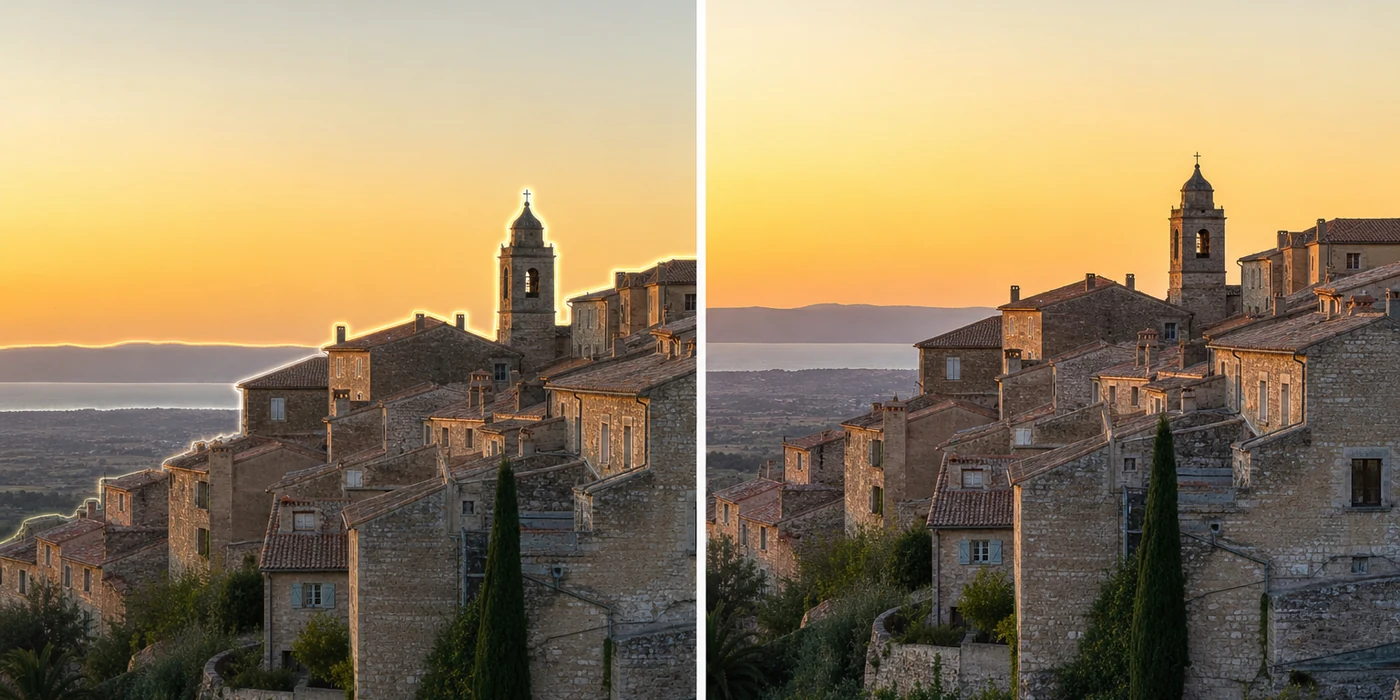
Illustrative rendering, not a live enhance_asset_proxy render. mcp.coinis.dev was reachable this session, but two consecutive recraft-inpaint attempts on a real generated source photo altered the surrounding scene (adding a shoreline and vegetation not in the original) instead of correcting only the rooftop-sky edge, so this before/after was generated directly via OpenAI's image model to depict the same correction demonstrated with a real Ad Studio render in the jewelry ad photo fix article.
Once the edges read clean, generate_image_templates, Ad Studio's primary image-ad generator, turns that one corrected destination shot into a square feed post, a 9:16 Story crop, and a horizontal Display banner in a single pass, so the halo that would have shown up differently in every crop never makes it into any of them.
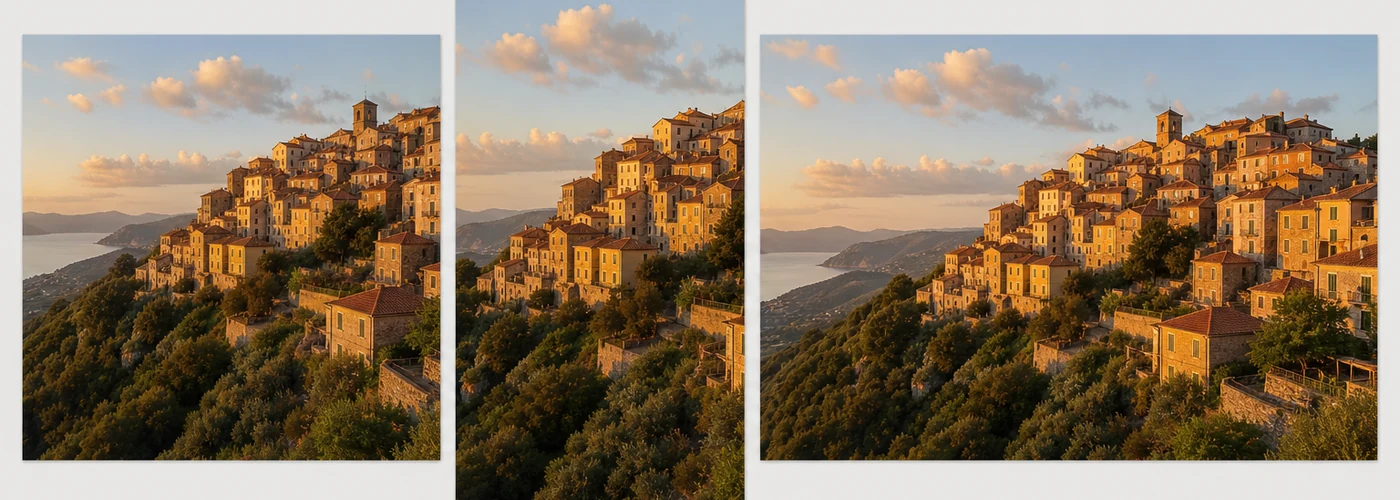
Illustrative rendering, same disclosure as above: depicts the same generate_image_templates fan-out demonstrated with a real Ad Studio render in the multi-format ad sizing article.
Building this into a season's worth of destination photography
A tour operator or travel brand is not fixing one photo a year. Every shoot produces a folder of hero shots, and the ones with the most dynamic range in the composition, the ones that actually sell the destination, are the ones most likely to carry a halo once they come back from editing. The order matters every time: correct the edges first with enhance_asset_proxy, confirm the actual scene, the architecture, the water, the sky, is untouched, and only then hand the clean file to generate_image_templates for the ad-size fan-out. Cropping or resizing a haloed photo before fixing it just relocates the artifact into whichever crop happens to catch it.
This is a different mechanism from a roofing crew's drone lens flare, which is light scattering inside the lens itself from a bright source in the frame, and from a construction site's atmospheric dust haze, which is airborne particulate scattering light across an entire outdoor scene. It is also distinct from a camping brand's blown-highlight, crushed-shadow dynamic-range failure, which is a raw exposure-clipping problem at capture time. A halo is a processing artifact, created after the shot is taken, by the software compensating for a display that cannot show the full range the camera captured, the same underlying compromise that a hotel's mixed-lighting photo runs into from a different direction. A travel brand with a folder of corrected hero shots on file can turn any of them into a full ad-ready set the moment a booking window opens, instead of waiting for the same light to come around again.
FAQ
Does correcting the halo change what the destination actually looks like? No. The mask is scoped to the ringing edges, not the scene itself. The rooftops, the ridgeline, the water, and the sky stay exactly as shot, just without the glow or dark ring tracing every high-contrast boundary.
Is a halo the same thing as a lens flare or a color cast? No. A lens flare comes from light scattering inside the lens from a bright source in frame. A color cast is a whole-photo white-balance problem. A halo is local contrast enhancement or tone-mapping software overcorrecting right at the edge between a light area and a dark area, a different mechanism that needs a correction scoped to those specific edges.
Why does this show up more in travel photography than other categories? Because the compositions that sell a destination, silhouettes against a bright sky, architecture against open water, a ridgeline against a lit horizon, are exactly the high-dynamic-range compositions that trigger the most local-contrast compensation, and therefore the most visible halo.
Do I need a separate photo for every ad platform's size? No. generate_image_templates produces the crop and composition for each platform's spec from one corrected source photo, which is why fixing the halo once, before any cropping happens, matters more here than for a defect that survives a crop unchanged.
The Coinis angle
A destination photo with a halo ringing every rooftop and ridgeline does not need a new shoot at the same golden hour to become ad-ready. Correct the edges with Ad Studio's enhance_asset_proxy, confirm the scene is untouched, then turn it into a full ad-ready set with generate_image_templates, and launch the result through Ad Studio's templates instead of exporting a photo whose halo will read clearly the moment someone looks closely.
Sources
- Tom Axford, answer, "Halo in pictures taken with HDR," Photography Stack Exchange, accessed 2026. https://photo.stackexchange.com/questions/129985/halo-in-pictures-taken-with-hdr
- Steven Kersting, answer, "what is the cause of halo around dark objects (non-HDR)," Photography Stack Exchange, accessed 2026. https://photo.stackexchange.com/questions/114135/what-is-the-cause-of-halo-around-dark-objects-non-hdr
- Cuesta-Valiño, P., Kazakov, S., Gutiérrez-Rodríguez, P. et al., "The effects of the aesthetics and composition of hotels' digital photo images on online booking decisions," Humanities and Social Sciences Communications, published February 15, 2023. https://www.nature.com/articles/s41599-023-01529-w
- IBISWorld, "Global Travel Agency Services Industry Analysis," accessed 2026. https://www.ibisworld.com/global/industry/global-travel-agency-services/1620/

Isidora Matovic
Author
Social media enthusiast and a full time researcher. She takes digital presence very seriously and that is why you are always in touch in what is going on with us! Follow us for more posts like this.